Are you using WordPress Google Form? If so, please consider making a donation!
The WordPress Google Form (aka wpGForm) plugin allows a Google Docs Form to be embedded into WordPress posts, pages, and widgets. Form are defined through a Custom Post Type User Interface where optional features are also controlled. Forms can be added to menus via the CPT permalink or added to a post or page using the wpgform shortcode. Using CSS, the look and feel of the form can be made to match the WordPress theme.
Note: Support for multi-page Google Forms was added in v0.12. With the addition of support for multi-page forms the custom confirmation page changed. See the release notes for details.
Sample Form
Click here to see a sample form.
Sample Results
Click here to see the results from form submissions.
Sample Multi-Page Form
Click here to see a sample form.
Sample Multi-Page Form Results
Click here to see the results from form submissions.
Interested in trying the WordPress Google Form plugin yourself? You can find the WordPress Google Form plugin in the WordPress plugin repository.
Tips and Tricks
- Hiding the Title
- Validation Form Fields
- Styling the Submit Button
- Highlighting Missing Required Fields
Help and Support
I try to respond to comments when they are posted and I do so on a best efforts basis. If you have a problem or question you’d like me to look, please submit the form on my Help and Support page and I’ll do my best to look at your problem as soon as I can.
Hi Michael!
I tested your google forsm plugin and it *almost* worked. I get the form, formatted using my WordPress Style, however I also get a chunk of css drawn above the form.
I tried chaning custom css, default, disabling them to no good. When I changed the theme of the form in google-forms then the css-changed as well. Do you know how I can remove or hide this large chunk of css above the form?
Awesome plugin, I think I’ll use it a lot once I get it to work 🙂
Best regards,
Patrik
Can you send me a link to where you have it installed? I’ll take a look and see if I can figure out why you’re seeing some extra CSS. It is possible your form is different enough from mine that the HTML the plugin is receiving from Google isn’t exactly as expected.
You can also try changing the Form Theme on the Google side to “plain” or no theme.
I have run into the same problem you described on one of my own sites so I will get busy on finding a solution.
Works like a charm now 🙂
Hey im go to live feed of form and put in that adress is that the right url to give the shortcode because for now its telling me unable to retrive form
Yes, that is the correct URL. Make sure the permissions are set so it works when you aren’t logged into Google Docs. WordPress will not have your login credentials when it goes to pull the form.
How are permissions set? Is this something I do on Google? If so where?
FYI I’m not a coder so CSS doesn’t make much sense to me.
Permissions can mean lots of things. For WordPress Google Form to work correctly the following must be in place:
If the above is true, then the only permission issue which could come into play would be whether or not the post or page the form appears on is protected with a password or role capability. In most cases this isn’t enabled but there is no reason why a post or page can’t be protected using any number of methods which WordPress supports. There isn’t any functionality inherently in WordPress Google Form which deals with permissions – if the encapsulating page or post is visible to the user, the form will be rendered when the short code is processed.
Hi Michael,
Your plug in is great! My form looks 1000x better now than previously.
There is bullet points before the options, do you know how to remove them?
If it can be done, then this plug in is absolutely perfect 🙂
My form is located at http://couragegym.sg/?page_id=138
Thanks for your help!!
Hongkiat
If you load the default GForm CSS (it is a checkbox on the GFroms Setting page) the bullets should go away. Also, I have been alerted to an issue with required fields (see this) that I am trying to resolve right now.
I also am having trouble with the bullets on the list. I checked the box as instructed. Any idea what I can do to fix this? I had the same trouble when I tried to add the form to my page using HTML, before I used this plugin.
Here is my page
http://www.tammyhowellblog.com/?page_id=814
Looks great – see my reply to your other comment and I think you’ll be all set.
More details on how to hide bullets can be found here.
Add the following to either your Theme’s CSS or to the Custom CSS section on the wpGForm Settings page:
div.ss-form-entry>ul {

    list-style-type: none;

}
This will turn the bullets off for the list items. For your application, I would put this in wpGForm Custom CSS settings and make sure to enable the checkbox to load the custom CSS.
Hi Mike – I did this, the CSS is being loaded in the source code, yet the bullets are still there. Here is the form: http://66.147.242.158/~corebaby/cleveland-humanities-magnet-online-confirmation-for-2012-2013-enrollment/
Based on the solution I sent you for your site, I’ve updated the post I show how to hide the bullets so it will be more generally applicable. For the curious, the CSS should appear like this:
div.ss-form-entry>ul li { list-style-type: none;}If have been having trouble with Google Forms that contain required fields, check out my latest post on the subject.
Hi,
Thanks for your help. Really a newbie here. How do you load the default Gform? Not sure where the checkbox is located…
BTW, the link to your required fields page does not lead to anywhere. Perhaps you have included the wrong link?
Hongkiat
The checkbox for the default GForm CSS is on the Settings page for WP Google Forms on the Dashboard.
Pingback: www.MichaelWalsh.org | Support for multi-page Google Forms?
Although I don’t use wpgform in WordPress, I’ve been trying to figure out a way to get around the default confirmation page for months for another project. How did you get a custom confirmation to override? Everything I tried was ignored or broke the action.
And in this section of the “readme.txt file” there’s a spelling error you may want to correct (If not, that’s cool).
== Usage ==
The WordPress Google Form shortcode `gform` suupports (There are two u’s in supports)
Even though you are not using WordPress, if you download the plugin code and take a look at the source file wpgform-core.php, on our about line 280 you’ll find the following code:
// Redirect to a custom confirmation page instead of the Google default?
if (!is_null($confirm))
{
// Need to modify the FORM tag and add some new attributes.
$xtra_form_attrs = 'target="gform_iframe" onsubmit="submitted=true;"' ;
$html = preg_replace("/<form/i", "<form {$xtra_form_attrs}", $html) ;
// Need some extra HTML which must be inserted before the extract FORM HTML.
$xtra_html = 'var submitted=false;' ;
$xtra_html .= '' ;
}
else
$xtra_html = '' ;
Essentially I insert a small bit of Javascript to redirect the confirmation to my page instead of Google’s. Hope you find this helpful. I can’t take complete credit for this trick, I found something similar when I first started working on this plugin and adapted it work with with WordPress and my application.
There seems to be a bug with Google Forms on my installation. The confirmation page is not working, not even the original Google one.
The plugin generates HTML code with spaces instead of / characters!
For example
http://kek.org.hu/filmnapok/regisztraciojat-fogadtuk</a>';}">The above link doesn’t resolve – can you point me to the right one? I’ll take a look at my test forms, it is possible I introduced a bug – it wouldn’t be the first time!
Here is a pastebin about the code instead:
http://pastebin.com/raw.php?i=p30jmsN1
I am still not seeing where the issue is – this pastebin shows a bit of an iframe – is that what you want me to look at?
Firstly thank you for the plugin. Its nice to use the same.
I have integrated the form in my Website. But what i want to know is how do I integrate the results page?
http://michaelwalsh.org/wordpress/wordpress-plugins/wpgform/sample-form-results/
The one which is being displayed on the above link?
I use the Inline Google Spreadsheet Viewer plugin (which I did not write) to display the results on a web page. The plugin has some nice features and if you know CSS pretty well you can really style how the Google Spreadsheet results are displayed.
im having an issue with our form confirmation page as well.. Forum submits, but never shows the confirmation page http://occupyatlanta.org/communicate/proposal-or-complaint-form/
I looked at the source of your page and something doesn’t look correct in this code:
<iframe name="gform_iframe" id="gform_iframe" style="display:none;" onload="var _0=this;__CF.DJS.push(function(){(function(){if(submitted){window.location='http://occupyatlanta.org/2010/11/03/thank-you/';}}).call(_0)})"></iframe>
This is the code from the sample here on my web site:
<iframe name="gform_iframe" id="gform_iframe" style="display:none;" onload="if(submitted){window.location='http://michaelwalsh.org/wordpress/wordpress-plugins/wpgform/sample-thank-you/';}"></iframe>
As you can see, yours has some extra stuff in which isn’t generated by my plugin and I am not sure what it does. Any idea where it came from?
Hi Mike,
Are there any directions on how to use your plugin for someone who knows very little html? I am trying to make slight adjustments to my form and can’t figure out how to do it through your plug in.
Thank you!
Did you read through the Other Notes section on the WordPress plugin repository? It shows an actual URL embedded in the short code. If you can point me to your page I can probably make a suggestion on how to achieve what you want.
hello Michael –
integrating wpGForm with my wp contact page and so far so good. i like it and think it will work great for more elaborate forms planned for the future.
i was adding to Custom GForm CSS with no hang ups until i got to the submit button. now i’m stumped :[ when i try to alter css it seems to effect other input field formatting as well. having a hard time determining what is styling what.
for what its worth… site currently uses a wootheme template where shortcodes are available to decorate buttons but unsure how or if its possible to use button shortcodes for wpGForm.
any advice or recommended resource is much appreciated,
paul –
Paul –
I used this code on one site to change the background color of the submit button.
div.ss-form-entry>input {

    background-color: pink;

}
It only affected the submit button for the Google Form so I am pretty sure you can use the same CSS selector to do what you want.
Mike –
Went with your suggestion… The CSS does effect the ‘Submit’ button but also effects all entry fields (Name, Email, etc) the same way. My form fields ‘Name & Email’ are set to ‘required’ so perhaps that’s why my result was different then yours. To gain control of the ‘required’ entry fields i began playing with:
input.ss-q-short.gform-required { }It worked but somehow it doesn’t seem to be the most efficient. I’m still new to CSS and barely grasping it, so always open to advice.
Thanx Mike,
Paul –
Yes, you’re right, it would affect all fields which on the site I used it on was intentional. I didn’t think about that. I can’t think of anything better off the top of my other than what you’ve done without using jQuery to select the specific input tag for the submit button. The code that Google returns looks like this:
<div class="ss-item ss-navigate"><div class="ss-form-entry">

<input type="submit" name="submit" value="Submit"></div></div>
There isn’t any class or id attributes for the submit to style. I’ll have to think about it but it is likely possible to insert a class based on another attribute on the shortcode.
Hi!
Thank yuo for this awesome plugin.
I’m a bit struggilng with making this plugin work.
My page with a form is here:
http://szybkanaukapro.pl/potwierdz-subskrybcje/
My gform shortcode:
[gform form=” confirm=” class=” legal=’on’ br=’on’ prefix=” suffix=”]
When on a page there is error message:
“Unable to retrieve Google Form.”
PS my google form is available for public.
Please HELP!
Sorry but i see that it deletes everything in ”
My google form url: https://docs.google.com/a/szybkirozwoj.pl/spreadsheet/embeddedform?formkey=dFZ5azZWTFpwZVc2dW50WXNzdkdvX3c6MQ
Your form can definitely be embedded, I put it on a test page on my own site and it rendered fine.
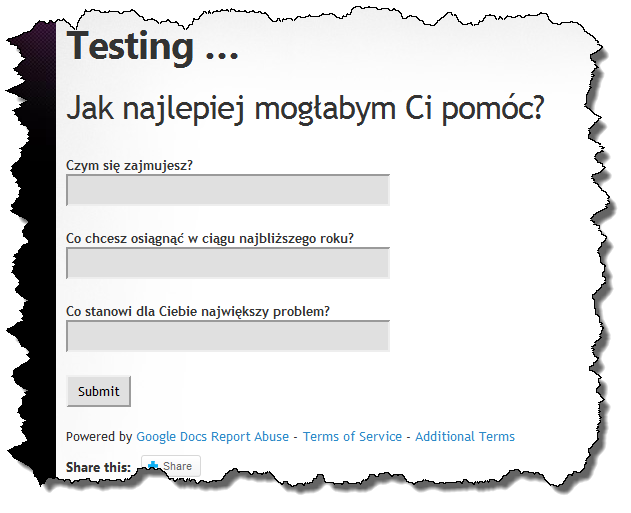
I suspect you have a syntax problem. I looked at your web page and there isn’t enough information in the HTML for me to see where you might have made a mistake. Any chance you can post a screen shot of your page in the Editor so I can see what you have in the shortcode?
Hmmmm, there seems to be a minor bug in the CSS application.
I added my custom prefix (works!)
I added definitions for three of the custom-prefixed values in the special CSS box for your application.
— No effect…
I added the definitions to my theme’s CSS file
— Works
So… the prefix is working, the CSS is being processed, if its in my theme’s CSS file, but the part that should allow me to add it without editing the theme directly doesn’t appear to work.
(as I say, minor issue, because I can work around it, but thought I’d report it)
Did you also check the box that tells the plugin to use the Custom CSS you added to the text box? In addition to adding the CSS declarations, you also have to tell the plugin to load your custom CSS by marking the appropriate check box.
boy, do I feel stupid…. that was indeed the issue. DOH!
I love this plugin… the only thing I am waiting for is multi-page support since my forms are multi-page surveys (the forms skip to certain pages based on answers)
No worries – I want multipage to work too but unless I embed the form in an iframe (which loses the ability to style it), I don’t have a viable solution yet. I have found a pretty slick Javascript technique that looks promising, I just need the time to focus on it. Soon – I promise!
Just wanted to provide a quick update on multi-page forms. I am making progress. I have a solution working in my development area, the only thing left to do is to solve the custom confirmation page. My solution for multi-page forms invalidates the technique I used for the custom confirmation page so currently the Google confirmation page is displayed (correctly) upon form submission.
Pingback: Cómo incrustar un formulario de Google en WordPress « Oficio Gráfico
Hi Mike,
This is a great plugin. I’m currently using it at http://www.wurble.net/blog/improvisational-travel-workshops.
I’m still struggling with one thing: line breaks! All of the line breaks have disappeared, and I can’t figure out how to bring them back. For example, in the last few questions on the page, the “help” text and the input box come directly after the question, and it’s confusing.
How can I solve this?
I really struggled with this for a while because when I put this on my site to test it, it worked.
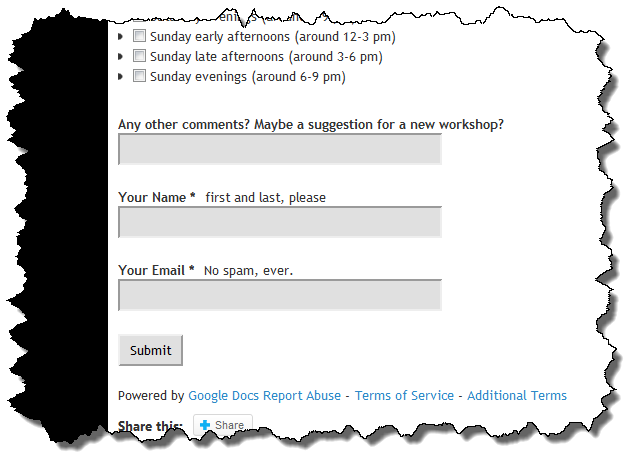
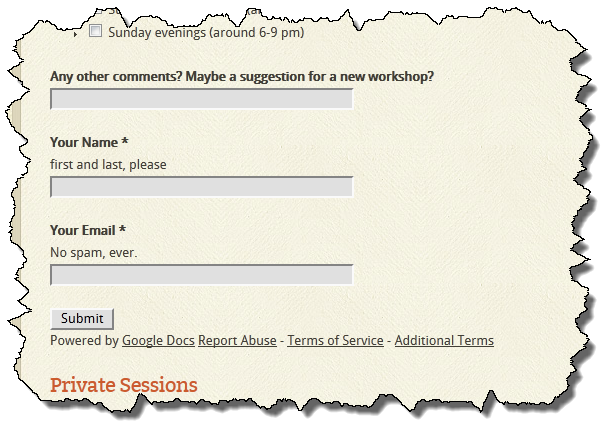
So why does it work on my site but not on yours? It turns out, it is a CSS issue. My guess is that my theme has some parent level CSS which is causing it to behave differently than yours does. So how can we fix it? I believe this is what you’d like to achieve (which I did using FireBug):
To achieve this, add the following CSS to either your theme or to the custom CSS field (and make sure to enable it) in the plugin settings:
label.ss-q-help {

    display: block;

}
Thanks for your help, this worked great!
I’m still trying to figure out how to handle the form description at the top, though. It has the line breaks, but the empty lines between the paragraphs have disappeared, and my bold tags (from the original Google form) aren’t being rendered.
Is this something that’s possible to fix using CSS? Or should I just write the description part of the form on my own website, and only display the input part of the form using wpGForm?
Thanks again for your help!
I should add that on the original Google Form, which is at ___, the line breaks are present AND it correctly renders my bold tags — so this is a plugin issue, not a Google Forms issue.
Thanks for your help!
This is actually a grey area. The intent of the plugin is to allow the Google form to be embedded within your WordPress site so it can be styled to match your theme using CSS. The CSS supplied by Google is not used so the behavior you see may (and in your case it is) different than what you see when you look at your form within the Google Docs context. This is by design. I’ve included some very basic CSS definitions in the default CSS supplied with the plugin but they are minimal and only style what I thought would be the default.
So the real answer to your question isn’t that there is a problem with the plugin, it is doing what it is supposed to do. The problem is that you need some additional CSS to achieve the design you want to achieve.
Nope that helps explain why you’re seeing what you’re seeing and as I replied to your other comment, there is a simple solution to address your problem.
Forgot the form link:
https://docs.google.com/spreadsheet/viewform?hl=en_US&formkey=dDJPVVNNSWpRT3pNZ3RxY3hQOWgwSEE6MQ#gid=0
Thanks – this helped me chase down your issue because I could put your form on my site. See my other reply.
It works nice, but after submitting it returns to the same empty form. How do I redirect it to a confirmation page?
Joost
There is a bug in the default confirmation page behavior which is why you’re seeing it return to the same page. I have it fixed but haven’t released an update yet because I am trying to handle multiple page forms (which doesn’t look possible unless I find another idea). The confirmation page will work if you specify a URL as the confirm argument:
[gform form='<form URL>' confirm='<confirm URL>']
Hi Mike,
I tried the code above, but I still get resolution to only the first page.
Any ideas?
thx.
Is your form multipage? If so, the current version of the plugin doesn’t support multipage forms. I’ve tried a couple things to get it to work and I have one idea I am working on but I have not had much time to work on it over the past couple weeks. Now that the holidays are over and I am back from the Disney Soccer Tournament, I should have some more cycles to look at it again.
Pingback: create a free website form using google docs and embed it in wordpress
Hi Mike,
Really like your plugin!
The one odd thing is that the Google text comes up in german and I don’t see where to tweak that.
Any ideas?
thx.
Sorry for the delayed response – off the top of my head, I am not sure. Is there a way to share a Google Doc with a language setting? If so, I would try adding that to the form URL.
I have the same problem. My site is in catalan/spanish/english/italian, I use mlanguage plugin which had a default language choiche as german, but I disabled it and I use those 4 other languages.
Anyway, the gform now displays messages in german (!). Gform account is in catalan. Very strange. How can I tweak it?
Thank you it is a great plugin
done it with the URL thing. Thanks!
Hi again,
I’m still wondering if there’s something that can be done about the linebreaks and bold tags that are missing in the “form description” area.
My website: http://www.wurble.net/blog/improvisational-travel-workshops/
My google form: https://docs.google.com/spreadsheet/viewform?hl=en_US&formkey=dDJPVVNNSWpRT3pNZ3RxY3hQOWgwSEE6MQ#gid=0
Is this something that’s possible to fix using CSS? Or should I just write the description part of the form on my own website, and only display the input part of the form using wpGForm?
Many thanks, and happy holidays!
Sorry for the delayed response on this – I’ve been tied up for the past few weeks and am behind on looking at these issues. It turns out the reason why your bold text isn’t coming through is because the bold tag isn’t in the list of allowed tags when the HTML is parsed. I’ve added it (along with the italic tag) to the list of allowed tags in my development version so when I get an update posted, it should work.
I have everything working but styling the checkbox section nicely. It looks like the check box section has been expanded to the same length as all of the other input boxes (45%). This results in a lot of white space then the small check box then more white space and my label.
What can I add in the custom CSS section to shift this all back over to be left justified? I’m guessing it’s by defining CSS for that one section of input by it’s group ID or something.
Thanks for any pointers!
Doug
I figured it out.
#post-142 .ss-q-checkbox {
width: 0%;
}
post-142 is the page I embedded the form on.
Tks,
Doug
Glad you figured it out – sorry for not getting to you sooner.
Hi Mike,
Your plugin is very interesting but I’ve 3 problems with it
1) My website is hosted in Germany so the form is displayed in german instead of french. A language switcher in the option panel must be the solution.
2) It would be nice if we could disable the title and the description of the Gform. The title is into an h1 element, h2 or h3 would be better.
3) between questions and descriptions would be appreciated
I let you see the form : http://wp-themes-pro.com/gform
(don’t look at CSS, it’s still ugly 😉 )
Thank you
Alex
Let me see if I can answer your questions:
Thanks – I’ll do what I can to help.
Hi Mike,
I rechecked and here is my responses :
1) I added the language parameter in the URL and it’s working in french 🙂
2) It would be awesome !
3) My mistake, I ommited to write br in this one
so a br element between questions and descriptions would be good because description are displayed just after questions.
I hope you see what I mean, you can check this page to understand : http://wp-themes-pro.com/gform
Thnaks for your time 🙂
Alex
Hopefully these changes will address the things you are trying to do.
Thank you for this plun-in. I’ve figured out pretty much everything, except on thing. I used your suggestion to eliminate the bullet points in front of the checked-boxes, and it worked to get rid of the bullet points. But it’s still adding a lot of white space on both sides of the checked boxes. How do I get them to align on the left margin, with no extra space?
Thanks.
Without seeing your form it is hard to say exactly by I would play with the “margin-left” and “padding-left” properties within the same CSS declaration you turned off the bullets. I’d start with something like this and change the values until I was happy with how it looked. White space can sometimes be tough to collapse but it can be done, sometimes you need to change the style for the surrounding element.
div.ss-form-entry>ul {

    list-style-type: none;

    margin-left: 0px;

    padding-left: 0px;

}
You can also play around with negative margins too. If you want to post a link to your form I can take a look at it.
Hi,
This is a great product. I’m having trouble with proper display, which I’m assuming is a styling conflict. Any thoughts? Here’s the page: http://www.thejre.org/?page_id=1307
Thanks so much!
It looks like your theme has a float property of left on all label elements which is making your form look like a mess. I would try adding the following to the wpGForms custom CSS setting (make sure you enable it with the check box):
div.ss-form-container label {

    float: none;

}
Fantastic. Displays perfectly now. Thanks so much!
Hi, I tried using this plugin, but I am getting message “Unable to retrieve Google Form. Please try reloading this page.”
page url: http://arisys.co.cc/wordpress/?page_id=121
Form URL: https://docs.google.com/spreadsheet/viewform?hl=en_US&pli=1&formkey=dEt1MnJWUXpvOFd0aGFGdExtTFRGZUE6MQ#gid=0
The syntax of your shortcode must be incorrect because I was able to load your form, see it on my site here. I used this shortcode:
[gform form='https://docs.google.com/spreadsheet/viewform?hl=en_US&formkey=dEt1MnJWUXpvOFd0aGFGdExtTFRGZUE6MQ#gid=0']
Hi Mike, Thanks a lot for you reply. I tried using exactly the same syntax which you have mentioned above, but still getting the same message. Please check http://arisys.co.cc/wordpress/?page_id=121. Can this be a problem with my plugin installation. If yes what should I do?
Please help as I can’t miss using such a wonderful plugin 🙂
A couple of things I have seen that could cause it not to load properly:
Check these and let me know what you find. It has to be something like this causing the problem because it works fine on my site.
Hi Mike,
None of this is fixing my issue. I am still getting same message.
Sumit
If you want to create a username for me on your blog so I can look at I would be happy to do so. Otherwise I’ll need you to send me a screen shot of the post edit screen.
Just to close the loop on this issue – the reason is isn’t working is due the WordPress running on a free hosting service which disallows use of the the remote request options that the WordPress HTTP API relies on. The same issue affected prevented Dashboard notifications, WordPress, theme, and plugin update notifications, and plugin and theme installation from the Dashboard. If you see HTTP API errors on the WordPress Dashboard it is unlikely wpGForm will work because it relies on the same API.
Exactly this was my issue 🙂
Visual editor added a link in the shortcode.
THANK YOU!!!!!
Mike You ROCK!!!!!
You’re welcome – glad it is working for you.
Hi Mike, Please provide your mail id, so that I can send credentials. My mail id jacksumit@gmail.com
I have sent you an email with my Gmail address in it.
Hi Mike,
Thanks for the updated version (I’m using 0.14 now). The bold tags work great, and I was able to add line breaks by adding extra tags in the form description at the Google doc.
After adding the tags, though, I am seeing extra space being added at the bottom of the ss-form-desc container. Firebug indicates that there are two extra sets of tags at the bottom there, even though I didn’t write them. Where could they be coming from? Obviously it’s easy to fix by controlling margins, but it seems odd that it’s happening at all.
Lastly, is it possible to add the , , , etc. heading tags to the list of things that can be included in the Google doc (and are not stripped during the import)? This would enable me to format my mini-headings in the form description. (In my case, that’s the titles of my workshops, which are currently just bold.) Hopefully this is relatively simple to implement.
Thanks so much for your help.
Oh, and the website and Google doc are same as in my comments above…
My website: http://www.wurble.net/blog/improvisational-travel-workshops/
My Google form: https://docs.google.com/spreadsheet/viewform?hl=en_US&formkey=dDJPVVNNSWpRT3pNZ3RxY3hQOWgwSEE6MQ#gid=0
Ah… forgot to exclude code. Trying again.
Thanks for the updated version (I’m using 0.14 now). The bold tags work great, and I was able to add line breaks by adding extra
tags in the form description at the Google doc.After adding the tags, though, I am seeing extra space being added at the bottom of the ss-form-desc container. Firebug indicates that there are two extra sets of
tags at the bottom there, even though I didn’t write them. Where could they be coming from? Obviously it’s easy to fix by controlling margins, but it seems odd that it’s happening at all.Lastly, is it possible to add the
,,etc. heading tags to the list of things that can be included in the Google doc (and are not stripped during the import)? This would enable me to format my mini-headings in the form description. (In my case, that’s the titles of my workshops, which are currently just bold.) Hopefully this is relatively simple to implement.Thanks so much for your help.
If you look at your original form using FireBug you will see this:
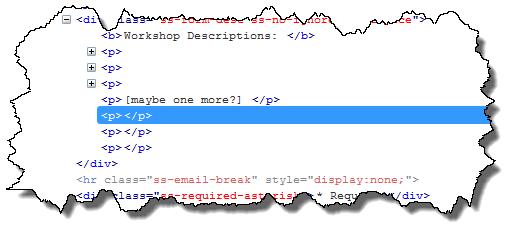
The extra space you’re seeing is due to the three empty <p> tags in your original form. I am not sure why you don’t see them rendered the exact same way, there must be some sort of CSS display or collapse property that is different between the CSS on your web site and the CSS that Google uses.
The other issue you reported (default CSS problem) is fixed in v0.15 and available now, see this post.
Still didn’t work 🙁 sorry. In my first two paragraphs, I’m talking about paragraph tags. After the word “lastly,” I’m talking about h2, h3, h4 etc. heading tags.
Yes, I can add these tags – I will try and do that tomorrow morning.
One more thing – it looks like in version 0.14 of the plugin, it’s loading both the Google default CSS and the custom CSS at the same time. For one thing, I can’t uncheck the “enable default CSS” checkbox on the plugin settings page in WordPress (if I uncheck it and press “save changes,” it comes back checked again). For another thing, some of that default CSS is now overriding my custom CSS. Notably, I am trying to make the Submit button to have background “none,” which works just fine in Firebug but not when I type in the actual code.
http://www.wurble.net/blog/improvisational-travel-workshops/
I will take a look at this and the other issues you noted tomorrow morning. I made a change to the way the defaults are loaded, I’ll bet I messed up the it always takes the default even when it is already set to be off.
The H2-H6 tags have been added to the list of allowed HTML and the problem with the default settings has been fixed. See this post for details.
I added your plugin here and determined that checked select boxes (see group “Aufenthalt”) aren’t written to the according Google table. If I use the Google form itself those checkboxes are transformed to the sheet (?)
I will take a look at it today and let you know what I find.
Can you send me the URL to view the spreadsheet with the results in it?
This bug is fixed in v0.16.
Hi Michael, thanks for the plugin.
I’m testing the plugin in 2 blogs, but only worl«king on one.
The first submits and sends back a success message.
The otther onne just refreshes, show the form again and submits nothing, even if I don’t fiil in required , nothing happens, it just refreshes.
Yesterday was giving me a 403 code, until I stated using friendly permalinks instead of id=1223.
http://www.ppa.pt/eventos/inovacao-para-a-competitividade-em-servicos-de-agua/inscricao/
here it is the form
I get a 404 error when I try and view the form using the URL you posted.
Does your form have an “Other” question? If so, there was a bug that incorrectly passed the value of the other field on to Google during the form submission. That bug has been fixed in v0.16 which is now available.
Hello Mike,
This was working fine. I made a few changes to my form, but I don’t think that should have affected the link. I updated the plug-in. Still can’t get confirmation page after submit. I have even removed any “other” options from the questions, and left only minimal required questions. Still can’t get form to submit. It says, “still have unanswered questions”. Which ones are unanswered aren’t readily apparent either. Here is my code.
[gform form=’https://docs.google.com/spreadsheet/viewform?hl=en_US&formkey=dHBSd0ZZTWY0OVJONF96MXFZWEY0OVE6MQ#gid=0′ confirm=’http://www.balancedmeridian.com/thankyou/’ class=’mgform’ legal=’off’ br=’on’ title=’off’ prefix=gfo’mygform-‘ maph1h2=’on’]Thanks for your time
Michele
I believe I have fixed this problem, please try the new v0.18 release and let me know if you are still seeing incorrect behavior.
I have just installed this plugin(v0.16) and loving it, however I am using a multipage form which takes the user to a certain page depending on their choice on the first page. The form goes through everything fine but on the results sheet the plugin doesn’t appear to be sending the results correctly. I have made the results sheet public for now to help fix this and so you can see what I mean. Links: Form. Results Sheet”
The form using the plugin is located here, my bad: http://www.avalonproject.co.uk/?page_id=44
Think server is having a bit of a hiccup atm, should be working again soon. You can still see the broken results though. Feel free to submit a form if server sorts itself out.
I will try and look at this either tonight or tomorrow morning.
ok thanks, Much appreciated.
Please try the latest update (v0.18), I believe it will address the problem you are seeing.
Thanks, works a treat!
Hey – just wondering if I could use just a ‘Thank You’ alert instead of of a page for the ‘confirm’ parameter. I think I have to edit wpgform-core.php, if you could provide the code I could paste for this, that would be so helpful!!
Instead of editing the plugin source files, I have added a new feature to support your use case. If you add the optional alert=’message text’ to your gform shortcode, you’ll get an Alert Box upon successful submission. You can find more details in this post about the new update.
Mike,
I am continuously getting the “Unable to retrieve Google Form. Please try reloading this page.” and I already checked with the hosting company to make sure that the WordPress HTTP API was working and they said it was. Any other ideas on what to do?
Thanks
Here are a couple of ideas: 1) Do you see any errors on the WordPress Dashboard? You would see these on the “Other WordPress News” widget. WordPress Google Form uses the same API as this widget does. 2) Is this Google form published? If not, it needs to be. 3) Can you share the shortcode you’re using with me? I can test it or look at it.
Hi Mike,
I used version 0.22 of your excellent plugin here but I can’t get the multi-form part working properly. The multiple choice question on page 1 determines, which page is called next. Answer 1 leads to page 2, answer 2 to page 3 and answer 3 leads to page 4 (the last page in the form).
When I select answer 3 it works fine and forwards me to page 4 but when I select answer 1 or 2 it doesn’t forward me to the page specified with the question but to the setting specified with “After page 1… Continue to next Page/Go to Page 1/2/3) in the bottom right corner of the page box.
Any idea what could cause this behavior? If you need any more details just drop me an email (everything works as expected when opening the form directly btw).
Thanks you!
Wolfgang
I’d be happy to look into this for you if you can share some of the data with me. I dropped you an e-mail with some questions in it.
I downloaded your plugin and am having a slight problem. All the formatting shows up at the top of the page and none of the formatting affects the actual text. What am I doing wrong.
http://kprdradio.com/wp/?page_id=6
Thanks for your help.
You have a whole bunch of content that appears between <code> tags including the CSS declarations which appear on your page. Any idea where those tags are coming from? Anything which appears within <code> tags will be rendered as raw text and not interprted by the browser as HTML or other syntax (e.g. CSS or Javascript).
I just opented up Google Docs and went to new/document. I created the document, made it look like I wanted it to look, and then saved it. Below is the code I inserted.
[gform form=’https://docs.google.com/document/pub?id=1GWVCuU9dMJgwmx6p2Qa5hran-rOjpSCwRgRyLheVLww’]
Have you selected a theme within Google Forms? If so, try changing it to the “Plane” theme and see if that makes a difference.
I am pretty sure I found and fixed the problem. I think it is due to choosing an appearance theme for the Google Form in the Google Form designer. I recommend not choosing a theme and instead letting the WordPress theme dictate the appearance of the form when it is embedded on a WordPress site. All that said, I think I have it fixed in v0.23 which I released a short time ago.
Thanks so much. That seems to have done it. I’ll check into it a little further but it seems to be working. I didn’t realize I’d piced a theme. But I guess I did. Thanks again.
The plugin is having serious issues with non-english characters.
I put it in a form and accents and the ñ are not being saved in the spreadsheet. It is not a Google Form issue as i tested using the form directly and the characters are being saved.
For example if i select in languages Español and Inglés (for Spanish and English) directly using the form i find “Español, Inglés”, but using the one your plugin embeds i got “Espaol, Ingls” instead. Are you using some specific encoding on your files or something? I suggest you to use UTF-8 to avoid those issues.
Anyway i wonder why is that happening because in the webpage the values are being shown correctly. It should be on the values or at the form sending time…
In order to solve the issues about bad management of non-english characters on those forms, we checked the generated html using firebug just to find the values are correctly shown on the html code. Then we believed your code to split checkboxes was wrong, but also find that values of checkboxes or textfields and textareas were being saved with errors on the spreadsheets.
Then we decided to go and replace this lines of code:
                if (is_array($_POST[$key]))

                {

                    $pa = &$_POST[$key] ;

                    foreach ($pa as $pv)

                        $body .= preg_replace($patterns, $replacements, $key) . '=' . $pv . '&' ;

                }

                else

                {

                    $body .= preg_replace($patterns, $replacements, $key) . '=' . $value . '&' ;

                }
with
                if (is_array($_POST[$key]))

                {

                    $pa = &$_POST[$key] ;

                    foreach ($pa as $pv)

                        $body .= preg_replace($patterns, $replacements, $key) . '=' . rawurlencode($pv) . '&' ;

                }

                else

                {

                    $body .= preg_replace($patterns, $replacements, $key) . '=' . rawurlencode($value) . '&' ;

                }
And it is working now.
The key is to rawurlencode the values.
Thanks for digging into this, it was on my to-do list for this weekend! I fugured it had to be something I wasn’t accounting for with UTF-8 characters. I will fold your change into my code and push out an update.
I have incorporated your fix into v0.24 which is now available. Thanks again for doing this.
It was driving me crazy, hehe. Nice i was able to find it on time.
There’s another issue. A really simple one. The file wpgform-core.php was triggering a warning “PHP Warning: Cannot modify header information – headers already sent by (output started at /…/wp-content/plugins/wpgform/wpgform-core.php:1079)”. I checked the file just to find a few empty lines at the end. This seems to not to cause an error, except when loading the url with www before it. I installed it on lidapatty.com/website, and sometimes the pages were giving wp blank screen of death. When trying to load the website as http://www.lidapatty.com/website they’re were always blank dead. A simple error like that would lead other users to remove the plugin rather than finding and removing a few empty lines.
By the way, are you coding on Mac? WinSCP text editor shows lines separated by empty lines in between, like using double enter before each one. I don’t know if that caused the issue or if file had the empty lines before.
That is a very odd error and I don’t see it on my development platform. The wpgform-core.php file only has 539 lines in it so I am not sure why it would report a problem on line 1079. I edit my files on a Windows 7 Virtual Machine using Vim as my text editor. Running “wc -l wpgform-core.php” under Cygwin also reports 539 lines. Tomorrow I will take a look at the file as it is delivered by the WordPress plugin repository, maybe something is happening to it in that process.
Hello Mike,
is there any possibility you to add an option of autoreply to the person who submitted the form in the next plugin update?
What sort of auto-reply? The tricky problem would be determining what e-mail address to send the auto-reply to. Something on the form? Is the user required to be logged in? If the user was required to be logged in, then yes, an auto-reply feature would be possible. That said, I don’t know how generally applicable it would be. If I’ve completely missed what you are asking for, please clarify.
I mean the auto-reply to the person who is not logged in and the e-mail is being provided via the form.
I see this in that way that I can provide the content of the auto reply in the plugin’s admin page and the same when it comes to the email field. I would simply enter the name of the field in which the user inputs the email address, in order to plugin knew where in fact this data is.
See the my posting from today. If I went the CPT route, what you are asking for may be possible but it would mean “special” handling for a field somewhat like I mentioned on how some fields could be hidden and populated with data from a user.
THX for this great lil plugin!
I’m using it on an institution web page. My only problem is with custom confirmation page.
So A user clicks SUBMIT, then page shows original confirmation page for a while, only then it redirects to custom confirm page.
As I have seen in your demos, you managed it to run without redirection delay.
Anything I’m missing
here?
THX in advance.
I don’t do anything special to make mine load quickly. However, my form is pretty simple, it only has a few form elements. How complex is your form? How quickly the redirection happens is a function of how quickly Google Docs responds. I need to look into this again and see if I can “re-implement” the original solution I had before I supported multi-page Google Forms. The multi-page form require forced me to change how I was doing the confirmation page.
It’s no complex at all. I’d like to point the address of my site but it’s an gov institute and for that, I just don’t wanna put the address here.
Let me see if I can send you a twit message.
Yeah multiform support could’ve broke delayless redirection. I just got two text boxes (one is a paragraph) and a submit button, thats all.
Check your e-mail for how you can send me something you don’t wanted posted in these comments (which I completely understand).
Mike,
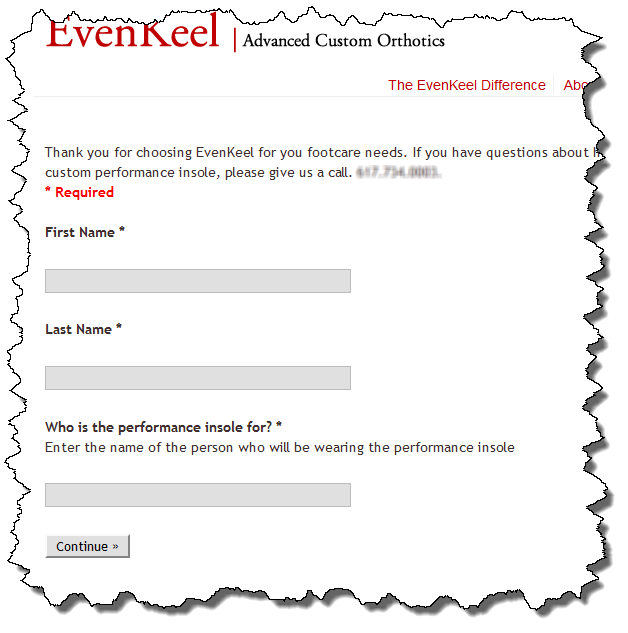
Thanks for all your work and great support. The plugin is really great. I am experiencing some formatting issues. Looks like extra tags or tags that make the layout of the embedded form stretched out.
1. I’d like to tighten it up vertically.
2. Tons of vertical whitespace that needs to be taken out.
2. The asterisk for the required fields is on a line below.
http://www.evenkeelorthotics.com/custom-performance-insole-ordering-form/
Could you please take a look and share your thoughts.
I am happy to take a look but the URL you provided shows a 404 when I visit.
I think the bulk of your problem stems from the fact that you appear to have wrapped the gform shortcode in <pre><code> and </code></pre> tags. I think if you go to the HTML view of your page (post) you will see something which looks like this:
<pre>

<code>

[gform url='' br='on' ...]

</code>

</pre>
Removing the PRE and CODE opening and closing tags should eliminate the majority of your white space. The PRE tag is the primary contributor to your white space problem. I used FireBug to edit your page content and took out the PRE and CODE tags and your page renders like this:
You can also set the change the br shortcode attribute from ‘off’ to ‘on’ and see if that moves the asterisk to where you want it. You may not have to after getting rid of the PRE and CODE tags, I’d start with them.
Mike,
Thank you for looking into this. I removed the <code> and </code> tags as you recommended.
IT WORKED!. How those nasty tags got in there is a mystery.
Not only is your plugin a great tool but you really helped to support me with a problem that wasn’t really related to the plugin.
Thank you for your good work. We need more developers like you.
-B
1- I tried :
div.ss-form-entry>ul {

list-style-type: none;

}
to remove bullets but it changed nothing. Acutally nothing that i put in the Custom GForm CSS box seems to work, and i only have Enable custom WordPress Google Form CSS checked, so it should work!
2- My form is in portuguese, but when i load it, says “* Required” instead of the portuguese term from the original, how do i correct that?
3- The “Powered by Google Docs Report Abuse – Terms of Service – Additional Terms” is annoying. Is there a way to remove that, or at least break some lines before it? Its stuck on the Submit button
Thanks! This addon rocks!
Hope this gets you going!
Oh.. im actually using legal=’off’
Heres the form page:
http://www.rensp.com.br/?page_id=717
and this is the shortcode I’m using:
[gform form=’https://docs.google.com/spreadsheet/viewform?formkey=dG9GdTNFcFVoNFhRWHlZX0FqYW1EM2c6MQ#gid=0′ confirm=’http://www.example.com/thankyou/’ class=’mygform’ legal=’off’ prefix=’mygform-‘ br=’on’ title=’off’ maph1h2=’on’ ]
I’m currently using Version 0.24, the one i downloaded directly from WP interface…
Because you’re using the prefix attribute, all of your CSS classes need to also have the prefix in order for the styling to affect the elements you want to affect. You have this:
div.ss-form-entry>ul {
list-style-type: none;
}
What you should have is this:
div.mygform-ss-form-entry>ul {

list-style-type: none;

}
Oh i just removed the prefix and the class and it worked! Thanks very much (I didn’t even know what were these for anyway ^^)
I have just pushed v0.25 out which fixes problems #2 and #3 that I noted above.
Ohh just noticed something else:
4- When i have a question with checkboxes, and i mark 2+ of them, it only displays the last one on the answers spreadsheet, while it works if i use the real form.
Thanks again! Please help!
What version of the plugin are you using? I fixed this problem a while ago and it required me to add a jQuery script which runs when the page loads to convert the checkbox variables from a format that PHP uses (WordPress and the plugin are written in PHP) to a format that Python uses (Google’s form processing is written in Python). If it isn’t working then it could be one of three things:
Hope this helps.
Hi Mike, is there anyway to be notified say by email when a form has been submitted? Thanks.
Not currently but there have been a couple of requests for something similar. I outlined some possible ideas that I may implement in this post from about a week ago. If I move wpGForm to a Custom Post Type (CPT) there are a number of things I could do that would be much easier than adding a bunch more attributes to the short code. E-mail notification would be one of those and is a good idea.
Even in the short term, adding a short code attribute like “notification=’on'” might be pretty simple to do if I default notification to the blog’s admin e-mail address.
I have added e-mail notification, give it a shot and let me know what you think. See this post for more details.
No matter what i do i can’t edit the css?!
Well… I can edit it – it just not shown…
The form is placed at http://mailoplysninger.weien.dk/
(don’t mind the layout – it’s still a test page at the moment…)
I have tried everything (or at least it feels that way) and i just can’t fix it.
Can you tell me what the problem is? What am i doing wrong?
Thanks
From looking at the HTML, you haven’t enabled the custom GForm CSS on the WP Google Form settings page:
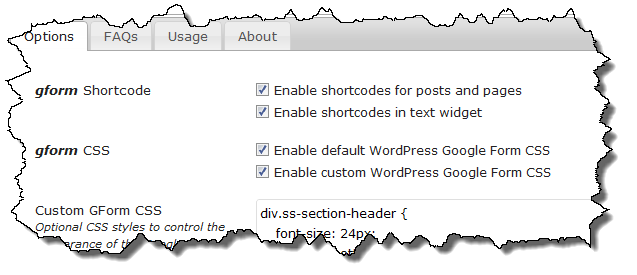
You need to have the CSS defined and enabled in order for it to unless you add it to your own style sheet which is loaded as part of your theme.
Thank you so much.
I thought i did everything right and feel a bit stupid now…
The onlye problem now is the required fields – it won’t change the background color or show the “This fields is required”-text… I read your post http://michaelwalsh.org/blog/2011/10/02/form-validation-working/ – but i can’t get it right…
The form can be seen here: http://abfmail.dk/
Is this what you are trying to achieve?
If so, I was able to do this by defining the following CSS in my Custom GForm CSS setting:
div.ss-item-required label {color: red;
}
If you are trying to do something else, please explain so I can try and help you.
Thanks for the reply.
What i want to do is, that when a required field is left blank and the page loads again and tells you that there are some required fields that needs to be filled out – then i want the missing required fields to be marked with red.
Does it make sense?
I don’t want them red all the time – just when they’re left blank to signal which ones are missing.
That should be possible, I am pretty sure Google wraps the error message in a unique class. Let me see if I can find it.
I am pretty sure this is what you want to do, please clarify if I have misunderstood.
Before submitting a form that has required fields:
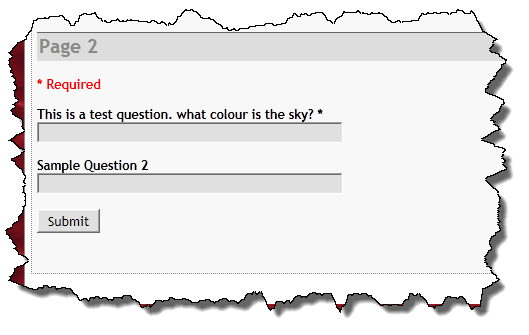
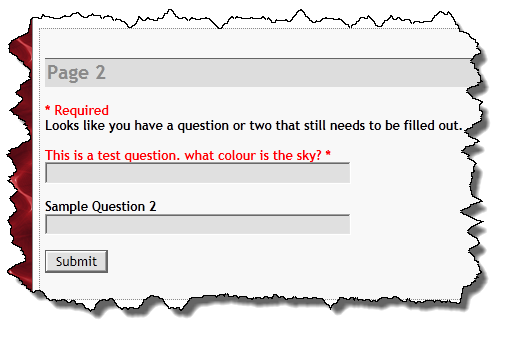
After submitting a form which has required fields:
To have the field text appear in red only after submitting the form without providing the required field, I used this CSS:
div.errorbox-bad div.ss-item-required label {color: red;
}
Let me know if that doesn’t work for you. If you have used the prefix attribute in your short code you’ll need to adjust the class names accordingly.
We are having issues with the redirect in, ie when you press submit it just refreshes the page. I had to downgrade the plugin all the way to your version 0.10 and then it worked as it should – I think it has something to do with when you implemement multi page support in 0.11 as i noticed you said this in your last news note “The v0.26 version switches from a Javascript redirect to an Ajax page load using jQuery. In my testing it seems to work pretty well and is much less intrusive than the redirect was. Let me know if you run into any problems with it.”
From 0.11 onwards the submit button doesn’t work for us. I can link up on here a sample of it not working on our site if need be but do you know why this might be?
Check your e-mail, I’d like to look at your particular problem and sent you some questions. There have been a lot of bugs fixed since v0.10 so I’d be reluctant to use that but I do understand the preference for a custom confirmation page. If the confirmation page isn’t working, I’d still stick with the latest version and use the default Google confirmation content for now until I can figure out a solution.
Thanks Mike, unfortunately we need the form on the site operational now so I’m going to stick with 0.10 this time, I will email you a link for a test page with 0.26 installed so you can see what I mean. Basically we get no confirmation page at all, not enough the default google one. Obviously i’d love to use 0.26 for all its bug fixes but ive tried every version above 0.10 and the issue happens in all of them. Thanks for your prompt reply 🙂
Moving this to e-mail so hopefully we can figure it out since your form works fine on my site.
I’ve been thinking about your problem and why v0.10 works but anything later does not. In v0.10 and earlier (before I supported multi-page forms) the “Submit” action actually called the same action the source Google Form calls. Without a custom confirmation page, the submission would result in the user ending up on the Google Confirmstion page. While this worked, it wasn’t very elegant so I came up with the custom confirmation page. In v0.10 the custom confirmation page was accomplished with a redirect on form submission.
In order to support multi-page forms I needed to change how the form was actually submitted so the submit action is stripped from the source Google Form and replaced with action=”” effectively causing the page to submit to itself. The plugin will detect this second submission, process all of the POST parameters and then submit them to the Google Form processor using wp_remote_post(). This is actually a more “elegant” solution and is the only way to support multi-page forms that I can think of.
In your case I think the form submission which should be ending up on the same page, isn’t for some reason. The only thing I can think of is something in the .htaccess file causing URL routing not be processed correctly so the plugin never gets run a second time to process the post parameters.
I cannot go back to the confirmation model I used for v0.10 and earlier versions – it doesn’t work for all of the models I need to support. I will keep looking to see if I can figure out why the URL routing doesn’t seem to be working correctly.
I have a strange problem. Form was working fine but then started redirecting users back to the form page instead of the confirm page. I updated the plug-in and the problem kind of persists. Now what it does is for some browsers (chrome on a mac) it does eventually, after a good few seconds take the user to the confirmation page. For other browsers (safari) it hangs.
page is: http://bournvilleharriers.org.uk/test
Code on the wordpress page is: [gform form=’https://docs.google.com/spreadsheet/viewform?formkey=dGpKcUZKdVNNNU85ZUIzOHlHSDV1amc6MQ#gid=0′ confirm=’http://bournvilleharriers.org.uk/payment-page’ legal=’off’ title=’off’]
I think what you’re seeing is due to a problem in v0.26. I’ve been working on a fix off and on today and hope to have a release tomorrow morning.
The slight lag is the AJAX page load the custom confirmation page is doing. It should be fairly quick, certainly not seconds. I have reverted the confirmation behavior in v0.27 release so please try that and let me know if you’re still seeing a problem.
Actually. Re: previous comment. I realise now that the page was redirecting when I was logged into my wordpress account but when logged out it doesn’t direct. It actually returns a page with a smiley face on it for some reason!
The other form on my site seems to be working okay: http://bournvilleharriers.org.uk/beginners-course-2012-entry-form/
Can you try the new v0.27 release which came out today and let me know if you still have this problem?
I rolled back to version 0.25 which is working well for me so I think I’ll hold on the update for now. Once I’m past this busy period of my running club members using the form I’ll apply the update and report back. Thanks.
hello i am using your form and am getting the ‘unable to retrieve Google Form error’ Is this the right short code?
[gform form='https://docs.google.com/spreadsheet/viewform?formkey=dHR3NGtnMjdwVFRvNm81NFFrOHpxOXc6MQ' confirm='http://www.thisiskelly.com/thanks' legal='off']i have two forms that are being used on this page: http://www.thisiskelly.com/contact both use the format above.
thanks!!!!
I just added your short code syntax to my development area and it works without any problem, you should see a submission from me in your Google Doc. If you consistently get that error, then you may be running into an issue with WordPress’ HTTP API. Read this post for some background data on a similar situation another user had and this comment regarding a hosting plan that prevented the WordPress HTTP API from running.
Pingback: WordPress Google Form | Best Plugins - wordpress – widgets – plugin
Just added it to my pages and it is amazing – works excellent. Thanks.
This plugin is exactly what I have been looking for! However, just a small but annoying detail: is it possible to have the “*” for required items in red?? I had a quick look at the code but it seems there is a lot of Javascript involved for that part so I gave up after a while.
The asterisk is part of the label element which you can see here:
<label for="entry_0" class="ss-q-title">This is a test question. what colour is the sky?*</label>There isn’t any way (that I know of) to style just the last character (or any specific character other than the first for that matter) without manipulating the element using Javascript. I think it would be possible to manipulate the elements using jQuery but that isn’t something I currently have in the queue.
OK, thanks for that. At least that is a starting point for me to sink me teeth into! Cheers.
Any possibility of this working for a page in draft mode or password protected? I saw the note that it only works for published pages. I want only people invited to use my form to be able to use it. I found a guy selling a script that’s suppose to allow a redirect to a page of my choice, but did not see if it works with pass protected pages. For the $5 he’s charging for the script, it might be worth a try.
This should work fine for draft or protected pages. The only restriction is the Google Form (on the Google Docs side) must be published. There isn’t any requirement on the WordPress side for a post or page to be published.
i can pull up the form but as soon as they hit submit i get this error
the data goes into the spreadsheet on google but i get this error
Fatal error: Call to undefined method wpGForm::GetPageUrl()
What version of the plugin are you running?
Version 0.27
Version 0.28
Works Great
Thanks
hi mike, i’ll try but it doesn’t work. it gives me this message “Unable to retrieve Google Form. Please try reloading this page.”
I run my wordpress on localhost. is that makes any different ??
thanks for the answer.
Running locally might be an issue depending on how you have PHP and WordPress configured. I do all of my development on a Windows 7 Virtual Machine running PHP, MySQL, and WordPress locally under http://localhost/ so running locally isn’t an issue in of itself. I would guess that something in your configuration is preventing the WordPress HTTP API from operating correctly. Do you see any errors or warnings on the main Dashboard about not being able to update WordPress Feeds? Are you able to install plugins from the Plugin Repository through the Dashboard?
Pingback: www.MichaelWalsh.org | wpGForm v0.28 released
Hi Mike,
GREAT plugin!
1. if the “required” asterisk gets pushed to a new line because of a BR tag, is that a WP/theme issue?
2. On my site I have odd spacing/padding on all “Other” text input fields at the bottom of a form element. Also theme-related?
Helmar
Check the BR tag behind the label tag and the closing P tag behind the label other_option:1. Is the theme or WP adding this? And how can I possibly get rid of it, because it clearly is invalid HTML, esp. the closing P tag.
TIA,
Helmar
Internet Radio, TV
Sonstiges:
I’ll need a URL to look at this, it isn’t clear what the problem is from your description.
Hi Mike,
I’m really liking your plugin. There is one similar but yours seems to be alot better. I just have a few things that I want to ask.
First of all, I can’t seem to load the settings page for the plugin within the admin section of my website. I don’t know if it just me who has this issue or not.
Also, would you be able to implement url parameters into the plugin? I want one of the fields to be auto-populated when /?parameter=example (or similar) is added to the end of the url. This one of the biggest things that I need otherwise the plugin doesn’t have the full effect that I want it to.
Regarding the inability to load the Admin page, it sounds like a plugin conflict of some sort. You may want to try disabling other plugins and see if will work properly. I have not had anyone else mention problems loading the Options/Settings page.
Regarding your second question about adding URL parameters – where would they originate from? What would they map to? I have had a couple people ask me to add hidden fields (e.g. username or email address) to capture the current user which should be possible. The hesitation I’ve had in implementing something like this is what to do with the data? How is it connected to one of the fields on the Google Docs speadsheet? A column on the spreadsheet can have any arbitrary name so how should it be mapped to what is essentially WordPress data? Adding all of the mapping could make the current shortcode pretty ugly so I’ve thought I’d introduce a Custom Post Type where it would be easier to manage some of these more abstract ideas.
Basically, the URL parameter thing is so that an actual field in the form is automatically filled. If you go to http://burnoutaddict.co.cc/gt5carlist and click on one of the links on the page, it would send you to the form with one of those fields automatically filled, based on what was added to the end of the URL. It currently links directly to the form in Google Docs instead of your WordPress version, but I would like your plugin to implement that kind of feature so I can keep everything with the same style instead linking to Google.
As for the admin panel issue I am having, I will test disabling all other plugins and try to find out which one is causing the conflict.
On the back of what I have posted before, I have disabled all other plugins, and still get this message:
Also, about the url parameters, I currently have the other plugin that I was speaking about installed on a test page to show you what I would want. Page is password so if you want to check it out, can you email me, and i’ll reply with link and password.
oops, forgot the image: http://burnoutaddict.co.cc/wp-content/uploads/2012/04/Untitled-1.png
Earlier today I posted some thoughts on potential enhancements and I’ve done some reading this week on query parameters. What you want to do should be possible although I believe I’d need to implement the Custom Post Type I’ve mentioned previously. I would be interested in getting the password to see what you’re proposing, I’ll drop you an e-mail.
My organisation (a small charity community choir) uses Google forms a lot to send questionnaires to the members about performance availability, etc. I was sitting here the other day thinking how great it would be to tie the forms into the Buddypress website I’ve developed for the members and then, lo & behold, I find your plugin. Amazing!
I’ve got a couple of suggestions for additional features that you might like to consider:
1. auto-fill the user name into a corresponding field (this could either be configurable, or just a simple look for a field called “username”)
2. store in the database the fact that a user has filled in the form (this way I can then test for it and warn them they’ve already done it, or even deny a duplicate entry)
Thanks for a great plugin.
Check out my recent post, I based it on your comments as well as some other similar ones I’ve received.
Hi Mike,
Can you lend any help on how I can cut down on the white space between questions and answer fields, and between questions? All the space makes the form more vertical than I’d like it but I don’t have a strong enough knowledge of css to make that happen…
http://bostonbodyworker.com/boston-bodyworker-massage-intake-form/
Your theme defines a 20px margin for all <P> elements. You can try a couple of things reduce the white space. Add the following to your Custom wpGForm CSS settings and make sure you enable it:
div.ss-form-container p { margin: 0px; }

div.ss-form-container br { display: none; }
I would add the first one only initially and see of that does what you want. If there is still too much white space then I’d add the second one.
Hey Michael
Great plug-in. Thanks a million. For some reason the checkboxes in my Google form are being converted to bullet points on the website and thus cannot be ‘checked’. I wonder if something in my CSS is cancelling it out or is this an issue you’ve run into before. Any ideas? The issue is on the second page of the form found at homeharvest.ca/start-your-project/
Thanks a million!
It’s a CSS issue with your theme. Somewhere you have the following style:
element.style {position: absolute;
left: -10000px;
}
The “left” property is causing the checkboxes not to show. If you disable it (I did it temporarily with Chrome’s element inspector) the checkbox will show up. It still looks funny due to another CSS issue but that should be fixable using CSS in the wpGForm settings for Custom CSS.
Hello,
any idea on how can i divide the whole form into two columns? I can’t use shortcodes because i can’t put the divider inside the content.
Thanks for your time! Amazing plugin!
This is a somewhat open ended question. Could it be done? Probably, the question becomes how to do it. The easiest way would probably be to put all of the elements in a table and put the even numbered (all form elements have a form ID) elements in one column and the odd numbered elements in another column. This has potential problems though because there is no guarantee that there are the same number of elements or that Google will render HTML with them in numerical order. They would be in order if the form was perfectly created from the outset but in my experience, that rarely if ever happens. Some clever jQuery could probably count the input elements and wrap each in the necessary table element tags or CSS classes to make them into columns. Here is an article that covers multi column lists, as you can see, the process isn’t real straight forward.
Well i did it on a wordpress theme that i use which divides ALL pages into a Two Column Layout. Sadly the page with the GForm is the only one that i need to divide in two columns so it’s not really a solution 🙁
Considering my lack of knowledge on this layout stuff, i don’t know if it can be used on a single page…
Well… i found this on the header.php on the theme that does what i said. Not sure if it helps…
/*–TWO COLUMN STUFF–*/
#twoColumns {
text-align: justify;
-moz-column-count: 2;
-webkit-column-count: 2;
column-count: 2;
-moz-column-gap: 60px;
-webkit-column-gap: 60px;
column-gap:60px;
-moz-column-rule: 1px dashed #ccc;
-webkit-column-rule: 1px dashed #ccc;
column-rule: 1px dashed #ccc;
}
@media screen and (max-width:740px) {
#twoColumns {
text-align: inherit;
-moz-column-count: 1;
-webkit-column-count: 1;
column-count: 1;
}
}
Without actually seeing the page it is hard to say if this can help. This basically describes the two column layout for normal devices and has a separate layout defined for devices with a screen width of 740px or less. Without seeing the actual site, it is hard to say if these styles could be added to the Google Form and yield anything usable.
If you’d like me to take a look at it, fill out this the information on my Help form and I’ll see if I have any ideas.
Well i created a new template on my theme just to use this Two Column Layout… i guess im fine now.
Is there any way to return the number of the line (on the spreadsheet which receives the form info) on the confirmation page?
No, there is no feedback between the spreadsheet and the form that is available externally (as far as I know of). The content of the confirmation page either comes from Google or from your site if using a custom confirmation page. If you turn the email confirmation on using the shortcode the timestamp on the email should be fairly close to the timestamp in the Google Spreadsheet. I’ve had a couple requests for some sort of logging feature which I may be able to accommodate if/when I incorporate a Custom Post Type.
Well i started using email=’on’ and I’m not getting any emails on the admin email account when i submit a form… What could I be missing?
Do you get email from your WordPress site already for user registrations and comment notifications? The email confirmation uses the same wp_mail() function that is used within WordPress. Did you check your spam folder?
Mike,
I keep getting the ‘Unable to retrive Google Form..” message.
Form is published
I am currently using godaddy…do they present a problem with API + WordPress?
here is the link:
http://escapitos.com/customize-your-escape/
Thanks for your time and assistance!
My blog is also hosted on GoDaddy do there shouldn’t be any issues UNLESS you are using the free hosting plan GoDaddy offers with domain registration. That plan disables the PHP functionality that wpGForm depends on the retrieve the form content.
is this support for wordpress 3.3.2?
Yes, it works fine with 3.3.2.
Form works fine (displays correctly and collects the information to my spreadhseet), onsubmit, instead of redirecting, it gives me the ‘unable to retrieve Google Form’ error.
I have tried all three options form submission confirmation (ajax, redirect, and alert).
I am thinking now that it has to do with the theme I am using (http://wptitans.com/dagda/) or one of the many plugins.
I will be debugging it for the next few hours, if I find the solution I will post here.
Please let me know if you have any ideas.
(I have used this plugin before on this server, so that isn’t the problem either).
Found the issue.
This plugin: Simple Facebook Connect (http://ottopress.com/wordpress-plugins/simple-facebook-connect/) is conflicting with something.
Disabeling the plugin solved all problems.
Can you elaborate on what the conflict was? I am curious as I have used SFC previously but am not actively using it on any projects right now.
Hi, I am constantly getting Unable to retive form message. I checked my HTTP API and the form is public. I read your forum but did not find an answer. Can you help me please.
Thank you
The website: http://phdjobfair.org/cformtest/
Google form: https://docs.google.com/spreadsheet/viewform?formkey=dFdqcnA2Q2gwdTQwS080R0szS0lxSUE6MA#gid=0
Can you fill out the information on my Help and Support form? it will help me chase the problem down. If there any chance you are using the Facebook Like Thumbnail plugin? It is incompatible because it forces short codes to be processed as part of the WordPress ‘wp_head’ action which IMNSHO is a no-no.
Your problem appears to be an improperly formatted shortcode, check your email for a fix.
Hello–love the plugin! I am using a Genesis Studiopress theme, can you help me fix the HUGE font sizes on the form when I use the plugin?
The instructions part looks like 50 point font!
It looked fine in my old Google Site https://sites.google.com/site/areyouinmyclass/ but in WordPress it looks awful! http://areyouinmyclass.org/
Thanks!
Try adding this to your custom wpGForm CSS:
h2.ss-section-title {
    font-size: 12px; /* or whatever size font your want it to be */
}
I think that should do the trick.
I have enabled “custom wordpress google form css” in the settings but no matter what I do, my form refuses to accept any styling changes. I have also read through this entire thread, along with the one on wp forum, to no avail.
The link to the form is here: http://bocamedicaldelivery.com/?page_id=88
I have used inspect element and I can see that my current theme is being used to style the form instead of the parameters I copied into the plugins customs CSS box. I am a noob and I have no idea what steps I can take force the styling changes. I’ve noticed you’re a very helpful developer and I hope you can guide me in the right direction.
Thank you
I’d be happy to look at it for you but it shows up as a 404 error right now. I would recommend filling out my Help and Support form as it will be the fastest way to resolve this.
Thank you Mike, i have looked at other embedding solutions and I am set on using yours for my page. I have completed a form on the help and support page.
*****the 404 error was due to the page being set as private, it’s been fixed now
Everything about the plug in works smoothly, getting any styling is my sole issue
Hello, ive been checking the results and the plugin looks great, it just does not seem to be working on my site.
i tried putting it here: http://beta.briezonline.com/service-request-form/
and also i did a test here: http://beta.briezonline.com/test/
Dono why its putting that, even though im pasting the right URL for the form in.
This is the Gform URL:
https://docs.google.com/spreadsheet/viewform?formkey=dGZwenRVMXNocjhWaDJlSW1xX2tucnc6MQ#gid=0
Any advice on what might be happening??
What you are seeing typically happens when the WordPress post or page editor tries to be smart and sees the URL for the Google Form and wraps it in link tags. When you are in the Editor, does the shortcode look like it has a link (different color, underlined, etc.)? The easiest way to check this is to toggle to the HTML editor and see if your shortcode looks like you think it should.
I fixed it in the HTML thank you!
Excellent!
Hi Mike,
I’ve just started testing with your plug-in for a form that will capture volunteer information.
At present there are 2 issues plaguing me;
1) The ‘powered by Google’ message is still at the bottom even though I’ve turned legal off.
2) I can’t get the redirect working to my confirmation page.
The gform shortcode is here:
[gform form=’https://docs.google.com/spreadsheet/embeddedform?formkey=dEFFYlpzMzFzemxhU3JrVUhFNmJEc1E6MQ’ ,confirm=’http://lowcostwebsites.net.au/budgetfunrun/volunteer-application-thank-you’ ,style=’redirect’ ,alert=’Thank you for your interest, we will get back to you very soon.’ ,legal=’off’ ,title=’off’ ,email=’on’, sendto=’on’]
the link to the volunteer registration page where this form is held, is here:
http://lowcostwebsites.net.au/budgetfunrun/registration/volunteer-registration/
Reading some comments above, you suggested the redirect might not work where other plug-ins are also active. I hope this is not the case for me.
thank you for any advise you may have.
Regards,
John.
Your shortcode has a bunch of commas (“,”) in it which it shouldn’t have as the short code parser sees them as part of the attribute name so they don’t match what is registered as part of the short code. Try changing your short code to this:
The short code attributes simply need to be deliminated by white space.
One other thing – the value of your ‘sendto’ attribute needs to be an email address!
Mike,
I feel like an idiot! thanks. that’s definitely working much better now. 🙂
Hi mike,
I was scanning around the web and found a website for epic triathlons nova scotia. The volunteer button takes you to a google form and this site uses your plugin to unwrap the form. What’s particularly interesting is that some of the input fields are side by side.
Do you have any idea how this is done?
Thanks,
John.
Without a link to the page where the form appears it is hard to say for sure. For another project I’ve been looking at a jQuery script that will automatically split a DIV into two columns. It is entirely possible they did something like that. My guess is they did some sort of a CSS solution. Post the URL and I’ll take a look at what they did.
Hi mike,
Sorry for not posting earlier. The URL is http://epicdartmouth.com/volunteers.
Thank you.
John.
That form was built using a plugin called Gravity Forms. Gravity Forms is not a free plugin, you have to purchase it – you can find their pricing models here. I have never used Gravity Forms so I have no idea how it works but my understanding is it is a fully featured form builder for WordPress.
Hi Mick,
Thanks for the great plugin. Quick question thouhg.
How would you embed this form on your homepage of your wordpress blog by editing the (index.php)
Within the post I can see the form but when I try to display this post on my homepage with the code below I see the shortcode in [ ]
post_content;
echo $content;
?>
If you want to embed it in your index.php you could wrap the short code text in a call to do_shortcode(). Something like this:
do_shortcode(‘[gform form=’URL’]);
The URL would the full URL to your Google form. You could add other shortcode parameters as needed. Another option would be to put the shortcode in a text widget and enable shortcode processing in widgets in the plugin setting for WordPress Google Form.
Mike,
I am building a Google Form to accept donations to our group. I don’t see a way in GFs to have a radio button link to our PayPal account. Is there a way, using your plug-in for me to accomplish this?
It isn’t clear to me what exactly you are trying to accomplish but I do agree that there isn’t a way to add a PayPal link to a Google Form. That said, you could add the PayPal link to your confirmation page so that your users see it once they have submitted the form. There are probably some tricks you could play using WordPress filters or jQuery to insert the link into your form but it wouldn’t really accomplish anything because (a) there isn’t a corresponding field on the Google Docs side and (b) I could be wrong but I think all PayPal donations actions are GET requests and Google Forms are POST requests.
Mike, thanks for the reply. Your answer confirmed what I was thinking. But thanks for the idea of using a reply message to add links like PayPal.
I think I will have to use a different plug-in.
Hey!!
I’d like to know if theres a way to customize the email sent to the admin and to the ‘sendto’ value…. Is there any way to add the content of the form in this email?
Nevermind… i managed to do it using the trigger and custom function on the google form. Thanks
Why are my submit buttons in japanese
This has come up a couple times lately. See this thread on the WordPress.org support forum where I answered it most recently. It seems to be an issue with Google’s CDN. You should be able to fix it by forcing Google to use English with your form by appending &hl=en to your form’s URL. It is best to make this change in the HTML editor as the WYSIWYG editor will frequently encode the ampersand (&) using it’s HTML entity code (&) which means Google will never see it.
I found it on a google forum right after I posted this, fixed the problem. Thanks for the response!
Hey…
Would you help me with the custom CSS?
http://img3.imageshack.us/img3/5340/formhe.jpg
1- I’d like to add some space on the multiple choice after the marker ball
2- I’d like to make the text box border a bit darker
Is that possible?
Yes, it is possible. In order to help you out please fill out my Help and Support form.
The title of my embeded GForm is using tags it seems… can i change these to ? I wanna reduce the title size! Thanks 🙂
Yes, you can change just about anything depending on your level of CSS knowledge. See the bottom half of this page where I explain how to use the CSS classes Google defines and enable custom CSS for your site. FYI – this same information is on one of the tabs on the Plugin Setting Page when you install WordPress Google Form on your site.
Great plugin! I just updated to version 0.37 with wordpress 3.4.2 and I started getting HTTP headers appearing above the form in an Array. I also noticed on your demo pages the headers are also there. Any help would be much appreciated!
That was a mistake, I inadvertently left some debug code in. See this blog post for details. I have just pushed out v0.38 which fixes this!
Thanks!
my form is in English but i am getting some chinese
3 spots that i can see so far
*必填 = Required
您好像还有一两个问题需要填写。 =
Looks like you still need to fill out one or two issues.
sorry if this posted twice
Sorry for the delayed response, your comment ended up in the spam queue. This happens from time to time, it is a Google issue. There is a support thread for this issue on the WordPress forums where I’ve explained how to resolve it.
This fix hasn’t worked for me!
Can you share some details so I can try and help you out?
I’ve found something strange after instalation 0.39. On the first line of html on my page plugin returns “string(87) (…)”.
Check it here:
http://festiwalwolontariatu.pl/zapraszamy-na-festiwal-wolontariatu-2012/zgloszenie/
I am not seeing anything when I look at that page. In fact, if I look at the page source, the letters “87” don’t appear in the HTML source anywhere. Can you send or post a screen shot?
I found it – a leftover var_dump() from debugging the Unite theme problem. I have just release v0.40.
Thanks for fast reaction 😀
It shows after moving to another page of multipage form – anyway it doesn’t matter now.
Hello! Posting this again here, just in case 🙂
– – –
I noticed the “ss-paragraph-text” seems to be missing a between the and
Is there a way for me to go into the HTML and add the ?
Link: http://www.soulfireretreats.com
User: Development
Pass: developer
Note: it’s currently in maintenance mode, hence subscriber login.
Thanks in advance!
Sorry it is missing a “ between the “ and ‘`. Hope this works… first time actually requesting wordpress help and have never actually had to add code.
Hi Mike,
Sorry for the confusion. Please go to: http://wordpress.org/support/plugin/wpgform and visit the “paragraph text – missing” thread.
Again, thank you in advance!
I think the best thing to do is to fill out my Help and Support Form. That should give me the information I need to take a look at your problem.
I am using the latest release of WordPress and XAMPP on a local machine with Windows 7 32-bit. I have installed this plugin but when I try to go to Settings > WP Google Form, i get nowhere. The browser just hangs, both IE9 and Chrome. Any thoughts?
When running on your local machine do you still have access to the Internet? Does the URL to the WordPress plugin repository work? I ask because the plugin pulls information from the WordPress plugin repository to populate some of the tabs on the plugin settings page. In my development environment, a Win 7/32 VM running Microsft’s Web Platform Installer with IIS, I am frequently offline (e.g. on an airplane). I sometimes see a delay as the WordPress HTTP API times out but eventually the page will render, usually in a couple of seconds.
Pingback: Antivirus Software Blog » WordPress Google Form 0.38
Weird problem. When this plugin is active, my “Preview Post/Changes” stops working and pushes me to “View Page”.
I am unable to replicate the problem you’re describing. I tried it on a couple sites and the Preview button works as I would expect. Any chance another plugin might be manipulating what the preview button does? WordPress Google Form doesn’t do anything to the Preview button. On my development site the HTML for the Preview button looks like this:
Clicking on the Preview button results in my browser opening up the page in a new tab. I tried it on Chrome and Firefox.
Pingback: Wordpress Update (3.5.1) – February 13th – Columbia Blogs
Hey Mike Walsh, I’m developing a PHP script with Google Spreadsheet and just found your blog! This plugin looks great. I’d love to dig into the code to see how you communicate with Google API. This thing is really amazing!
There really isn’t an API per se for Google Forms. Google Forms do have the ability to preset values through URL parameters however there isn’t anything else to interact with the form itself. What WordPress Google Form does is interact with the form itself through the WordPress HTTP API which is based on cURL and some other similar transports.
I am running into a couple of the problems mentioned, but am not able to fix them with the advice given. Here is the link: http://www.maxpvb.com/registration/ I would like the get the asterisk and check boxes on the same line as the text. Is there a custom css snippet you would recommend?
Sorry for the delayed response, you comment had been flagged as spam for some reason.
In looking at your site, it appears you have the problem sorted out – is it still an issue?
Hello –
I am running into a problem with just the installation itself. After I activate the plugin, and go to the settings page, I get redirected to a page that says “Error: 404 Not found” I can’t figure out what is going on, or how to actually get this working? Help!
From what you are describing I would suspect a conflict with another plugin or theme. Have you tried disabling other plugins to see if the problem persists? That is where I would start.
Greetings,
I’m getting a 404 error. My link is http://heaveeweights.com/wpgforms/questionnaire
Thank you for your assistance
I would do two things:
Let me know how you make out.
Hi Mike I can create a form from your examples codes, but then I replace it with my googledoc’s link (https://docs.google.com/a/stiki.ac.id/forms/d/1vTr_WFizAE_16FLEOPhsUPUhMDQo_oRRs3qzKS3_MPI/viewform) and sadly, my page did not load that form, I only found an error page.
I read that your google doc’s link (https://docs.google.com/spreadsheet/viewform?formkey=dE56R1ZldXo4a0N3VTNMNEpSemdGV3c6MQ) have different format with mine, which is include formkey or kind of that thing , is it matter ?
I think I have a problem like person before me also. Looking forward for your feedback . Thanks
Based on the URL of your form it looks like you are using Google Apps for a hosted domain. You need to make sure the form is published so it can be viewed outside of your Google Apps domain. When I try to view the form I receive a “You don’t have permission to view this item.” error. Your web server will encounter the same issue when it tries to retrieve the form HTML from Google.
Hi Mike. You’ve been so helpful to so many people so for that I want to say thank you. I’m having a similar asterisk * problem (showing up on a separate line) as many of the others but can’t seem to sort it out. Here’s the link to my page: http://www.curbsfitlife.com/wpgforms/athlete-intake-form/
I noticed if I changed this:
to this:
then I was good, but I’m not sure how to put that in my CSS or where to put it.
Whatever you changed didn’t come through the comment!
To fix your asterisk problem add the following to the Custom CSS field (and make sure the checkbox to enable Custom CSS is enabled) on the WordPress Google Form plugin settings page (Dashboard->Settings->Google Forms):
.ss-q-title > label {

    display: inline;

}
Thank you Mike!!
I have a problem retreiving forms after I implemented rewrite rules, could you take a look at http://wordpress.org/support/topic/wpgform-unable-to-retreive-google-forms-after-changing-site-url?replies=1#post-4427387 ? Thank you in advance!
I have responded on the forum but also wondering what sort of changes you made that might affect your re-write rules?
Hi Mike, thank you for your willingness to help.
The changes I made was that I made the website in the folder ‘blog’ available from root and also implemented a rule in order to rewrite http://www.domain.com to domain.com
Also I created a child theme (but switching back to normal theme doesn’t give a good result either).
I tried other things (see forum) including the beta, but it still doesn’t work unfortunately. I hope you have a few more suggestions!
Did you ever resolve this problem?
Unfortunately not, Mike. I tried some things that I posted on http://wordpress.org/support/topic/wpgform-unable-to-retreive-google-forms-after-changing-site-url?replies=1#post-4427387
I replied on the forum but figured I’d catch you in one place or the other – if you want to set up a login for me, I’d be happy to take a look. You can use my userername at gmail dot com to reach me.
Ei Mike can you please help me. I have 4 differents forms, one for each lang i need, i create an HTML page to select the language and then when i click i redirect to another page, in that page i use the code
This used to work but now doesn´t work anymore, how do you resolve the URL problem in your plugin to show the form in the language you want?
Thanks
The answer depends on your Google Form URL. You need to add the hl=XX parameter to your URL but need to prefix it with either a question mark (?) or an ampersand (&). The choice of which prefix character to use depends on whether or not you have any other parameters as part of the URL string. See this post and this page for more information.
Ei Mike thanks for the answer. I already had the ?hl=en or ?hl=fr in the URL and it works in IE an Safari but in Chrome even if you don´t have the login done in our google account it change the form language validation and buttons to browser defaut language.
https://docs.google.com/forms/d/18sHKWxtGje231U4Mjm7ECzrhq8eaVPFA7uEMjkgtyUM/viewform?hl=en&pli=1
Is this still an issue?
this is an issue for me.. No matter what hl=XX I set, form is always in Russian 🙁
What URL are you using? Depending on the Google Docs URL, you either need to use &hl=en or ?hl=en.
This is my form http://jci.lv/bc/lv/wpgforms/jci-baltijas-konference-2014/ and this is URL https://docs.google.com/forms/d/11_5OlRiZnt5MYbPuv93HCSP1mRjUnJUEoIfhyINl8B4/viewform?hl=lv
I need it in Latvian, that’s why hl=lv
hmm, I didn’t do anything and now it is in correct language. Could be some cache on Google side?
Yes, it could have been cached. Did you clear your browser cache when you changed it originally?
No, I didn’t clear browser cache. I thought your plugin is using server side caching 🙂 I had Russian in plugin generated form, not in original one.
Great plugin. Was having a problem with it timing out even after I changed the timeout settings until I updated to the beta.
I do have one small question, is there a way to add text explaining what the CAPTCHA is for? I have a client that needs it explained due to legal issues.
That is a pretty simple thing to add so I have rolled it into the latest beta release. I am hoping this will be the final beta release so if you can check it out and let me know if there are any issues I’d appreciate it. You can find more details and the beta download here.
Thanks, works great so far!
Pingback: Upgrading Wordpress to 3.5.2 – Columbia Blogs
Is there a “using this plugin for dummies?” I feel like I missed something. I think my form is published as others can access it but when I go to Add New Google Form, enter the link to form, https://docs.google.com/forms/d/1dWiibmQvNuFVy_qyeOUXRkbjCZLngliNCr5DK2xe8fs/viewform, then update and try to test by clicking View Google Form button I come to a 404 Error.
Thanks.
There isn’t a “for dummies” article although that is a pretty good idea. If you click on the Google Forms tag in the tag cloud on my site you will see a whole slew of posts on how to use various features of the plugin – I usually post about how to use a feature when I introduce it.
From your description, it sounds like you did it correctly. You really only need two things:
Your case sounds like a permalinks issue. Have you tried setting your permalinks back to the default setting and then try accessing the form using the View Form link? If that works, change your permalinks back to how you want them and try it again. Sometimes toggling permalinks back to default and then back to how you want them will rewrite the .htaccess file and the permalink for the Google Form custom post type will resolve correctly.
Thanks for the response Mike!
Not sure what is wrong, I didn’t try the permalink suggestion but when I put the short code on a page it works…. so, I think I am good there.
Now I have to figure out how to massage the form and get it to look how I want. But already looks nicer than just embedding it!
Any also why my text boxes are so short?
http://khanyaphotography.com/gformtest/
The fields are small likely due to some default CSS from your theme. Try adding the following CSS to Custom CSS section of the plugin settings and make sure the Enable Custom CSS checkbox is chedked!
input.ss-q.short {width: 400px;
}
textarea.ss-q-long {
width: 400px;
}
You can play around with the width to make it how you want it. You can change a lot of the form’s appearance through CSS, there are tons of classes in the generated HTML.
Pingback: Upgrading Wordpress to 3.6 – Columbia Blogs
Pingback: Antivirus Software Blog » WordPress Google Form 0.56
Pingback: Upgrading Wordpress to 3.6.1 – Columbia Blogs
Hi Mike, thanks a lot for your plugin. It’s great but I get a “required field” under each field of the all the form. Even when I don’t ask for in Google Form ! I also had the * going under the label. Would you have an issue ? Thanks a lot
I am having the exact same issue! The * is under the label and under the field is says “this is a required question”, whether required or not. Any help?
This can usually be fixed with CSS, it happens with a lot of WordPress themes. Can you fill out my Help and Support form?
having the same prob mike. need help on taking out the “required question” statemente
You need to add the following to your Custom CSS (make sure Custom CSS is enabled on the plugin settings page):
div.required-message {display: none;
}
I am planning to include this in the default CSS in the next release.
did u get this fix? and if u did can u send me the instructions on how to do it please
*** required question SOLUTION****
Got it , thanks allot Mike. First I added the “simple custom CSS” plug in, opened the plug in and inserted your provided code from the top comment and whamm!! done!!!, thanks man!
Glad it is working for you but you didn’t need to download a separate plugin for Custom CSS. The ability to add Custom CSS for your Google Forms is built into the plugin. On the plugin settings page (Dashboard->Settings->Google Forms) there is a checkbox to enable Custom CSS and a text box where you can enter your custom CSS. Any custom CSS entered on the settings page will be applied to all Google Forms. If you have CSS which should only be applied to a specific form, there is a Custom CSS field where you can add it when defining the form.
Hi Mike, I’m having the same issue as Jennifer. I’m putting my url in from the Google form and when I click on publish it says page not found. the url is similar to Jennifer’s comment on August 12, 2013
12:08 pm.
The easiest way to resolve this is using my Help and Support form. That will let me view your within the context of my debug environment.
Just a question – do we know if the new WordPress 3.7 has any glitches with the plugin? Want to make sure I’m ok to upgrade 😉
I am running 3.7 on my own web site and have not seen any problems. I haven’t had any reports on the WordPress Support Forum either so I think everything is ok.
Michael,
Thanks for the great plugin! It’s an amazing tool. I just wanted to see if you’ve been hearing of any reports regarding indentation of a form. So all of the sudden, an entire google form (and I use short code on a number of pages and in the text widget for my sidebar) indent all the questions. The introductory text of my form appears aligned left, but everything else, i.e. the questions, are one “tab” in… a single indentation. Can’t seem to solve it and this is a new issue. Thanks for any insight you may be able to offer.
I have not had any reports (here or on the WordPress Support Forum) of anything resembling what you’re describing. Because HTML doesn’t recognize tabs (they simply get compressed as white space like a regular space characters do) if you’re seeing some of your text indented, it is almost certainly due to CSS (most likely margin or padding). Now where it is coming from is what you need to figure out.
Have you made any changes (plugins, themes, etc.) to your site recently? If you have a URL you want me to look at, I’d be happy to do so. Post it here or use my Help and Support form.
Hi Mike… I used to use your plugin on the my website with the older version of google docs and it used to work fine. Now when I try I get the error: Unable to process Google Form short code.
I have used the shot code: [wpgform id=’1ife3QvcK1nq-VHatJ_jE4J2SYCYBQkfD02-YxbjXnYg’]
I tried quite a bit to figure it out, but couldn’t – Can you tell me why it might not be working?
The id for the wpgform shortcode is always a number. The number is the post id that WordPress assigns when the custom post for the form is created.
Did you define your form in the Dashboard yet? I am guessing not because when you do, you will have a link where you can “View Google Form” which works just like the View Post or View Page does when you create a post or page.
There is a UI within the Dashboard to demon forms. Look for the “Google Forms” menu on the left hand side of the Dashboard. When you define your form within WordPress, you need the full URL to the public Google Form (which you can get from the “View Live Form” button within Google Docs. All of the other options can be optionally set but the form URL is required.
Good day sir… I was trying to use your plugin on a website I’m working on since it worked well with my last website… Though I’m having problems with the plug-in at the moment… The form is displayed in an unusual manner which gives me a hard time to fix…
here is the site…
http://retrospect.ecg-dlsu.com/registration-form-proxy/
The CSS for the theme you are using defines all form input elements as “float: left” which is why the page looks the way it does. Everything is being floated. What you want to do is disable the float for everything inside the div.ss-form-container DIV element although I am having a hard time find a selector which will do that.
I’ll poke at it a bit more but wanted to at least let you know the source of the problem.
I tried using the CSS with this short code
div.ss-form-container label {
float: none;
}
and the form was straight now but the labels are now beside the input boxes…
Hi Mike,
I’m having some issues with plugin:
1. When I’m clicking on checkboxes (or other input boxes) javascript slows down and breaks whole page
2. Custom CSS in admin field “Form CSS” isn’t working (I must change wpgform.css to affect the look)
3. CAPTCHA is turn On but not displaying in form page
Thanks a lot.
Thanks.
1. http://www.relevant.sk/vylet-silvester-2013/ (just click on my name) (only slovak language.. sorry)
2. It works.
3. I am not using preset/custom validation (i am using default settings)
Issue #1 is important for me.
Thank you for your time Mike.
PG.
After update on v0.61-beta-5:
1. issue still remains
2. works fine!
3. works fine!
Glad to hear that #2 and #3 are working. Regarding #1, I took a look at your site and I see sluggishness on checkboxes but even more so on radio buttons.
This is very odd and I don’t think it is something that WordPress Google Form is doing.
The best way to isolate the problem is to temporarily disable all other plugins and see if the problem persists. If it does, temporarily switch themes back to one of the WordPress default themes. I like TwentyTen for testing.
Hi Mike, I have a signup form that used to be displayed in two columns (and would change to for mobile devices). After the most recent update the form will only display in one column despite my many efforts to change it. You can see it here: http://andrewmcneilforcongress.com/contact/ Thanks!
When I load your site there is a Javascript error which is preventing the jQuery script that WordPress Google Form uses to complete. The portion of the script which makes the form into columns never runs nor does the validation of user data. In looking at the jQuery script which is generated by the plugin based on the form settings and other options, I find this fragment:
$("#ss-form").validate({

    errorClass: "wpgform-error",

    rules: {

        "": {required: true}

        "wpgform-captcha": {

        equal: 1+0

    }

},
The empty string noted as required: true is the problem but I am not sure why it would be there. It looks like you may have used the optional validation feature but not entered the name of the field correctly or left it empty and I don’t handle an empty string correctly. Can you check to see if that is the case on your end?
I have found another jQuery validation problem which I am currently working on although finding time to finish it between work and the Thanksgiving holiday has proven challenging.
In follow up to my previous reply, can you check to see if you have validation enabled for your form but didn’t include any additional fields for special validation?
When I turned the CAPTCHA off it worked but now the form doesn’t have any bot prevention question. Oh well.
Can you try the v0.61-beta-5 build? I am pretty sure it will address your problem.
Hello,
I want to send form response through email also. right now it is sending in this format:
FYI –
A form was submitted on your web site:
Form: Contact Us
URL: http://demo8.uparw.com/01/pages/page-snippets/contact-us/
Responses: N/A
Date: 2013-12-14
Time: 05:02
Thank you,
how can i include response in the email.
Thanks in advance 🙂
Unfortunately you cannot include the form response in the email message. While technically it may be possible to do so, multi-page Google Forms would make it difficult due to the way Google saves field values across multiple pages. The plugin would have to replicate something similar to what Google does in order to send an email on final form submission. It isn’t something I plan to add at this point as it is a fair amount of work.
That said, if you really need something like this, there are a number of articles which show how you can add a script to the Google Forms spreadsheet which sends an email when certain changes are made to the spreadsheet (e.g. a new submission).
thanks! can you tell me, how to change css of the input boxes.
There isn’t a generic answer for this – it is typically dependent on the theme and how it’s CSS affects the Google Form. My recommendation is to use a tool (I like Firebug) to inspect the rendered HTML (Google Chome’s built in inspector also works) to narrow down the CSS selector or class you want to define. There are a lot of CSS classes that Google defines which are all passed through to the form when rendered within WordPress.
Hi, the plugin looks like it will be quite useful to me. But, I can’t get it to work properly. And the page displays an error message as well.
The text on the wordpress page is –
[wpgform id=’861′]
[gform form=’https://docs.google.com/forms/d/1tRNUU8ztxNNBdnK8BIb9O_eyyN4sMVoZhRJ43YBrp7k/viewform?embedded=true” width=”760″ height=”500″ frameborder=”0″ marginheight=”0″ marginwidth=”0″‘]
The URL of the draft page is http://www.kendoaustralia.asn.au/content/?page_id=2489
Thanks in advance
Richard
You should only use one shortcode or the other, not both. My recommendation is that you use the wpgform shortcode although it looks like that is giving you an error. I put your form on my site as a test, you can see it here.
When you create the from with the Dashboard UI, what URL did you use? After you create the form, what does the “View Google Form” button do? It should render the form as a custom post type.
I am a newbee with Google Forms and now your Plugin. It looks very promising. I have gotten it to work with gform, as with Richard [wpgform id=’861′] does not work. Is 861 just illustrative? How would i determine the proper id to use? Is there really much additional benefit in using wpgform vs gform if I am keeping it really simple? A separate question: right now the response is populated into a spreadsheet at Google Drive. Do you know if there is a way to get populated form image generated and e-mailed automatically to a target e-mail list?
Sorry for the delay, I am behind on comments.
The 861 id value you note is indeed illustrative, it is the value of the post id associated with anything WordPress manages as some sort of post type (e.g. posts, pages, and with my plugin Google Forms too). The easiest way to work with the form is to use the wpgform shortcode syntax which appears on the list of forms when you visit Dashboard > Google Forms. One of the columns in the list will show the shortcode syntax for that specific form and you’ll note they are all different.
Regarding your second question – I don’t know but I believe some people have written Google Docs scripts that automatically do something when a form is submitted and the result recorded in the spreadsheet.
Well that solved it – thank you very much.
Cheers and Merry Christmas
Hi, I’m having trouble with a multi-page form. Whenever I advance from page 5 to 6 of the form (or from 6 to 7, depending on the answer to one of the questions), it jumps to the google form itself, instead of staying embedded on my page. Do you have any idea what could be the problem? The form is at http://lyf.tacl.org/registration/registration-form/
(If it helps, I used this plugin last year with an almost identical form, and didn’t have this problem.)
Thank you in advance!
I have never seen that behavior but I just went through your form and sure enough, it does exactly what you say it does. The only thing I can think of is Google has changed something in how they navigate through multi-page forms that skip to sections. I’ll have to dust off my development form I used when I added multi-page support and see if it has the same behavior.
I also noted that you are still using the gform shortcode instead of defining Forms using the Dashboard UI and the Google Forms custom post type. I would strongly encourage you to change as I am no longer supporting the gform shortcode and none of the recent enhancements I’ve added are tested with it. By using the Dashboard UI it is easier to define the form and you can still place it on a page (using the wpgform shortcode) or you can simply use the permalink that is derived for the form to view it (which is what I typically do).
Can you try this with your form and see if the behavior is the same?
After submitting form, I receive text “Create your own form”. How to remove it?
Try adding this to your Csutom CSS:
div.ss-response-footer {display: none;
}
Thanks! It worked! Why don’t you add this to the next release of the plugin… 🙂
I likely will. Google has changes the footer in Google Forms quite a few times, it is hard to keep up with it.
If I enable validation, everything goes to one column, even though I have selected 2 column layout. How to fix that?
Is your two column problem still an issue?
Yes, and also confirmation customizing isn’t working nor Ajax, nor redirect.
Yes, and also confirmation customization doesn’t work – nor Ajax, nor Redirect.
Hi Mike,
I love your plugin, so simple to use and elegant in the result – thank you!
Is it possible to include a CAPTCHA on the implementation? That will help avoid lots of spam/etc.
Kind regards,
Rob
http://www.learningarchitects.com
It already supports a CAPTCHA. If you are using the old “gform” shortcode format, you need to switch to the “wpgform” shortcode and define your form within WordPress using the Google Form menu on the Dashboard.
My apologies, and thanks again for the amazing plugin and support.
This plugin put me in so much trouble!!! Did you know that after selecting multiple checkboxes only the last one is added to answers ??
Please tell me how to fix it ASAP!
Yes, it is an issue I have been spending a lot of time on for the past week or so. If you look at my web site, the last three posts (this one, this one, and this one) are all about this issue.
You can try the v0.64-beta-2 release to see if it addresses the problem on your site. However, if your site does not have cURL installed, I do not expect it to work. The crux of the problem is a change WordPress made between 3.6.1 and 3.7.1 to the HTTP API. I don’t know exactly what changed, following it through the code takes a fair amount of time.
Believe me, I’d like to find an answer to this problem. Right now I expect to release an update that issues a notice when cURL isn’t installed warning the user about potentially incomplete answers.
thanks for this quick replay!
Beta version works on my hosting, but there’s another problem. UTF-8 special charachters like āēīūķļšņž are not supported.
Hi Mike, this looks great and simple but for some reason I do not see how to add into an existing page. It must be simple but I cannot seem to see it. My form does publish on my WP site but I want to add it into a page. Is there something I am missing? I am simply adding a google spreadsheet into a post. A basic attendee list.
Are you trying to put a form or the results of the form on a page? Either is possible. If you look at the list of Google Forms you’ve defined (Dashboard->Google Forms) you will see a column which shows the shortcode syntax required to add your form to a post or a page. That is the easiest way to do it.
thanks. That was it. I was looking for something in my post to directly link it to or click. Thanks
This is a great plugin!
However, there may be a small bug in wpgform-core.php @ line 1917 and @ line 1921, where you hardcoded “http”. If I use SSL fro my site, browsers will complain about unsecured elements.
This is already fixed, I have a beta version you can test which you can find here.
Hey Mike, this is awesome as always. But the most recent Beta update breaks my site 🙁
We have a WPPhpBB Bridge that we use heavily, and I’m getting error codes there.
Warning: Invalid argument supplied for foreach() in /home/content/90/7781490/html/wp-content/plugins/wp-phpbb-bridge.bak/inc/wpbb_functions.php on line 534
Warning: require(includes/utf/utf_tools.php) [function.require]: failed to open stream: No such file or directory in /home/content/90/7781490/html/wp-content/plugins/wp-phpbb-bridge.bak/inc/wpbb_functions.php on line 560
Fatal error: require() [function.require]: Failed opening required ‘includes/utf/utf_tools.php’ (include_path=’.:/usr/local/php5_3/lib/php’) in /home/content/90/7781490/html/wp-content/plugins/wp-phpbb-bridge.bak/inc/wpbb_functions.php on line 560
There’s my error.
What version were you using prior to trying the beta?
This looks to me like a problem with the other plugin – have you tried to figure out what it is doing? All of the error messages are coming from WPphpBB Beidge. In fact, the path implies you might have two copies of the plugin running because you have “.bak” in the path reported by the error and in looking at the plugin’s code, it should just have “wp-php-bridge” as opposed to “wp-php-bridge.bak”.
I just looked at the code for WP-phpBB-Bridge and it looks to me like it is trying to do something I don’t think it should be doing. That plugin defines an action for ‘wp_insert_post’ which means anytime a post is created, it will do something. That is fine for regular posts but it also gets called for custom post types which is how Google Forms defines forms. It is fine to hook into wp_inset_post but it should check to see what sort of post it is operating on before doing anything. I don’t think you want form posts cross posted to PHPBB do you?
Hi Mike,
Firstly, thanks for your work on this.
I’ve been trying to POST the form data to an additional script [which should send data to an autoresponder service], but absolutely none of the POST data from the form is available. PHP’s isset() function always returns FALSE on the php script. Even if I check for the POST form data in the root folder’s index.php [just to test] nothing comes up. Why is this so? Can you suggest a way around this?
How are you hooking into WordPress to access the post data?
Thanks for the speedy response.
Maybe that’s where the flop is: I’m not hooking into any of WP’s events.
I’m using ordinary, non-wordpress, PHP functions in my theme’s header.php. My first lines are like so
if (isset($_POST[‘entry.1041481935’])) { $firstname = $_POST[‘entry.1041481935’]) etc etc…
What’s wrong with this? And which event should I hook into.
I saw your comment while watching the Tennesssee-Iowa basketball game last night, I am not usually up that late!
I think I sort of understand what you’re doing – it sounds like you want to intercept the normal flow of WordPress and the Google Forms plugin and capture the form’s post data and send it along to another script. Is that right?
There are a couple of hooks you could use (“wp_head” and “init” come to mind but I’d have to test to see which is better) which you include in your theme’s functions.php file which would be a whole lot more elegant than modifying the header.php file. That said, I don’t believe that is the crux of your problem. I think you’re running into the difference between PHP (on the WordPress side) and Python (on the Google side).
Unless you’ve read through the Google Forms source code or any of the background posts on this site, it isn’t readily apparent that because WordPress uses PHP and Google uses Python, simply using the Google Form HTML code as is from Google won’t work. There is a fair amount of manipulation of the form’s post variables that happens to make it all work. So while you are looking for ‘entry.1041481935’, what actually is being posted is probably ‘entry_1041481935’. I’d do a var_dump($_POST) to confirm this but off the top of my head, I think that is what you’ll find.
Assuming that is the problem and you can detect when you want to do the intercept (how will you know it is a specific form submit and not some other activity?), I would use wp_remote_post() to send the data to your additional script.
MIke,
Exactly! I did a var_dump($_POST) and confirmed that the variables are being renamed to ‘entry_1041481935′. Thanks a million for your help; now I can de-stress.
Hi Mike!
Thanks for the great plugin. I have a question about prefilling the page url to my first input box.
I am using the same form on multiple post-pages (like a reservation system) and i would like to send the url with the form data to my drive file. (It will be used to check from where the reservation is send)
I am curious if I can use the hidden fields or placeholder for this? Or do you know a better way?
I have put the http_referer into a hidden field but it will only send the top-level url, not the page its on.
Hope you can help!
B.
You could use hidden fields to do what you want to do. What I would do is define multiple forms within WordPress, all using the same URL to your Google Form but each has a different value for the field you want hidden with a preset value. Then use the appropriate shortcode code to drop the form the various pages. Depending on where the form was submitted from, the field in the spreadsheet will have the corresponding hidden field value.
Thank you for the reply. I have thought about adding multiple forms but there are way to many posts (at least 60), so therefore i was looking for another solution.
To get the same form for all posts I have put it in the sidebar on a post page. Ideally I am looking for a script or trick which catches the post url and then sets it as the (hidden) value.
But I am not sure that is even possible.. Thanks for thinking along.
You’ve bundled css in the plugin directory. The bundled css carries this text:
* These can be copied and modified to fit the needs of
* a theme.
However, any modifications within the plugin dir will be overwritten when the plugin gets updated.
This could be really costly for site operators.
I wanted to alert you of this via github, but it seems that you aren’t accepting issues.
Further, instructions for altering styles on the plugin page at wordpress.com are not entirely innacurate, but they are misleading.
You say:
“By adding the necessary CSS to your theme’s style sheet.
Through the WordPress Google Form custom CSS setting.”
That’s true, but the styles you provide are pretty specific. To be overriden, the author should first be alerted to the fact that css is provided by the plugin. Then the author has to figure out how to override the specifity by hand.
I reccomend simply adding a radio button in the admin interface that just turns off the provided styles. That would make things a lot easier for users of the plugin. And looking at this thread, it might also make things a little easier for you.
I don’t have this plugin hosted on GitHub, only within the WordPress plugin repository so posting issues here or in the WordPress Support Forum is best. My comment in default CSS implies the default CSS can be copied from the file provided with the plugin and added to the theme’s CSS as this is a fairly common use model.
You suggest adding a radio button to disable the default CSS. This already exists although I implemented it with a checkbox instead of a radio button. By default the checkbox is enabled, it should be unchecked when the default CSS is unnecessary if alternate CSS is provided elsewhere (e.g. in the theme CSS).
I will recheck the wording to make sure it was what I intended. Google changes their CSS periodically so there is a chance the default CSS is also out of date.
Thank you for this awesome pulgin 😀
Q: how to add a space between each element, like the original google forms. 🙂
Adding space between form elements can be done with Custom CSS. To know exactly what you need to fix your specific problem I’d need to see your form on your web site.
Hi, I’m getting a 404 error when trying to access the form on my WP site. I’m using your plugin for the first time and don’t know how to fix this issue. Can you help? (Let me know if you need more details)
Try temporarily setting your permalinks back to the WordPress default and save themn. Then set the permalinks back to your preferred setting and see if it resolves the 404 issue. It usually does.
Hi, Mike. Thanks for this wonderful plugin!
I have the same issue as here: https://wordpress.org/support/topic/array_map-functionarray-map-argument-2
Can you tell me what version of WordPress, the Google Forms plugin, and the PHP version your web site is using?
WordPress 3.8.3 and 3.9, PHP 5.3, Google Forms 0.67.
The problem has begun when I updated to GF 0.67 (previous was 0.63) on WP 3.8.3. Then I updated to WP 3.9.
I have fixed this problem in Google Forms v0.68 which was released today. Shortly after I released v0.69 to fix a different problem so I would recommend updating to the latest version.
Thanks a lot!
Hi Michael, I love this plugin – it’s GREAT. I’m trying to make it a bit more attractive and am getting stuck with the CSS. Would you please help me?
The URL of the form is: http://www.learningarchitects.com/subscribe
These are the things I’m trying to achieve:
-get the label and the feild side by side on some of the questions (ie. all except the ‘I would like more help with…’ question
-make the ‘I would like more help with…’ field much wider so it’s a rectangle rather than a square.
I see the enclosing Div is displaying as: block… would making it inline or left work?
Regards,
Rob
Moving the input boxes so they are up next to the labels can be done with a float like this although I don’t think it looks very good:
label.ss-q-item-label {float: left;
}
You could use additional CSS to space things out but without putting all of the elements in a table, which would be hard, I don’t think you could achieve any sort of reasonable alignment using CSS. The plugin does support columns so you could have your form arranged in two columns.
To make the “I would like more help with…” box wider, you’ll need to separate rules for the input boxes and the text area. You have a combined rule to set them to 300px.
input.ss-q-short {width: 300px;
}
textarea.ss-q-long {
width: 500px;
}
Hi Mike. Thank you for your great plugin. Just one (probably silly) question. How can I hide Gforms from Dashboard Menu for any users other than administrators? Thanks
I’ll have to check into that. It should note be visible to Subscribers so if you’re seeing otherwise, that is a mistake.
It is not visible for subscribers, but it is for any other roles, and I would like it only for admins. Thanks indeed for your help
Hey. Your plugin is a huge improvement over the standard embedded forms. I have one small problem that I couldn’t resolve reading the FAQ and comments.
On the site below, when I fill out the fields and submit, the page redirects to google saying “incomplete fields.” In reality, the information actually gets sent to my spreadsheet. This tricks the user into submitting 2 or 3 times.
Any ideas why this is?
Thanks!
http://www.sbs-english.com/contact/
I just submitted a dummy response to your form. It looks like you have the Google Form URL set for your confirmation page within WordPress and it is redirecting there after submission. Do you have the confirmation page URL defined for your form?
I made the wordpress update to 3.9.1 nad update the plugin to 0.71.
Now when I send the result the following message appear:
Call to undefined function is_empty()
I am surprised this hasn’t come up earlier. The call to is_empty() should be a call to empty(). I have fixed it and updated the plugin to v0.72.
Hi, this is really strange, but when I go into to add a new google form through the UI in WP, I add all the info, save/publish it and the form goes blank. All the fields that I just filled out are blank. So when I go the form id page I get a 404 error. It correctly assigns me a url on my domain with /wpgforms/667 appended to the end. Do you know of any reason why I would not be able to add a new form through the UI?
This is very odd behavior and I’d suspect a plugin conflict of some sort. The easiest way to chase this down is to disable all plugins except Google Forms and see if the problem persists. If it does, then you have some sort of plugin conflict. Narrowing it down is a process of elimination, re enable the other plugins one at a time until it fails again.
If it is still an issue when all other plugins are disabled, it could be a theme conflict although this is pretty rare. It does happen sometimes with themes that add a lot of functionality to the Dashboard and don’t do it cleanly.
Thanks Mike, that helped. It actually ended up being the wp core that needed to be updated. It’s working fine now. Just one more question, when I test my form (I have a custom url for the thank you page) it goes to a quick flash of a standard google thank you message and then it goes over to my custom thank you page. Do you have any idea why that would be happening? Thanks!
The reason you see the brief confirmation page content from Google is due to the fact that there is no way to know for sure, due to multi-page forms, when the last page or confirmation page will be returned by Google. The best way to eliminate the brief display of the default Google confirmation page is using CSS to hide the content (display:none). I don’t recall off the top of my head what the CSS class is that you need to hide but if you turn off your redirection temporarily you can figure it out pretty quickly.
Hi,
I’ve embeddded a google form using the plug-in but the submit botton doesn’t work. Any idea?
It is hard to know for sure without seeing the page which exhibits the problem. I have run into a couple themes which try to do something clever with the submit button to style it as part of the theme. In the process of doing so some attributes are lost which render the form non-working from a Google perspective. The Unite theme is one the ones guilty of doing this, hence the “Unite Theme Hack” option.
If you look at the HTML for the submit button and it doesn’t look like this, you have a problem:
<input type="submit" name="submit" value="Submit">If you want to post a link or submit a Help and Support request I can take a look at it.
I have two forms on my site… a basic contact form and an application page that has more fields. The contact form works flawlessly but the other page with the application will not.
Here are the pages:
Application page:
http://pickersmarkettyler.com/wpgforms/vendor-application/
Google URL:
https://docs.google.com/forms/d/1lhzKGIoY18ppWanVjVh-npXbIr4TVdjprg3vwgYuVQI
Contact form that works correctly:
http://pickersmarkettyler.com/contacts/
Your contact form likely works because it doesn’t have any checkboxes on it. You have some Javascript errors on your site which prevent the jQuery script which fixes checkboxes to be compatible with Google (WordPress uses PHP, Google uses Python and the way checkbox parameters are passed is different between the languages) from running. Because the jQuery script doesn’t run, the checkboxes aren’t fixed and they look like a missing field on the Google side of the form submission. You will need to sort out the Javascript errors before it will work reliably. Use a tool like Firebug to see where the Javascript errors are coming from. It looks like it is coming from something you’re doing with Google Maps.
Hi Mike ,
you have already mastered the google form , so is it possible for you to kindly create a workaround which doesnt require a website built using WordPress , i am using google blogger and want custom thank you box instead of the normal google message which is displayed when a form is submitted along with the text that form is created using Google form , is it possible for you to do so , kindly help
Sorry but this is way out of scope of what my plugin is intended for. I know almost nothing about Blogger and can’t for see any reason why I would ever use it over WordPress. I have no idea if Blogger supports any sort of plugin system but if it does, someone, not me though, could certainly use my plugin, which is open source, as a model of how it might be possible to accomplish the same thing with Blogger that I did with WordPress.
Hello! I have to say, this is a great plugin, or at least it was. It worked perfectly until a couple of days and now I get this error on all my forms: “Problem with the SSL CA cert (path? access rights?)”.
Does anybody know what could be the problem? I didn’t do anything, I just appeared out of nowhere… Thank you in advance!
Are you still having this issue? This sounds like something has introduced SSL into the mix but i am not positive. No changes at your server for SSL?
I fixed it, but I really don’t have any idea how. I played with the advanced options of your plugin (the ones for disabling cURL, SSL Verify and Local SSL Verify). After disabling then enabling them (and trying different combinations), the forms started working again.
Mike, I am able to get my form to show on my site but I can net get the formatting to work. I want to use the same formatting as my site. Also, the fields seem short/small.
I have tried a number of CSS things but they do not seem to be working for me. I suspect it is something simple that I am missing.
Here is a link to a test page with the form. You will be able to see both the default fonts we are using on our site and the form.
http://backboneradio.com/backbone-talk-1000-free-minutes-90-day-demo/
Thanks for any help or pointers you can provide.
Have you enabled custom CSS? You need to have the checkbox on the plugin settings page checked for any custom CSS to be loaded. I’ll look at it later tonight when I get home and am in front of my computer.
Mike, Got it, all set . . . there is still some funkiness around the size of the input fields like it says in the documented CSS you provide. It is working well enough. Thanks for developing a great plugin.
Hi Mike,
Google new forms don’t seem to work with your plugin anymore.
At least not mine: https://docs.google.com/forms/d/12boac35eBYw5_V1ktyYEN0F12_cnPbbF3027gh62wG0/viewform
Could you please let me know if you will make them work?
Thanks!
Miguel
How did you create this form? It appears it isn’t shared correctly. I created a new form from scratch and it worked as they always have.
Hi Mike, amazing plugin. I see a bright future ahead for us!
I have read every comment here and don’t seem to see anyone comment about “edit your response” functionality.
Is it possible to get back into an existing form just like you can on Google?
If I use the “edit your response” link on the submission confirmation page it just takes me to the google form.
I think the “Edit your response” link relies on a Cookie which isn’t persistent when not running the form as part of Google Docs. I don’t know for sure but that is my guess based on the behavior I’ve seen. Because the actual post of form data is done using the WordPress HTTP API, there really isn’t anyway to get that Cookie, if that is how it is done, back to the user.
Hi, I have a very similar question. Is it possible to get form data back once posted? Displaying the data would be enough for our needs. Thanks and great work.
Where do you want to display the data? There are a couple plugins which can show the Google Spreadsheet which stores the submission data within WordPress. If you want to simply echo the data the user submitted as part of confirmation, there is no way to do that as none of the form variables which are posted to Google are stored in anyway.
I am getting this error please check and suggest.Unable to process Google Form short code.
There are many reasons why you would/could get this error. I will need more information in order to suggest a solution. Can you fill out my Help and Support form?
Hi Mike – Your plugin is easy to use and works great! I’ve combed through the comments here, but didn’t quite find was I was looking for. To fix the problem of the required field asterisk dropping to the line below, I enabled custom WordPress google form CSS and inserted this css which I found in another discussion group:
div.ss-q-title {
display: inline-flex;
}
The problem appears to be resolved in Chrome while I’m still logged in to my WordPress account. But when I load the page with the form (http://ergsprints.com/volunteer/) in Firefox, or in Chrome on another device, the awkward line break remains. Ideas?
Try doing this:
div.ss-form label {display: inline;
}
You may need to add some additional CSS to increase spacing between elements but that CSS above will tighten up your form considerably.
Hello Mike,
I love the plug-in, but I’m having problems formatting it so looks presentable…change of font, space between questions, width of text boxes.
http://www.lashanacoaches.com/?post_type=wpgform&p=282&preview=true
This is the link to my site…HELP!!!
Sorry for the delayed response, I’ve been traveling for work with little time to look into WordPress issues. I’m back home and going through the list – the link to your site doesn’t resolve so I can’t offer any specific solutions but in general, everything you mention can be addressed with CSS once you get the proper selector identified.
Great one, Mike! I have a decrypt function which solves the url query encryption… any idea of how i can implement a javascript maybe to pass a descrypted value to the a field since i cant get it directly from the url?
I don’t understand what you’re trying to do. Where does the encrypted data originate?
Never mind on that, I am using the shortcode now and fixed this… I generated a link with encrypted from a previoues page and then passed it along the url.. but using the shortcode on my own pages the problem is solved..
BTW, I can’t make the Google Form Text Default Overrides work, neither the validations (the form wont submit, but it doesnt show the error values I inserted on the Field Validation section).. any tips on this?
I would need to see the form to give you a definitive answer. I’ve seen a couple cases recently where there have been conflicts with the “error-message” CSS class. The solution was to use the CSS prefix option to make the CSS classes within the Google Form unique.
hmmm, gonna try the CSS prefix.. here is my page http://wushuzeiros.com/curso-de-danca-do-leao/ and my form https://docs.google.com/forms/d/1kKGcDJxVHAfh0fZi-CQ1DYCHLttrAUIstETuY4Ko0ks/edit
I’ve looked at your form and there is a Javascript error which prevents the validation from running. The error appears to be caused by a bug in my plugin, I am looking at it now.
I have found and fixed the jQuery bug which was preventing the jQuery script from running. Please update to v0.78 and that should at least let the validation run. Hopefully that is all that is required to resolve your problem.
I updated and looked at the CSS and I am using the CSS prefix too, but still no validation nor default text override. Any ideas of what might be wrong here? (links are the same)
There is still a jQuery error. Can you change something? You have the validation of your form fields set to “email” and then have this as a value “Insira um e-mail válido”. Can you remove the “Insira um e-mail válido” and just leave the text box empty? It should eliminate the jQuery error and hopefully allow the jQuery script run.
Yep, removed that and everything works fine now (even the default text override)… so i should not use email validation or i cant have the same field with two different validations?
I think I need to account for the combination you tried to use. I read the jQuery Validate documentation as email could only be true or false but I think it should actually work like the required option does where if you supply an value, the message will take on the value and the “true” will be inferred. Marking the field as required in Google Forms is sufficient for the Validation of required fields to occur. Now if you want custom messages, what you have done is the right way to do it.
Oh, it is possible to change the date fields to display a single line (dd/mm/yy) and when clicked popup a calendar to pick a date? Mine show 3 select fields on for day, other for month and one for year..
Not easily. Google actually defines the form as three separate fields and that is what WordPress receives when the HTML is requested so that is why you see it that way. What Google is doing when you view the form using just the URL and you see the date picker, is running a piece of Javascript which replaces the three input fields with one HTML 5 field of type “date”. It may be possible to do this with jQuery but it would require some additional work on my part.
This same question was raised in the WordPress Support Forum, is that from you as well?
Hey there,
Love your thing, really helped to integrate a form into a site. Only thing I’ve noticed is that in doing so it drives things like validators etc absolutely bananas. Are there any ways to resolve some of them or is it just something we have to live with?
What validators are you referring to?
Hi Mike,
I usually use https://validator.w3.org/
https://validator.w3.org/check?uri=https%3A%2F%2Fdrayjay.com%2Fcommission%2F&charset=%28detect+automatically%29&doctype=Inline&group=0
I am not in front of my computer so I can’t run the validator right now myself – can you elaborate on what sort of errors you are seeing? The HTML from Google should be pretty clean, I am trying to think of what would be poor HTML and can’t think of anything off the top of my head.
I just took a quick look at one of my simple forms I use for testing and development using the validator link you provided. I tested it within my WordPress site as well as the source URL for the form as well. There are a lot of validator errors but in my highly unscientific analysis, it appears the majority of them come from the Google Form source HTML itself as opposed to the plugin. There really isn’t anything I can do about the HTML provided by Google. It would be a major effort to “fix it” and I have no plan to do that. I did see a couple minor things in some of the HTML the Google Forms plugin generates and when I get a chance I will take a look at fixing it but I don’t think it will make much of a dent in the validation report.
Heya Mike,
No worries, I just thought I’d mention it and see if it was anything you could poke at.
I appreciate you taking the time to reply and to look into it 🙂
Fantastic Plugin 🙂
I am new to html and css. I have downloaded your plugin to try and retrieve my google form on my wordpress site but I can not get the style looking the same as it shows via google.
Can you navigate me in the direction to help me with this?
Thank you!
It is unlikely you’ll be able to get the form to look like it does within Google Docs and that is by design. The intent of the Google Forms plugin is to have the form take on the look and feel of your site’s WordPress theme. If you want it to look just like it does within Google Docs, you can achieve that with an embedded IFRAME.
Now if you want it to look like the rest of your web site, then the Google Forms plugin is for you. Because every WordPress theme is different, there is no “one size fits all” answer to integrating your form with your theme. You are welcome to submit a Help and Support request and I’ll look at it. In almost all cases, I need to see the form in order to make suggestions on how to improve its appearance.
Hi, a very nice plugin.
But I am having difficulty in adding google form in tabs. Please help!!!
You can request Help through my Help and Support form. That said, I’ve looked at problems with adding forms to tabs in the past and in most cases, there was a Javascript conflict which was causing problems. I am happy to look it though, so go ahead and submit a help request.
Hi Mike,
Wonderful plugin! It has helped me a lot with the following form: http://events.ff.um.si/sdas2016/?page_id=305
However, I still have problems with the following:
1. I would like to have the labels above the fields in bold, but not the text under the “Abstract” label. Also, is it possible reduce line spacing of the text under the “Abstract” label?
2. Is it possible to make the text fields wider?
3. I suppose font size in the fields cannot be changed (made smaller)?
Best,
Simon
Make sure Custom CSS is enabled (Dashboard > Settings > Google Forms – Custom CSS checkbox) and then add the following to your Google Form definition within WordPress:
div.ss-q-title {font-weight: bold;
}
div.ss-q-help {
font-weight: normal;
}
input.ss-q-short {
width: 300px;
font-size: 12px;
}
textarea.ss-q-long {
width: 400px;
font-size: 12px;
}
Worked like a charm! Thank you.
I hope you don’t mind just one more request. If I wanted to also use paragraph text for the “Postal address” field, however, a lower and a narrower than the “Abstract” field below it, is that possible? (I have updated the form so you can get a better idea of what I mean.)
Yes you can. You would use the specific ID field for the field like this:
#entry_929374341 {

    font-family: sans-serif;

}
I added the CSS code you provided; however, my “Postal address” and “Abstract” fields are still the same size. I suppose I have to identify the field. How do I know which ID to target? Do I then apply the code you last provided to each individual field?
I use Firebug to examine page elements and figure out the CSS settings. Each form element has an “id” attribute, the one I mentioned below is “entry_929374341” and the using the # { } notation in CSS means that rule only applies to that specific element. If the element id changes for any reason, which is possible since Google generates the form HTML, then your CSS would need to be updated. A lot of CSS tweaking is trial and error and sometimes you have to add “!important” to a rule to override priority.
Great plugin, i’m testing now and it works fine.
Pingback: Google Forms | WP Plugin Directory
Hi there sorry about this but i been having problems with the plugins.
Basically the is a big wide gap on in between the input forms in my google forms.
The website is over here and i have been wrecking my brains overs this:
http://smartmoneycourse.com/
I don’t see gaps on your form but I do see some other issues. I would add the following CSS to drop the input boxes below the labels:
input.ss-q-short {display: block;
}
Let me know what other problems you have. I have a Help and Support Form too if you want to provide more detail.
In the help text of my google form I have used a link to a pdf document which I’m using as a sort of ToS agreement before someone clicks a checkbox agreeing to the terms. Is there anyway to force this link to open in a new window? Currently clicking the link leaves the for page. When a user hits the back button their data is gone and they must start over. Any help is appreciated!
Do you define this help text link as part of the Google Form itself? If so, does Google allow you to add the target=”_new” attribute in your link? If so, that would cause it to open in a new window.
Great suggestion, the link is just dropped into the help text and it becomes a clickable link. I tried your suggestion but the added code does not remain part of the link and therefore has no change. Any other ideas or ways to make this rule globally within your plugin or per page?
If you are dropping your form on to a page or post with a shortcode you could always place the TOS link, with the _new attribute, above shortcode so it would appear on the same page but it wouldn’t be part of the form itself. The only other thing I could think of would be a small jQuery script which modifies just the link to your TOS but that is fairly involved for a one off case.
You know – try turning off HTML filtering in the plugin settings (it is a setting on the “Advanced” tab of the plugin settings page) and see of the _new comes through. It might be filtered out due to the setting on the call to wp_kses().
Sorry for the delay in replying but I only just got to trying your idea. Unfortunately it did not work. It just appends the “target=”_new” after the link. The first half (the url) a link and the 2nd just text. I tried the same also including all preceding/related code i.e. “a href”, etc.
Is there any chance you would consider incorporating a rule into a future update to “open all links within a form in a new window”? It just seems to me that this is all someone would want. The way it works now users leave the page in the existing window causing the loss of any data entered.
Thanks for your help!
Very good plugin. You have obviously put in a lot of time. Thank you for that.
I notice that in your latest bugfix you have tried to fix the Google default text bug. I’m afreaid it is still not working. I’m running the latest version of WP, but when I want to override the English text, it still shows up.
Does it happen for all of the Google override text or just one of them?
Yes it’s happening for all override texts
I will look into this weekend. I have another issue to look at as well so I’ll handle them both at the same time.
i have the same issue with overwrites not showing up; Any news on this?
great plugin, thx!
Do you mean overrides? It was fixed in v4.7.10.
Hi, I read that you helped someone with the asterisk on the line below issue. I’m experiencing that here, but not exactly sure how to fix it with the solution you gave to the other person.
Your assistance is greatly appreciated 🙂 This is a great plugin!
http://thehealinglotus.ca/book-now/medical-history-form/
Nevermind, found the solution here. Had to CSS inline. Thanks!
With google form new update, I see the form displayed wrongly. How can we do about this?
You need to be a little more specific in order to help you out.
The Google Forms plugin hasn’t changed in a while so if you’re seeing different results today than you did a few days ago, something else must have changed. If you can elaborate further on you’re seeing then I can take a look at it.
Hi,
See Google’s blogpost (https://support.google.com/docs/answer/6281888?hl=en) related to the completely redesigned Google Forms. Google will be migrating forms from the old layout to the new layout as I understand the related posts og Google’s page, and I have not found a way to “downgrade” my forms to the old version.
Any idea when this will roll out? It breaks the plugin because Google is no longer using HTML input elements. To be honest, I am not sure what to do with this. I’ll have to dig into but it looks like it is very dependent on Javascript and the actual inputs are all hidden but what you see on the screen are styled DIV elements which do something via Javascript. My guess is this will be a lot of work to deal with.
Will the plugin continue to work if I choose not to upgrade to the new, completely redesigned version of google forms? Also will the spreadsheet view also be affected?
To the best of my knowledge it will continue to work as it has with existing forms. It is only forms created using the new model which are a problem but I don’t really know to be honest.
Hi Mike,
Excellent work with this plugin. I’ve been using it for over a year.
I recently updated from v0.72 to the latest v0.84 but didn’t go quite right.
1) It’s now showing the Google Default Text, while in the older version was following my site font.
2) I get a message: “Please enter a valid email address” in red text under the email address box, which stays there even if the user misses out on some other Required fields, so they only thing they look at is that message.
Is there a way to resolve the above or else to revert to the older version. I have the older one running on my demo site.
v0.72
http://www.italiansm.com/demo/new-brand-application
v0.84
http://www.italiansm.com/new-brand-application
thanks much
If you are seeing error messages before filling out the form, most likely your theme defines a CSS class, usually error-message, which is the same as a class Google Forms uses. The solution to this problem is to use the prefix option to ensure that all of the CSS classes on your Google form are unique.
Hi Mike,
Awesome plugin, I am almost ready to go live with it and will surely send a donation your way! One question, when I hit SUBMIT on the form, I get an intermediate screen that looks like this http://www.zumbroendurancerun.com/wp-content/uploads/Google-Forms-Processing-Screenshot.jpg before I am redirected to the custom URL I have chosen (I get it weather or not I have an “Alert” defined) My form is HERE http://www.zumbroendurancerun.com/volunteer-signup/ if you would like to test it out. Let me know if there is a way to not see this.
In the mode you are using there is no way to hide the brief display of that page because Google Forms doesn’t know until very late that the content received from Google is a confirmation page as opposed to the next page of a multi-page form. However, what you can do, and what I recommend, is use CSS to hide the Google Form confirmation content so the brief display of the page has no real content on it before redirecting the confirmation page. The easiest way to do this is to temporarily turn of the redirect so the Google Confirmation content is displayed, the using a tool like FireBug identify the HTML elements which contain the confirmation content and define CSS (display: none;) to hide the content. Once the content is successfully hidden, re-enable the custom confirmation page and check the results.
I didn’t check it but I think this custom CSS will do the trick (copied from a Support Response on WordPress.og):
div.ss-resp-card {display: none;
}
Mike, that worked wonderfully! Thank you!
I am using WordPress 4.4. There seems to be bug in the captcha in Google Form. Among three calculation questions displayed as captcha, it shows one of the answer as incorrect although the answer is correct. Also it lets users submit form although they enter wrong answer for the captcha calculation questions.
The CAPTCHA issue you are describing is likely due to a Javascript error on your page.
I installed this and connected a form, but now it isn’t showing up…http://jillianadriana.com/wpgforms/design-va-services-inquiry/
This could be any number of things. Is the form published? What are your permalinks set to? When viewing the form on the Dashboard (where you create the forma and set all of the various settings), after you save it there is a “View Google Form” button – does it take you to form?
Permalinks are set to post name, and the form appears to be published… https://docs.google.com/forms/d/1NQJDUsetXaIntniJ4CT27DuWU-_ngkmcNML6hzcK1r4/viewform
Can you fill out my Help and Support form?
I submitted a Help and Support form, but I figured it out b/c I’m stubborn 🙂
Leaving this here for anyone who’s using the FindCools theme and has whacked button spacing:
In the StyleSheet template of the FindCools theme there’s a section down toward the bottom called “Forms”. In the forms section, look for Input, Select, Textarea. I made mine look like this…
input, select, textarea {
border:1px solid #ddd;
color:#888;
padding:9px 10px;
width:auto;
box-sizing:border-box;
…and all the little buttons were happy 🙂
My boxes are still a little short, but I think I remember reading one of the above posts that mentioned how to do it.
Thank you Mr. Walsh for building the plugin- I’m using it on two sites- we love it because we can access the data on our phones- a feature which is important for outdoor events where you can’t really carry around a laptop.
Glad you were able to figure it out – I’ve been traveling a lot late for work lately so am behind on questions and support requests.
Hi Michael, i am working with your wpgform plugin and it works like a charm under normal circumstances. I ran into a problem when i had to insert the same form twice in a page ( i know it sounds a weird requirement but it is needed to be done ).
Even if i create two wpgform (which link to a same google form) they dont seem to work. Plesase suggest me how can that be done.
The problem you’re running into is some of the element IDs which come from the Google generated HTML are duplicated when the form is rendered twice. Fortunately, the solution is pretty simple. The “wpgform” shortcode supports an optional “uid” parameter which is a unique id for the form which is applied to all of the elements which could possibly conflict.
See this post on my site explaining how to use the uid parameter from when I added the functionality a couple years ago.
Thank you Mike for the response 🙂
i have used uid in the following way:
[wpgform id=’5′ uid=’201′]
[wpgform id=’10’ uid=’202′]
it works fine and entries do get inserted in their respective spreadsheets but say for example i filled the form with id=5 and clicked submit, the response message should only show where the id=5 form is but id=10 form also starts displaying the response text which was meant for id=5 and the fields which should be visible for id=10 also disappear.
i can share screenshots with you if my explanation isnt clear if you share your email id with me 🙂
i also tried alphabetical UIDs as follows:
[wpgform id=’5′ uid=A-‘]
[wpgform id=’10’ uid=’B-‘]
but still no luck 🙁
I will have to take a look at this problem as off the top of my head I don’t recall what the resolution was. What do you want to happen? If I submit Form A then show Form A confirmation and Form B on the page? Only show Form A confirmation? Redirect to another page?
I tried using this plug in and it actually worked! … for about 30 seconds. It was weird. After designing the form and putting the link in the Google Forms plug in field, I published the form and then clicked to see a preview of the site, and the form was there on my site, which I was excited about, but I wanted to tweak. As soon as I did that, I started getting Page Not Found warnings (http://pakpourlaw.com/wpgforms/client-intake-form/).
Not sure what I did wrong.
I tried deleting it entirely and starting a new one, but I get the same warning.
I deleted the page and made a new one, and it still doesn’t work: http://pakpourlaw.com/wpgforms/client-intake/
This happens sometimes – not entirely sure why. Solution is pretty simple though.
These steps cause a complete re-write of the permalinks and almost always resolves the 404 problem.
Deleting the page won’t solve the problem. You need to reset the permalinks.
Thank you so much! That worked: http://pakpourlaw.com/wpgforms/new-client-intake/
Lemme know if you ever need any family law advice in California so I can return the favor.
Best,
Brian
how to style the form when i used this plugin? Thanks
To style the form you define what the plugin refers to as “Custom CSS”. Custom CSS can be added for the whole site by adding it to the Custom CSS section on the plugin settings page (Dashboard > Settings > Google Forms) or on a form specific basis (the CSS is added as part of the form definition). In either case, Custom CSS must be enabled (Dashboard > Settings > Google Forms -> Enable Custom CSS checkbox) for the CSS to be output as part of the page the form resides on.
Figuring out the CSS can be fairly simple or fairly complicated, a lot of depends on your CSS knowledge and how your theme constructs a page. Personally I use Firebug with Firefox (although Chrome’s element inspector works just fine too) to figure out CSS selectors and to tweak CSS settings before I save them in WordPress.
Google defines numerous CSS classes. Many of them are included in the plugin documentation here although it is likely that list is out of date at this point.
i already style the form though why isn’t loading any checkbox? Thanks
Hard to know for sure, you can submit a request on my Help and Support form and I can look at it when I get a chance.
Can you verify whether your plugin is compatible with the new version of Google Forms?
When I create a form with the new Google From design, the radio boxes don’t come through correctly. However, after going back to the older Google Forms design and recreating the form in WordPress, it works again. Here’s how I was able to “opt out” of the new design. https://support.google.com/docs/answer/6281888?hl=en
Just wondering if this is on my end or yours. Great plugin by the way, thanks for making it.
Unfortunately the plugin is currently NOT compatible with the new version of Google Forms. I am not sure (a) if it is possible to make it compatible nor (b) when I will have enough time to sit down and plow through it. The new version of Google Forms is implemented very differently than the prior version and is heavily dependent on DIV elements which are handled with Javascript instead of regular HTML input methods. Why Google chose to do this I have no idea but it broke the plugin.
I have a post on my site about this issue and the recommended work-around which it sounds like you found on your own.
I created the form but submit button isnt available…
Can you help me out?
http://alanco.com.br/index.php/2016/03/30/teste-form/
https://docs.google.com/forms/d/1uNz-wpVimfbOtjZpFTbiPk3yB7SV9Wl1mi_F8nRd7bU/viewform
I just saw this (I am having an comment notification issue on my site right now) – looking at your form it appears you have resolved the Submit button problem. My guess is you had to downgrade the Google Form to the prior version. Do you still have an issue?
No….that was it. Thanks for your help.
Hi Mike,
I am having the same issue as Gabriel Pirondi, the submit button isn’t available, and google declaration show up at the bottom.
http://www.xdreamauto.ca/yegtelent/?page_id=72&lang=en
https://docs.google.com/forms/d/16MzQyoe73OC5PfuSNnN36woEDIfO6W0KRQsRhFQWygA/viewform
Thank you.
OK, problem solved by switch back to the older version google form.
Glad to see you were able to resolve the problem.
Hi! Is it’s possible to show the form in different portfolio elements and get the URL from the one that the form was submitted?
Tks!
The way you would do this is as follows:
Using the “tracking” field will result in the column in the results spreadsheet indicating the source page from where the form was submitted.
Hi Mike,
Buddy tell me How can I do with Google form after form submission, redirect to a custom URL? if you have any plugin for this please tell me i buy it.
Thanks,
You can use the Google Forms plugin to do this. To use a custom confirmation page you create a WordPress page with your confirmation content on it. When you define your form, enter the URL for the confirmation page entry box and as long as you don’t have any Javascript errors on your page, you should be good to go.
Hi Mike, Thanks for creating this plugin. I am having a small trouble and was wondering if you can help me. The formatting of the google form is lost Link to website is here http://productmanagerhub.com/2016/08/02/pm-rating-2/
Link to form is here https://docs.google.com/forms/d/e/1FAIpQLSfkEl-AZsNcve79jOALK5xCgwfKFrfxOoj1rCeUW3gD2oxjeg/viewform
You need to downgrade your Google Form. There are two posts on my web site (this one and this one) which explain what you need to do.
Hi Mike,
I’m a WP newbie. I’m using your plugin and find that there is a blog column to the right of my Google form, as you would expect from a post. Can that be suppressed so the form appears as a page? Also the dropdown values for a question appear in the form
http://liveintheater.com/wpgforms/test-wpgfor/
Is there a tutorial on settings to get someone started with the plugin? I have embedded it on my page but the form questions that are check boxes and the submit button do not work.
WordPress page (underdeveopment)
http://wordpress-24813-53217-140032.cloudwaysapps.com/register-for-expo/
Google form.
https://docs.google.com/forms/d/e/1FAIpQLSewqkSHinN1_leZwTUc9y-7v0D2ZdCbpmbj60CRXQXpS8U4Bw/viewform
Ah! I saw your reply to previous poster and reverting to the old forms helped!
Glad you got it working. I’ve looked into supporting the new version of Google Forms a couple times but it isn’t easy. I haven’t even figured out a way to detect if it is the new version of the form and issue a warning. Time to work on it has been an issue lately due to a work project taking every single free cycle I have.
Any idea how to make a 2 column form responsive in terms of collapsing into 1 column for mobile view?
This question came up a while ago – take a look at this thread on the WordPress Support Forum and see if it answers your question.
A bug this night : The wordpress page give me this message:
cURL error 28: Operation timed out after 1000 milliseconds with 0 bytes received
Unable to retrieve Google Form. Please try reloading this page.
The form open Ok from google.
This error means that the WordPress HTTP API, which is what the Google Forms pluin uses to connect your WordPress site and Google’s servers, has timed out waiting on a response from Google. There is a setting on the plugin settings page where you can increase the timeout but 1000 milliseconds is pretty long in web time.
The question is why the HTTP request is taking so long. If you have Shell access to your web server, you can mimic the behavior that the Google Forms plugin uses by using the Linux (assuming you are on a Linux hosting platform) curl command and your Google Forms URL. Something like this:
% curl URL_to_Google_Form
If it is operating correctly, the HTML from Google for your form should print out on the console.
I do not have access to the shell of the server,
This is the link to my google form : https://docs.google.com/forms/d/e/1FAIpQLSf89jzwyB3_S6Yn42v6pdyY9CWL7N78JuFr1C2mFGAUSpVfyg/viewform
This is the link to the encapsulated form :
http://mgroleau.com/wp/wpgforms/defi5/
The only difference whitin the las week is the update of WordPress to version 4.6
Can you change the HTTP API timout setting (second tab on the Google Forms plugin settings page) to a larger value and see if the problem persists? I checked the change log for WordPress 4.6 and they made some changes to the WordPress HTTP API but the change log doesn’t provide any detail. I don’t have the bandwidth right now to go wading through the code to determine what changed.
Hi Mike, I love your plugin. Moved to WP a few months ago and use your plugin for various forms on my site.
Since last week (after upgrade to WP 4.6 – but that could be coincidence) ) I regularly get this error:
“cURL error 28: Operation timed out after 1000 milliseconds with 0 bytes received”. Message shows with red background, in stead of the form. Happens appr. 1 in 10 times.
Any idea what this is? Anything I can do about it? Something you could fix? Thank you for the help!
I just answered this same question for another person so if this looks like a cut and paste response, it is. 🙂
This error means that the WordPress HTTP API, which is what the Google Forms pluin uses to connect your WordPress site and Google’s servers, has timed out waiting on a response from Google. There is a setting on the plugin settings page where you can increase the timeout but 1000 milliseconds is pretty long in web time.
The question is why the HTTP request is taking so long. If you have Shell access to your web server, you can mimic the behavior that the Google Forms plugin uses by using the Linux (assuming you are on a Linux hosting platform) curl command and your Google Forms URL. Something like this:
% curl URL_to_Google_Form
If it is operating correctly, the HTML from Google for your form should print out on the console.
Thank you, Mike! Your suggestion solved the problem. In ‘Settings’, ‘Google forms’, under ‘advanced options’ at ‘HTTP Request Timeout’ I ticked ‘Change HTTP Request Timeout’ and filled in ‘5’ (seconds). I don’t now what is causing the extra delay now and again, but problem is solved.
At the same time I set HTTP API Timeout to 10 seconds, so I am not sure which of these settings solved the poblem.
Hi Mike, can I know why when I use your plugin, the form itself change to others language and the submit button disappear ? Please guide me
Thanks.
Likely two different problems.
Hi Micheal,
This is an awesome plugin and I started using it today . But I had a couple of issues .
When I directly to publish onto my WordPress page , it was working fine on the preview mode .
But when I use the shortcode in to another plugin ( pop up maker) the behaviour was a bit different.
Only the form description was being displayed and when I try to debug using firebug that’s when the questions are options are being displayed.
Please help me in getting this resolved , my objective is to have the Google form as a popup ( similar to most contact popups)
Thanks,
Rajesh
Please take a look at this thread on the WordPress.org Support Forum where this topic came up a few weeks ago. I don’t recommend what you are trying to do. Too many chances for things not to work right.
I changed the delay from 5s (default) to 10s and it works! thank you!
Hi Michael,
I have a couple of issues with the wpGform and the help/support form seems not to work (no submit button but continue, and appearantly no action after pressing it). So I use this forum to ask for help.
gf page: https://docs.google.com/forms/d/e/1FAIpQLSeVLpq8ekbUc4wJEOqmQVPTZVhdkwpu64cArYc9_KLZmrQK4A/viewform
wp page: http://iepd.foxymedia.sk/test-wp-plugin/ (sometimes next week “foxymedia” will disappear from the site address) …ok to submit to it
shortcode: [wpgform id=’1806′]
my e-mail: –removed–
Problems:1: no line break between label and text (text area) input field
2: it seems styles of the wp theme are not used correctly (all text is in bold…)
3: sending of the results works, but from checkboxes only the last checked item is sent
4: captcha dont appear…
I have WP 4.6 wit UnderStrap based theme…
This plugin seems great, so I hope it will be possible to solve my issues. ..
Thanks. Henrich
label.ss-q-item-label {display: block;
}
Thank you for your help!
I tested wpGforms on another wordpress site and it worked perfectly, exactly as expected. We will look on it and I hope we will be able to figure out the problems.
Thanks again.
PS Pls, remove my email from my original post – I copied the support form content without much of thinking…
Hi. My google form seems to be close to working but I am having problems with the submit button being greyed out and the checkboxes don’t seem formatted correctly. I quite seem to find what I’m doing wrong.
Here is the google form: https://docs.google.com/forms/d/1gvcn0WQceEjWUapxkWieBU-aIieBeSWy6ZPcfYSDk5Y
Here it is on my site: http://lazaronutrition.com/nutrition-health-assesment/
You need to downgrade your Google Form to the prior version. See this post and this post on how to do it and why.
Hi Mike,
Thanks for all this info- made this process really easy! I’m trying to change the font color for the questions to show up against a dark background and I’m also finding that the submit button is not centered. Any ideas?
Thank you
I would have to see it to make any suggestion. CSS centering can be tricky, it usually involves setting the margins to the parent DIV to “auto”.
Thank you for your response. The site is foodparx.com/sign-up/. I can’t seem to get the submit button centered or the font color changed. Thanks for your help!
I would suggest the following Custom CSS additions for your form:
div.ss-q-title {color: white;
}
div.ss-form-entry > ul {
margin: auto;
text-align: left;
width: 300px;
}
textarea.ss-q-long {
width: 100%;
}
div.ss-navigate table {
width: 100%;
}
I think that will make your form look a lot better.
Thank you for your help!!
Hi,
First of all, thank you for this plugin but I have problem. When I add the form, there are some problems.
Can you check it ?
http://blog.buraksah.in/wpgforms/form-denemesi
Form URL: https://docs.google.com/forms/d/e/1FAIpQLSc71Y1-duM6gnUthh9TrQwJVoy_hIWSDcW8WlLMzBzF-icw6g/viewform
You need to downgrade your Google Form to the prior version. See this and this.
Thank you, It works (Y)
Hi Mike,
Your plugin works great for us; however, when activated with the popular Uncode Theme that we use, it disables the “Details” tab in Portfolio posts.
Any idea why this might happen and a workaround?
Thanks
Here is a link to the Uncode documentation, so you can see what I’m talking about. With the forms plugin enabled, this tab is just gone. https://undsgn.com/uncode/documentation/portfolio-details/
I’ve never heard of this problem and I am not sure what the Google Forms plugin is doing that would conflict with your theme and vice-versa. Without a copy of the theme to test with, I am not sure what I can offer in the way of advice.
Is your plugin no longer available? I am trying to locate it but your link shows that is not there?
http://wordpress.org/extend/plugins/wpgform/
WordPress.org has temporarily delisted the Google Forms plugin due to a security concern. I hope to resolve it this weekend.
Okay, thanks for the quick response! We are launching a new website this weekend and rely on this plugin for a form. Hopefully we can have it back up by Monday! Thank you!
You can find a beta release with the security fix on my web site until it is relisted.
Hey, are there current issues with the plugin? It is not working..
You need to be a little more specific when stating something is not working. What exactly isn’t working for you? The plugin has been temporarily been delisted from the WordPress plugin repository due to a security concern. I have provided a fix however it wasn’t accepted so I need to do some more work. The security concern does not prevent current installations from working so as long as you’ve downgraded your form (see this) it should continue working as it always has.
Hi, looking forward for it to be fixed. Cheers!
Me too. Finding time has been a challenge though. I thought I had it all done but WordPress did not accept the changes I made.
Hi Mike, at the end of the page, below the form, a link appears belief generated by the plugin.
Any idea for that?
The link appears in every form of the site
Page link: http://www.wineyes.net/faq-sistema-tessera-sanitaria/
http://www.wineyes.net/contatti/
Thanks
Alessandro
Another user reported a similar issue a few days ago. I need to see the URL to the form in Google Docs in order to figure this out as none of my own forms are doing this. Can you send me the URL? I will send you an email you can reply to.
Hi Mike, i get this message when activating the plugin (after deactivation)
The plugin generated 6 characters of unexpected output during activation. If you notice “headers already sent” messages, problems with syndication feeds or other issues, try deactivating or removing this plugin.
—————————
when its activated, everytime i save a post/page, lands me to a blank page, but the post/page actually saves.
i really love your plugin Mike, but giant google seems unhappy with it
Do you have any sort of a custom Dashboard theme in use?
Hi Mike,
it’s two days that the plugin doesn’t run.
I tried to pass to the new version of google form but anything changes.
A week ago appered the same proble as Alessandro above.
Have you investigated about the issue?
http://www.fisarmilano.org
Thanks for your collaboration
EM
The work-around for Allesandro’s problem (as well as two other people) is to check the “Disable HTML Filtering” option on the Google Forms settings page (Dashboard > Settings > Google Forms). I am still trying to figure out why this happens to some installs but not others but this option seems to resolve it in the short term.
Hi Mike,
Thanks for your great plugin. It has worked really well for me for the past 2 years but now I have got a problem: The form stopped working and I got error message: “Your nonce did not verify”.
I did some research on Google for solutions but still couldn’t fix it.
I would be really appreciate If you could help me out with this problem.
Thank you very much!
P/S: I still use the old version of Google form.
I had to do a lot of work in this area due to a security concern from WordPress.org. The plugin was de-listed for a while. I added a nonce and a few other security changes that they required. If your nonce is not validating it is possible that a part of the plugin is running twice. I have seen this a few times with some themes which don’t implement the wp_header hook correctly.
Mike!
Error – “Your nonce did not verify”.
My header.php:
https://pastebin.com/WH2piNtn
Was this a one time thing or does it happen every time?
When I’ve seen this before it typically means the form is being processed twice and the NONCE is being superseded. This can happen if the wp_header() action fires more than once (usually a theme error) or if the site is AJAX based and the page rendering process isn’t constructed with the normal WordPress loop.
One way to tell if the wp_header() action is firing multiple times is to look at the source HTML for the page which contains the form and see if the jQuery macro that the plugin uses appears more than once (it will be near the bottom of the HTML source). If it does, that is likely the root cause as the jQuery macro should only appear once.
Hi Mike, I was curious about the nonce issue with WordPress caching plugins. I noticed that the nonce is directly in the source and if the page is cached will continue to be the same value. I may not have a full understanding of nonce variables, but could this also cause the issue. If so is there a way around that? I like my caching for site speed!!!
I don’t really know how to answer this question as I don’t know much about cache plugins. Can you mark a URL (permalink) so that it isn’t cached? If so, that should address the problem if there is one. I would think the nonce issue would affect the Dashboard the same way. The nonce functionality WordPress Google Forms uses is identical to what WordPress uses itself. In fact, a while back, WordPress contacted me about adding nonces to the plugin because they were concerned about security. After several rounds of review they deemed it good and I haven’t made any further changes since.
I’m noticing a trailing hyperlink at the bottom of the page, pointing to a javascript file ending in formviewer_prd.js
When I click on the link, I go to a 404 page not found. I tried commenting the link out, as I’m sure if people click there it will be confusing, but then I noticed this unhid the Google links and text, which was the whole point of using the wpgforms plugin instead of an iframe. Just from a quick search online, I’ve noticed similar trailing hyperlinks on lots of sites, all on the contact form, so I’m guessing they’re all using the wpgforms plugin, too. Just wondering if that trailing hyperlink is necessary somehow and if so, what’s it doing? Or, am I erring somewhere in my page code that makes it show up?
This has come up a couple times, there is a thread on the WordPress Support Forum on this subject. The solution is to turn of the HTML filtering setting.
Great. Yes, this was exactly the issue. Disabled the HTML Filtering as described in the post and the trailing hyperlink no longer appears. Thank you. Couple other things:
1. Any more word on supporting the new google form? there are options there that would be nice to use such as option to store replies as PDFs.
2. My form contains checkboxes, and same as some other folks here have mentioned, the responses were not being captured. For me, the issue was my Jetpack plugin. Had to go to Jetpack > Settings > Sharing and turn off the first two options: “Automatically share your posts to social networks” and “Add sharing buttons to your posts”. I’m assuming there’s some call those functions make that prevents the JQuery call. Hope that helps someone.
Thanks for the great plugin.
Hi Mike! Thanks for this wonderful tool and all the time spent improving it! I’ve spent last few days trying to customize my form, but there are still a few things that bother me.
1. When I hit “Publish” and then try to view the form, I get message “Oops! That page can’t be found.” and the link re-directs to Home / Error 404. However, when the form is only in the draft mode, the preview is working fine.
2. My form contains data validation, but the custom error text from the Google form itself does not appear in the form on website when previewed from the draft mode.
3. Any chance to override or to get rid of the default data validation error message (i.e. “Must match pattern”)?
4. Any chance to get rid of the asterix? (Tried everything and sort of already gave up on it, but perhaps there’s a magical fix…)
I’d be forever grateful if you could help me with at least the first one.
Hi! Somehow I managed to resolve my first issue and publish the form. Is there any way how to publish it in full screen view so that the rest of webpage is not visible once the form’s link is opened?
Do you want to put your form in a lightbox? There is a thread on the WordPress Support Forum about using PopupMaker with Google Forms. The user reported it worked but I’ve never used it other than a quick look when first asked. I have not done any work with respect to adding native lightbox or popup to the plugin.
I use Firebug to figure out the CSS for these type of problems. Chrome’s Inspector can also be used. I would need the URL to the form in order to see it and make suggestions.
Hi.
Great plugin, works fine when you use the Old google Forms.
But I have an Issue with de design of my form. The Stars for every required field is displayed in an extra row and not behind the text like in the original form.
Here is the Link: http://www.bergfest-ev.de/Veranstaltung/bierathlon
I use the skin Twenty Seventeen with the Page Builder plugin on my Website.
And maybe you can tell my how i change every text from bold to normal? 🙂
The display problem can be resolved with CSS. I was going to look at your form and suggest the CSS but it appears you are using the new, and unsupported version of Google Forms. You’ll need to downgrade your for the plugin to work properly. There are several posts on my site on downgrading the form.
Whoops.One of my Co-Admins changed it to the new Form.
Now its the Old Version again, as i described.
There whas a label between the title and the required star.
so i addet the code:
.ss-q-title label {
display:none;
}
And now it works.
Mike,
I just installed your wpGforms plugin. It looks great except, for some reason, the submit button is not showing up. There is the word ‘submit’ under the form, but you cannot click on it. If you have any idea how to fix, please let me know.
Thanks
This happens when the Google Form has not been downgraded. There are several posts on my site on downgrading the form.
Hi Mike,
I was so happy to find your PlugIn and I installed it (and paid am upgrade to a business scheme on WordPress to be able to install it) — and now, for some reason, it does not seem to work., maybe because I am doing something wrong or missing a step — can you help me, PLEASE.
Please, can you help me get the embedded Google Form work properly at https://research-democratisation.org/?
And to remove the Google wrapper?
This should be possible, right?
I have already pasted the recommended CSS in the “options” of the GForms plugin — was this the right place to paste them?
Thank you SO MUCH!
Best regards,
Elitsa
This happens when the Google Form has not been downgraded. There are several posts on my site on downgrading the form.
Hi Mike,
Thank you for this great plugin. It works wonderfully.
I was wondering if there is any easy way to pass values from the form to the confirmation page. I doesn’t seem supported currently by the plugin, but I’m willing to hack around your code, but some guidance would be welcome. Namely, can somehow easily get the data field values in the code. If I could then I could easily add the values as query parameters to my confirmation page in this line of the code: https://plugins.trac.wordpress.org/browser/wpgform/trunk/wpgform-core.php#L1611.
OK, I managed to make it work. I’ve used the $_POST[‘entry_XXX’] to access the field the user entered and added it in above mentioned line of code to be forwarded to the confirmation page. It would be awesome if you could add this as a feature in the plugin it self. So that users can setup fields that should be forwarded as query parameters in redirect directly.
How/where did you add the POST parameter to line #1611? I am not opposed to adding this if it scales in the general purpose plugin usage.
Looks like you figured something out before I saw this. 😉
Hi, I really loved the plugin, and I don’t know why I just found out about it just recently. But I just want to ask if its possible to redirect after submit into a different page. I’m just new here, and I am not that fully aware of everything. I tried to put the url but I preview it was not showing the same it should be, if you can provide me with a tutorial or link, I will be really glad. Thank you.
Yes, you can redirect to a “confirmation”, “thank you”, or “whatever you want” page once the form is submitted. You have to first create the target page on your WordPress site and you’ll need the permalink for it. When you define the Google Form in WordPress you use the permalink as the value for the “Confirmation URL” then change the “Style” pulldown from “none” to “redirect” or “ajax”. I recommend starting with “redirect” to make sure it is working. Also I suggest testing with a simple form and not one that is 27 question spread across 4 pages. If you have any Javascript errors on your page it will almost always result in the redirect failing to change pages. This is not a bug in the plugin, it is just how Javascript works in the browser. A Javascript error prevents other Javascript from running and the redirect is done via Javascript.
Also, I can’t find the spreadsheet 🙁 it looks like this also, http://prntscr.com/g4p8oh instead of this http://prntscr.com/g4p8vw. I really appreciate your reply. Thank you.
I have no idea what you are asking here – the linked images don’t look like a form. What am I missing?
Hi there, I really love the plugin, I installed the free version, Im just having some confusions, because I put the url then, I preview it but the form doesnt show how it should be, i am using multipage form, with multiple choices plus images, and I was wondering if how can I make it show exactly the same or better than it, and how will I be able to see the submitted data files. I am not that fully aware with this plugin, I read the other notes. I hope you will reply. Thank you so much.
The plugin doesn’t do anything with the submitted data. Once a form has been submitted to Google, it is completely up to you as to how you’d like to work with the submitted data. There are other WordPress plugins which people have used to display the contents of Google Sheets or Charts on their WordPress site. The processing and display of the captured data is outside the scope of the Google Forms plugin.
To make your form look “nice” you will likely have to do some Custom CSS development to make it compatible with your WordPress theme. A Google Form has quite a few CSS styles you can take advantage of when setting up your form. Because every theme is different, there isn’t a “one size fits all” CSS solution that makes every form look great and the plugin doesn’t try and do that for you. What it does do is strip away a bunch of stuff Google adds to the form which isn’t needed to submit the form and let the WordPress site owner customize the form so it looks native to the WordPress site. You will need to know some CSS for this work work.
To use Custom CSS first enable it on the plugin settings page (Dashboard > Settings > Google Forms). You can define CSS for each form as part of the form defition or CSS which is applied to every form within the plugin settings. Use either or both depending on your needs.
If you spend a lot of time designing your form inside Google Drive, the styling will largely be discarded by the plugin. You can try disabling the HTML filtering option (on the Advanced Settings Page) but you are very much on your own by doing that. It works for some applications and not for others.
Hi, Thank you for your respond. Is this applying for multipart form, just a quick headstart do you have a tutorial or step by step, Im just a newbie, and I dont know a lot of things about this, I just do understand that your plugin is great and what I am looking for.
Do you have any suggestions on what kind of plugin they use to display the contents of Google Sheets or Charts on their WordPress site. I really appreciate it.
Thank you a lot.
I enable the google form, http://recordit.co/J0Pla8L7iH , kindly check the video, but its the same 🙁 , I dont know if I made a mistake, this is a multipart form by the way,or it is not applicable for multipage form? and this is how it used to be http://recordit.co/9m9Gb4bUVe , I am not good with CSS either. I hope you can assist me. Thank you.
I just want to know also, is this form made up of gform? https://decology.co.uk/your-style-quiz/ , actually this is the form that I am trying to come out with. I hope you can help me. Thank you so much.
The decology.co.uk appears to be using Gravity Forms as near as I can tell from looking at the HTML source code for that page.
The Google Forms plugin does support multipage forms so that likely isn’t the issue. Have you downgraded your form? Are you adding your form with the “gform” shortcode or the “wpgform” shortcode? If you are using “gform”, you need to change how you’re defining the form and switch to the “wpgform” shortcode. I can’t tell a lot from the video clip but my guess is you haven’t downgraded the form yet which is why it doesn’t work correctly.
Hi, I am new to this plugin. My Google Form has not transferred correctly to the plugin (drop downs don’t work, time slot doesn’t work). I have read other posts to “opt out of the new forms”, but I do not have the running man on the bottom left of my screen to do so. Can you please assist? Thank you.
Does your form contain a Survey? I have been told that some forms can’t downgrade because they use features which didn’t exist in the old version of Google Forms and Surveys is one of those things.
No, it contains very simple features (short answer, time, date, and multiple choice). I am using WordPress 4.8.1, would this cause the issue?
Also, it says “Your Answer” under each short answer text box, but no answer is displayed next to “Your Answer”, for example:
First Name:
[Text Box]
Your Answer
Is there a way to change that setting?
If you are unable to downgrade the form, there isn’t a lot I can do right now. Google changed the HTML structure between the current version of Google Forms and the previous version that supporting the new version is a pretty significant undertaking. I’d like to do it, I have an idea of how to do it, what I don’t have is a lot of time to actually work on it.
Try creating a new form with one question using a basic text box and see if you can downgrade the form. That would less us know if it is your account which can’t downgrade forms or something with the other form itself that is the stumbling block.
If I downgrade the form, you mean back to old form, the pictures wont be appearing, because I have multiple choices with pictures 🙁 . Like if I try to downgrade it, I will just put the url link of the publish form, and then it will automatically show? I dont need to change anything or add anything? Also, I can’t find the spreadsheet?
Do you know how to display fill out forms after submit in the front page, I searched but I can’t find the exact one.
I really appreciate the help.
So it is gravity form?
The other site is definitely Gravity Forms.
From some of the questions you are asking it isn’t clear to me that you know how Google Forms work. When you create a Google Form, you decide where the results go. Google Sheets is one of the places the results can be directed to. The ability to look at the results in Google Drive is completely independent of your WordPress site.
I don’t know what you mean about “display fill out forms after submit” – are you looking to confirm the values the user submitted? Or display the results of their submission to the user? No, that isn’t possible.
I tried it, it shows, thank you, but my problem is I am using images for the multiple choices 🙁 .
Also, how can I make it look like better with designs?
Also, I tried it, it went through the excel sheet in google drive, but I didnt see it in the submission form log, does the submission form log works as when we submit it will show there also?
great, id all this will work, all I need to do is to make it display after they submit, it will show in their accounts also and will remain there unless they decided to delete it.
waiting for the integration with payments.
Looking forward for your answer.
Thank you, you are great.
You may be able to show the images if you turn off the HTML filtering option but I am not sure how well it will actually do what you want to do. To make the visual appearance more to your liking, you will likely have to use CSS. If you are not a CSS expert then you’ll need to find someone to help you out. What you are trying to do is well beyond the scope of a simple form.
You really should be testing the system with a very simple form to make sure everything is working as you expect – confirmation page, submission log (which has to be enabled for the submissions to be logged – another setting on the plugin settings page).
There is no connection between the form submissions and the user who submitted it on the WordPress except the possible entry in the submission log. If the user is logged into the WordPress site it is possible to collect their username in a field defined on the form which is defined as a pre-filled field using the username as the pre-filled value.
If you are expecting the user to be able to go back and edit their form data at a later date, then my Google Forms plugin in the wrong plugin to meet your needs.
also, is this language settings because of my theme, http://prntscr.com/g6tohm ?
No, it is because Google’s server thinks your web server is somewhere on the planet where Google thinks you should be served a different language by default. You can override this by adding the “&hl=en” parameter to your Google Form URL. Look on my site for a post about buttons in Chinese like this one. There are several similar posts.
Hi, I will just add it at the end? or do you have a format for this?
Could not open file.
Check the address and try again.
Do everything you need to do with Google Drive
Google Drive apps make it easy to create, store, and share documents, spreadsheets, and presentations online, and more.
Learn more at drive.google.com/start/apps .
I am receiving this kind of messages whenever I am trying to view the form.
Also, do you have any idea on how to design the form, so it will look better?
Thank you so much.
http://prntscr.com/g7kd7t , I put the parameter, http://prntscr.com/g7kdan , but nothing happened, did I made it wrong?
Drop the ampersand character from your URL so there is just a question mark between the URL and the “hl=XX” parameter where XX is your preferred language. You can test this by opening a Chrome “Icognito” tab and then entering the URL like this:
Notice the difference between the Submit button on the three different versions of the same form? Your web server is not logged into Google Docs so it will receive a “locale” version of your form based on where Google thinks your web server is. The language parameter, and testing with Icongnito can ensure you have the syntax correct.
You have a great plugin, don’t get me wrong, by the questions I am asking you. You are great as well as your plugin.
I already turn off the HTML filtering option, but how can I make the pictures be uploaded?
I don’t know. You’re trying to do something I’ve never tried to do before.
Hi, I already tried it, https://docs.google.com/forms/d/e/1FAIpQLSdZeLIDQD4XNQjaVDDggueeR5vtD8q0u0ZjC801uKxMTDNcog/viewform?hl=en, but still it shows different langauge still http://prntscr.com/g877p6.
For the Form Submission Log Entry it will only show the time, and other details but still in google sheet we will check the submitted details?
Okay it’s fine, I just tried your suggestion about the html filtering.
Yes, the log is just a log of the submission with a timestamp and a username if the user was logged in. The actual submitted data is not logged.
Wait, the english is working now, don’t know how but it worked now. I just have to ask like how to make the two button separate from each other like with space,
do you know what css can I use to adjust the box of the date because it is too long and to remove the outline of the buttons? http://prntscr.com/g87gxo
I would actually need to be able to see the live form on your web site to figure out the CSS. YOu can email it to me at mpwalsh8 at gmail dot com if you don’t want to post it.
Where can I adjust the time when the confirmation was shown in after submission, before it is redirected to the another page.?
Thank you again.
There isn’t a setting for that. When the page completes loading and the Javascript “onload” event fires, the redirect will be performed.
Hello! I’m trying to use your form on http://nasowsunilag.org.ng/genesis-nomination-list/ but it’s unstyled and in another language.
Sorry for the delayed response, I was traveling and behind on email. I don’t see your form, did you resolve your issue? The language and styling issues are easily fixed using CSS and the Google Docs language parameter on the form URL.
I cannot figure out why our submit button is not working. We are on WP 4.2.2, and wpgform ver 0.91 – http://www.goorin.com/wpgforms/city-baseball-hats/
No Google Form theme is being used.
I just noticed that I may need to “opt out of the new Google Form” and downgrade, but I don’t see this running man icon anywhere when editing my google form. Is this still available?
Lol, sorry I found your blog on this and found it. Maybe something to put in the plugin FAQ?
Yes, I should do that – thanks. Glad you found the solution.
Looks like you got it figured out – I suspect you had not downgraded your form. Was that the issue?
Will a new plugin be available to be compatible with the new Google Forms?
I would like to say yes but I can’t make any promises. The change Google made is substantial and means a pretty big effort to support the new version of forms. I agree it would be nice to have but it is simply an available bandwidth issue for me. Are you able to use the downgraded form for you needs?
Thanks Mike! That’s too bad but understandable. I was able to downgrade but I worry that the old forms might not be available forever so wanted to see about a fix before this happens. Maybe you can do a gofundme campaign to get the new one started! :p I’ll pitch in. 🙂
That may be an idea worth pursuing. A lot of people ask me about this but even though I have a donation link in the plugin, it is pretty rare to actually receive donations. Maybe setting a target using GoFundMe would work better. I’ll think about it.
Pingback: Embedding Google Forms on Wordpress Pages and Posts
Hi Mike, we love your plugin but have the same question about support for new Google forms. Any progress on the GoFundMe campaign? We’d get behind it…
Sorry, nothing new to report on my end. Still want to do it, have an idea of how to do it, struggling to find any time to work on it.
Hi Mike,
Great plugin and thank you. I am experincing some trouble getting it to work on my site. The test URL is https://xpresspac.com/test. The test Google Form URL is https://docs.google.com/forms/d/e/1FAIpQLSen6QBWq3rxAwV2F1WnaEESvenuqQkYcB1WZhhlTjjv1V_i9g/viewform?usp=sf_link
I will really appreciate your help!
Thank you.
Examining the HTML of your test form, you have not downgraded the Google Form. There are several posts on my site like this one and this one which cover downgrading Google Forms.
so I love using wpGForm because i need the info collected to go in to a ggolle sheet.
here is my problem:
When I have a page with 2 wpGForm on it the checkbox will not show up in the responst sheet
https://jewishwv.org/two%20wpGForm%20on%20one%20page
thank you
I see a couple of issues that you’ll want to look at. Your Google Form appears twice on the page – is that by design or is that what you are trying to resolve? I suspect that is a problem based on what I can see. My guess is your WordPress header action or footer action is running twice because the source HTML contains a lot of duplicated content including the jQuery script which does some processing to ensure the checkbox elements are compatible between WordPress (PHP) and Google Forms (Python).
Now why would the footer action run twice? There are lots of reasons why it could happen but usually it is due to a theme calling wp_footer() and a plugin also calling wp_footer() (usually through a hook or action). These can be tricky to chase down, the easiest way I know is to disable all plugins except Google Forms and see if the problem persists. If it doesn’t, start enabling plugins one at a time until the problem comes back and you’ll know which plugin is misbehaving. If disabling all plugins doesn’t solve the problem, try temporarily switching to a different theme and see if it is your theme making the extra call.
I’m having problems adjusting the css on the newly created page with the short code embedded on it. Specifically I need to eliminate innie block from the fields and also remove number from the ul.
Every site is different so there isn’t a stock answer to your question. I would have to see the web page and poke at it with either FireFox’s developer tools or Chrome’s inspector. Is the form visible on the web somewhere I can look at it?
WHat we were afraid of has happened. Google has decided to stop the possibility to downgrade to the old Google Forms. Does this mean all users will have to look for an alternative solution for thier WordPress site? Depending on the situation the deadline announced is August 22nd or Novermber 21st 2018.
https://gsuiteupdates.googleblog.com/2018/07/migration-to-new-google-forms-ui_19.html
I just create today forms for my wp site, downgrade to old one, I see that tis must to be do just after creating a form, before insert anything
The easiest way to downgrade a form is to do it before anything is added to the form.
I just installed your plugin and activated it on WordPress. It does not work, and I get message
“Google has announced plans to remove the Google Forms downgrade option. The Google Forms plugin may no longer work after August 22, 2018. The Google Forms plugin does not work with the new version of Google Forms.”
Do you have a workaround solution or an update to the plugin?
Thank you.
Unfortunately I do not right now. There are a couple posts on my site and the WordPress Support forum (see this and this) about the technical change Google made and why it is a challenge to update the plugin to work with the new version of Google Forms. This isn’t something I am happy about. I do think if I had a couple weeks to work on it I could solve the problem but finding that time has been a challenge.