Are you using wp-SwimTeam? If so, please consider making a donation!
wp-SwimTeam is a WordPress plugin aimed at helping managing youth swim teams. The plugin is fairly comprehensive and is designed to interact with swim meet management software such as WinSwim and Hy-Tek Meet Manager.
You can learn more about wp-SwimTeam by reading through all of the posts tagged wp-SwimTeam.
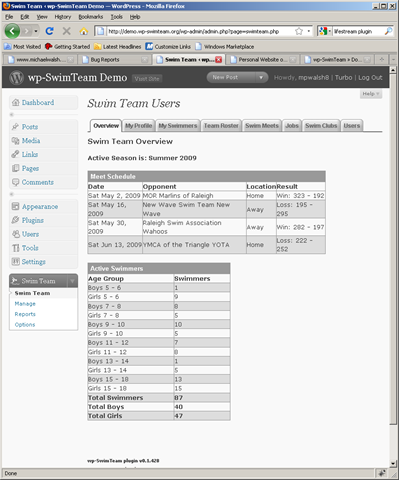
does this work with wordpress multisite. I have installed and I cannot get the users to show up so there is no choice for parent. I thought it might be due to my multisite configuration?
thx
barrett
To be honest with you it has been a long time since I have tried it with multi-site. I will have to give it a shot and report back but it may be tomorrow before I can do so.
Hi; Does this work with the latest wordpress update?
Yes, it works with WordPress 4.9. The demo site has been upgraded to WordPress 4.9.
I just did a quick check on the only multi-site installation I have access to. My site uses sub-folders and wp-SwimTeam doesn’t work correctly. In particular, the various tabs don’t work correctly. I need to look at how the tabs are constructed, it requires tweaking the URL and I am guessing I am not accounting for the sub-folder installation correctly.
Thanks for looking into this Mike, that was cool. My brother is a swim team coach and I showed him wp-swim team yesterday and he thought it was brilliant. I donate a swim team informational site to him within my multisite set-up. He has no technical knowledge. It would be ideal if I could get this to work within my current setup. If you have any ideas on how to fix this issue please let me know. The user information is stored in the root directory of the wordpress install. I have a subdomain site setup configuration.
Thanks Barrett
I looked at this briefly the other day and I think I can make it work with some better URL parsing than I am currently doing. I need to finish the changes I am making right now to support Events correctly and once I’ve done that, I will take a look at fixing it for multi-site. My progress on Events is going pretty well but it is a big change because my original thinking on it was pretty flawed. I think I have most of the infrastructure changes done and am working on importing a Hy-tek Events File right now. Once that is working, I will likely do a release.
Barrett –
I have a preliminary build of wp-SwimTeam working under WordPress multi-site. If you can test it out and let me know I’d greatly appreciate it. It works on my sub-directory multi-site installation. You can find the details and the beta release of v1.19 on my wp-SwimTeam site.
Mike
Thanks Mike. Good luck with your events. Hope you get them working for summer swim season. Thanks for the great plugin. The Hy-Tek events file sounds great. I’ll keep looking for your update.
Barrett
Hi Mike,
I just checked in on your plugin and have tried the new version. I have 2 different wordpress multisite installs. i have a subdomain and a subdirectory. It did not work on the subdomain so i tried it on my subdirectory site. It did not work there either. But since you said you got it to work on your subdomain install I tried running the plugin on the root. Basically it works at mysite.com and not mysite.com/swimteam. The users are nonexistent. I then tried it on my subdomain wp site and once again worked on the root mysite.com but not swimteam.mysite.com. I do not know if it worked on the root before because I never tried. I wanted to use the plugin on a subdomain site. Am I doing something wrong. Is it working on on your multisite install on a subdirectory site? Thanks V Barrett
Can you elaborate on what isn’t working? Do the various tabs and forms work? Are just the users missing? I’d be happy to look at it but I need some guidance on where to start. On my sub-directory installation I checked most of the menus and forms but I don’t think I tried adding another user.
on my installations i go to the swim team area and click on users. when I am in the original wordpress site, the root. there is a list of users. when i am in the sub-domain and subdirectory versions the same list is users is blank and it says no data found. I am not even listed and I am super admin with privledges on all accounts. I click on the myprofile tag and it shows all my info. i hit save. its says swim team user profile and the information is correct. then i click the users tab and once again there is no information saying no data found. It appears tabs are working, I can add a swimmer but there is “none” in the spot for parent. then I save and return to the myswimmer page and my swimmer is not listed. If I click on the team roster tab my swimmer is listed but not assigned a parent. The problem seems to only be accessing the user information.
Ok, that helps a lot. I am speculating that the list of users under multi-site requires me to use a different API call. I am working on a new release today, I’ll try and fix it and include it in the build.
I released a new build late yesterday but it does not include a fix for the missing users in multi-site. I did some reading last night and have a couple ideas to try.
I have a beta version of wp-SwimTeam posted which fixes a bunch of multi-site issues. Check it out and let me know if you find anything.
I have posted a beta release of v1.25 which addresses a bunch of user issues. Please give it a try and let me know how you make out.
I know this is after the fact, but on the most current release in the WordPress repo phpHtmlLib must be active before you activate wp-swim team otherwise it throws a ton of db errors, this is only on multi site
Thanks Mike. I have users now. All appears to be working on your awesome plugin. I am going to spend the day checking it out and trying out some shortcocdes.
Thanks for everything, you ROCK!
V Barrett
Excellent, glad to hear it. BTW – I have updated the v1.25 beta release to address a few more issues.
Hi Mike – I just stumbled across wp-swimteam and was amazed at how much you’ve built out over time. I built a custom website for our swim team using WP as CMS behind the scenes; however we we currently use a combination of Thriva and Team Manager for registration, billing, performance tracking, meet entries, etc. It seems as though TeamUnify is really taking over the world with it’s cloud-based offering and Hy-Tek is trying to play catch-up (in a slow and kludgy way!) I was curious if you were tracking what these two were up to! (Not affiliated with or a fan of either right now)
I am not familiar with Thriva, what is it? A few years ago I had a look at TeamUnify as they were calling our team constantly (that Ashley lady was persistent!). At the time the functionality wasn’t much better than what we had and the cost per swimmer really made it a non-option for our team so we never looked to seriously at it. There are now several teams in our league who speak highly of it including one who used to use wp-SwimTeam. I spoke with their Admin a few months ago and he told me that for him, the biggest benefit of moving from WordPress and wp-SwimTeam was there was a company providing support behind it and their whole system was dependent on him as his child was phasing out of swim team. Functionally he told me it did some things better but some things not as well.
Our swim team chair for next season plans to look at it for much the same reason this other team moved to it. There are (valid) concerns that our current solution is too dependent on me and now that I am down to one swimmer, how much longer will I remain involved? For the past four years wp-SwimTeam has served our team well and if the team chooses to go the TeamUnify route, I won’t stand in their way – I am not looking to make a career out this project!
I’ve done a lot of work this past summer adding Hy-tek support to wp-SwimTeam. I still don’t care for their software, the UI is awful but they are the market leader. So there is little choice but to work with them. I haven’t looked at their online offering in a long time and I don’t know anyone who uses it. When I last looked at it, it was pretty weak and I felt what I built with wp-SwimTeam was actually better.
From what I’ve seen in our local league, TeamUnify is winning the online space and Hy-tek continues to own the actual Meet Management space. My solution will continue to be available for those teams who can’t afford TeamUnify or don’t want it for one reason or another.
Thriva is the online registration/billing tool from Active Network who now own Hy-Tek and who have spurred a lot of their online capabilities of late and they do offer some data integration with Team Manager. It’s broader than swimming, but therefore not as specialized to the needs of a swim team. Meet Manager still dominates the actual meet side of things, but TeamUnify is giving away their TouchPad software to their subscribers to try to get a foothold. I’m also realistic about the fact that our team will likely move to a hosted solution that doesn’t rely on someone with the technical skills required to manage a custom site at some point but hoping they get some use out of the investment of my time in the meantime. I started to develop a team administration backbone myself a few years back, but as they say, work got in the way. All the best – and nice to see someone offering a well thought out alternative.
Mike,
I’ve got an event in my league that is a “Scotch” event open to both male and female (mix)…in my hytek event file it comes with an “X” for gender and the plugin is kicking it back. Is this something that can be added in on my end? Thanks, again!
Corey
Just yesterday I uploaded a beta version of the next release where I added support for mixed gender events. There are a number of posts on my wp-SwimTeam.org site which describe the changes I have made this past week to support mixed gender and combined age groups.
You can download the preliminary release at: http://www.wp-SwimTeam.org
Hello all, I’ve been playing with the plugin on a test wp site and I’m very impressed so far, it really looks to have great potential for us but I’m having a problem adding age groups, they’re always being entered using the min and max ages for the team rather than what I specify and if I try to update the age group once created to something other than the min and max I get “Age Group was not updated.” . Using phpMyAdmin I can edit the age ranges directly in the db and it seems to be happy I just can’t work out why I’m having an issue. any Ideas ? I’m in the UK by the way.
Thanks
Mike
I’ve had a similar report from another user that I am looking into. It looks like there is some sort of a bug. I hope to have this resolved in the next day or two.
I have found and fixed the age group bug. There is a new release available today, details can be found here.
That’s working for me, thanks very much .
Mike
Mike, 4 things:
I deleted all the WP users, which removed their SwimTeam profiles, but left a bunch of orphaned swimmers. I tried to remove the swimmers one-by-one, but the delete wouldn’t complete because it was looking for their parent association. How do I clear out these swimmers at this point?
What does the “Overide Age Range Checks” feature do, and can we hide it? It is just going to confuse the parents and I don’t really understand its purpose.
The Website ID field in the swimmer setup just seems to provide the list of users to choose from, so I don’t understand its purpose either since the tool already has us choosing contacts.
How is the Nickname field utilized and is it necessary?
Thanks!
Thanks Mike!
Mike, I think I’ve found an limitation of age groups when used with our club in the UK. The meets that we attend all (the ones I’ve seen so far) determine the age of a swimmer on a given date rather than the age being controlled by a season date and the given date depends on the date of the meet. In the case of a series of meets the date is usually the last date of the series. I can’t think of a way to sidestep this problem within the current plugin other than by overriding the qualification checks which I don’t think I want to do. We almost always have multiple meets scheduled with different “age” dates. Any advice? Am I understanding how the age functionality works?
Many Thanks
Mike
This is a tricky one. The entire “age group” thinking is based on a single “age up” date. The only thing I can think to do, it would be cumbersome, is to change the age up date in the system to correspond to whatever the next meet on the schedule is. If you’re working with two meets at the same time you might have to toggle it back and forth which could be confusing to say the least.
Off the top of my head I am thinking I might be able to add a meet specific age up date that if it existed, would override what the system setting for age up is but I am not sure what else it would affect without trying it and seeing what breaks. It would be most critical for meet entries but it could get very confusing very quickly.
How much do these dates vary?
You might as well consider it to be every meet having its own age date. The only meets that have the same date would be in a series but most aren’t. I didn’t think this would be easy , it’s clearly very different to how your meets operate.
In your situation does the concept of a swimmer being assigned an age group outside of a “meet” have any value? Or does it work that a swimmer will swim in whatever events are relevant to their age based on the meet details?
To your first question- No value: the swimmers age is only ever calculated with reference to a meet “age” date which is normally the last day of a meet or series of meets. 2nd question : yes swimmers swim in age grouped events for their age at the meet “age” date , hope that makes sense!
good morning Mike, I have just downloaded Swim Team and the following warning appears: Warning: The wp-SwimTeam plugin database version is incorrect (v vs. v0.88). Please notify the web site administrator. Have you come across this before? Thanks Edan
I thought I would download your current version and the error received was:
Fatal error: Cannot redeclare html_link() (previously declared in /home4/edanc/public_html/swim/wp-content/plugins/wp-pagenavi/scb/Util.php:271) in /home4/edanc/public_html/swim/wp-content/plugins/phphtmllib/tag_utils/html_utils.inc on line 952
This sounds like a conflict with the funtion html_link(). Can you disable all plugins except phpHtmlLib and wp-SwimTeam and let me know if the problem persists?
I have deactivated all other plugins and it appears to work fine.
I have not run into the database version issue but I’ll look into it shortly.
We are having an issue in which the First Name and Last Name is not showing up on the Jobs report, it shows up in their WP-Swimteam profile, but not their wordpress profile. I looked though the code and I am stuck! BTW: I am running WordPress 3.9.1
If the first and/or last name doesn’t show up in the WordPress user profile then it won’t appear in the SwimTeam system either. The swim team system doesn’t define new fields for first and last name, it uses them from the user’s WordPress profile. Are you running the current version of the plugin or a forked version?
Current version, WP 3.9.1, Swimteam v1.41.1037 and database v.88
Does the first and/or last name appear in any of the other reports? I have run a couple reports generating both CSV and HTML formats and the first and last names appear as expected. Have you eliminated any sort of a plugin conflict?
It was an issue with a conflicting plugin that modified the user table and took the 3.8 update bad! Thanks!
Riley Childs
That is good to know. In case it comes up again, what is the name of the offending plugin?
I think it was register plus redux, it leaves remenants after deactivation, I simply transfered our database to a new VPS and it worked!
Mike,
Just installed your plugin the other day and have been playing around with it for a few hours, and I’m still a little lost when it comes to how you add info. Things like registration forms would actually be the most resourceful part of this plugin.
I’m basically trying to better understand how this plugin works so I can help my friend who runs a summer swim league; I’m just the web designer. They use Hy-Tek currently, so something to integrate their site would be excellent.
I read the Two Minute Setup Guide but unfortunately I still didn’t get anywhere.
Do some of the fields have to come from their Hy-Tek account to work? Like the SDIF Profile?
Thanks
Let me see if I can do a quick reply while I have a few minutes and then I’ll try and follow up with more detail. I am happy to take a conversation to email as well, just let me know.
For the Hy-tek integration to work, you need to set up the SDIF profile information within the plugin. It is on one of the tabs on the Options menu under the main Swim Team menu on the Dashboard. Here is a quick summary of the order of operations to get things set up:
This will basically get you set up. From here you set up the events for a swim meet and depending on how you put swimmers in events (opt-in or opt-out), you let people register (opt-in) for a meet or scratch (opt-out). Once you have swimmers in a meet you can generate meet entry files which Hy-tek can import.
Feel free to ask questions. I realize there is a lot there but it is pretty straight forward once you get the hang of it.
Hi – are there any responsive themes that you have tried with this plugin you would recommend. I’m looking after a UK based swim club web site and it’s in need of a refresh. I’d like to combine a newer web brand / theme along with the features of swimteam.
Thanks
I know TwentyTen works as that is what I almost always use in my development work. As a quick test, I just activated TwentyTen on my demo site so you can see how it looks. As far as I can tell, it is working just fine. As I recall, there isn’t anything special about any of the HTML the shortcodes generate but it is possible I have some fixed width stuff in there. If you run into anything I can look into it. I know a lot more now than I did when I first wrote most of the plugin!
Thanks – is it possible to get a login to look at the demo site config and short code examples. I’m new to WordPress, but have got a local copy up and running on my macbook now.
I have a couple of questions around how our club is run against what I can see in the tool at the moment.
1) Is it possible to configure squads / training groups. This is how we manage and charge the swimmers. These are mixed gender / age group squads based on ability. This would allow me to be able to manage swim school as well as the club.
2) In UK we don’t tend to have meets vs specific teams, they tend to be open events where several clubs will be present. Is it possible to support open events.
3) Is it possible to allow swimmers / parents to register for events using the tool, and if so, can it be configured to add a cost per event to calculate the cost to the swimmer for participating at a particular meet.
4) In a previous comment you mentioned a parallel project around PB and swimmer time management. What is the status of that project ? (demo.flip-turn.com looks like a list of php error messages.)
Thanks
Lots of questions to answer … let’s see if I can cover them all.
Thanks for your comments (sorry for my delay in responding). Given that your swimmers have aged out now, will swim team be maintained going forward, or do you plan to opensource it and put into something like Github ?
Thanks again
Paul
I am still maintaining wp-SwimTeam – I fix bugs when they are reported but I haven’t added any new features in quite a while.
The code itself is under Subversion control on SourceForge but putting it up on GitHub is on my to-do list. I’ve using GitHub for new projects but have been negligent in moving older projects over. I have a “build” script for wp-SwimTeam which I would need to migrate or eliminate – that is the real obstacle. More than likely I will just eliminate it. It pulls the Subversion revision number out as part of the version number which I like but I don’t know if Git has an equivalent.
I am just wondering if the shortcode to display the meet schedule [wpst_meet_schedule] has any parameters that will make it only show upcoming meets rather than the full season.
The wpst_meet_schedule shortcode only supports one optional parameter which is the seasonid=’N’ parameter. When this parameter is omitted, the active season is used. There is not any option to only show past or future swim meets. It probably wouldn’t be that hard to add it – how many swim meets are in your season?
Hi Mike, I posted a week or two ago, but I do not see it here so I thought I would try again. I have been asked to help out our swim team and I am testing the swim team plugin as I really like it and think it would be a great alternative to swimtopia. The being said I had a couple of questions:
1. Is there any way to have the pages for the plug-in show outside of the admin area? We are trying to get it so our members can self register, but I don’t see a way to do this?
2. In the registration area can you have more than one fee? We have a base fee and then an additional amount per extra swimmer.
I cannot thank you enough for doing something like this! I am very hopeful that we can get this working for our swim team.
Thank you!
Doug
I forgot to say that the swim team web area is only a part of the community pool’s website. No one logs into the pool website so I am trying to find a way to fit the swim team plugin into all of this without having to make a new site dedicated just to the swim team.
Again, thank you for your help on this!
Doug
I have been reviewing the short codes, but have not found one for registration, have I missed something? Sorry to do so many posts I am bouncing back and forth between your demo site and ours to see what all I can do. Is there a complete list of the shortcodes?
You haven’t missed anything. There isn’t a shortcode for registration. You have to go through the registration process via the Dashboard.
The only way you can do what you propose is to have all of the swimmers be “children” of the admin user. You can do this and a few clubs have done so but you give up a lot of functionality by doing so. They set up a swim team “login” and that WordPress user was effectively the parent/guardian for all of the swimmers entered into the system. I don’t know if that login was shared or people simply used a computer to enter swimmer information with an account which was already logged in.
One of the main goals we wanted to achieve when I embarked on this project years ago was to have parents be responsible for their children’s information (birth date, gender, name, spelling, etc. – hand written forms, if legible, contained all sorts of erroneous information). We used our web site for all communication to parents as well so email was sent through the web site to all users with registered swimmers.
Without using WordPress user registration you also cannot make use of the volunteer system which may have been the single most time saving feature I ever added to the plugin according to our Swim Team chair. Once all of the volunteer job information was entered, it was trivial to keep it updated and report who wasn’t volunteering and send out reminders for volunteers about upcoming assignments.
In your case, you may be better off running the swim team site off a sub-domain of your regular site.
Doug – I don’t see anything from a week ago so it must have gone into the bit bucket somehow.
There is no support for the Swim Team functionality you see on the Dashboard on the front end of the web site. That would be really hard to do and even harder to support with the myriad of themes people use. There is nothing preventing your users from using it as is, they just have a slightly different view of the web site in User Dashboard mode. That is what we did and just about everyone else I have interacted has done. Most users can handle the Dashboard pretty easily because a non-admin user has so few choices available to them on the Dashboard. The plugin even has a mode where normal users land on the Swim Team page of the Dashboard instead of the default WordPress Dashboard page.
Our swim team had a registration guide which had some screen shots walking parents through the various steps required to register on the web site (standard WordPress user registration process) followed by the steps to add their family information (mailing address, contact information, etc.) then the steps to add their swimmers.
Mike,
Thank you very much for all the information! I do agree with the sub-domain part as this is only one of the items I am butting heads with the Pool board on that the swim team really needs.
Thanks again for the help on this!!
Doug
Honestly I would even go as far as to get your own domain/hosting, we pay GoDaddy $60 to host and that includes domain and email.
Hi Mike, I’m wondering about other sport applications. Can you send me an email to discuss?
Sure, I will drop you an email.
We uploaded Swim Team plugging for WP. Where can we find a detail instruction for using this plugin? Is it possible to create a member page using this plugin? If yes, how to set it up and connect our member page and the plugin?
Thanks
I probably need to make this post more visible – I have a “Two Minute Setup Guide” that I wrote up a while back to get people started.
I am not sure what you mean by a member page – the plugin is based on the standard WordPress user model – each parent/guardian is expected to have their own WordPress username on the site where wp-SwimTeam is running. From there, each user can add their swimmers into the system and will see their information (swimmers, volunteer stuff, schedules, etc.) from the WordPress Dashboard.
Hi Mike,
Thank you for this terrific plugin.
I followed your two minute guide and was able to set up our team parameters successfully. I started to enter the swim meets our team competed to – going into the process of registration and after this I wanted to input the meet results per event but was stuck when I got this message -> “Requested action (Results) has not been implemented yet.” which under swim meets tab. Is this feature not yet implemented or did I miss something – my version of the plugin is 1.45.1085.
Note: I’m locally building my site (localhost).
Cheers,
Robert
Results was and remains an unfinished area of the plugin. Not something I real proud of, it was a feature which always got pushed out due to other, high priority needs. I was always able to publish results by generating a PDF report from WinSwim or from Hy-tek that was “good enough” for our needs.
I did do some work on Results as a side project I called “Flip Turn”. You can see some details about it in Flip-Turn Results Management. A number of people have taken that code and done some work with it. I myself haven’t touched it in a long time.
I have on my to-do list to get wp-SwimTeam and Flip-Turn both up on GitHub so other people could potentially do some work on results. It is unlikely I will ever get to it since none of my children swim any longer and my “open source” time is now spent working on projects for their respective schools.
Have taken the “Flip Turn” codes and will take a look at it – update you later Mike.
Cheers,
Robert
Is there any documentation on how to use this plugin
The Two Minute Setup Guide is the best place to start. After that, the best source is all of the posts and comments related to the plugin where I explain how to do things or answer questions.
Hey, do you plan to upgrade your plugin for PHP7 a new version of WordPress?
I have not looked into what moving to PHP7 means to the plugin. It does work with the latest 4.9 version of WordPress.
Trying to activate the plug in and getting errors such as Warning: Declaration of FooterNav::push($url, $text) should be compatible with Container::push() in /home/dsitver/public_html/RC/wp-content/plugins/phphtmllib/widgets/FooterNav.inc on line 289
Warning: Declaration of FooterNav::add($url, $text) should be compatible with Container::add() in /home/dsitver/public_html/RC/wp-content/plugins/phphtmllib/widgets/FooterNav.inc on line 289
Warning: Declaration of ImageThumbnailWidget::push($url, $text, $selected = false) should be compatible with Container::push() in /home/dsitver/public_html/RC/wp-content/plugins/phphtmllib/widgets/ImageThumbnailWidget.inc on line 688
Warning: Declaration of NavTable::push($url, $text, $title = NULL, $target = NULL) should be compatible with Container::push() in /home/dsitver/public_html/RC/wp-content/plugins/phphtmllib/widgets/NavTable.inc on line 313
Warning: Declaration of NavTable::add($url, $text, $title = NULL, $target = NULL) should be compatible with Container::add() in /home/dsitver/public_html/RC/wp-content/plugins/phphtmllib/widgets/NavTable.inc on line 313
Warning: Declaration of TabList::add(&$tab_obj) should be compatible with Container::add() in /home/dsitver/public_html/RC/wp-content/plugins/phphtmllib/widgets/TabWidget.inc on line 658
Any thoughts
These are PHP warnings which stem from the phpHtmlLib library which wp-SwimTeam depends on. They likely can be ignored but they are issued because phpHtmlLib was written in PHP4 and was only slightly modified for PHP5 when it was first introduced. Some (a lot?) of the phpHtmlLib functions have syntax which is no longer recommended but the effort to modernize phpHtmlLib would be significant. In the testing I have done, the warnings do not affect the plugin operation however I have not done much with PHP7 so I don’t know if anything changes there.
Mike, my summer swim team is struggling with the same issues you mention. I even started creating my own solution for this. I would love to be able to login and try out your demo page if possible.
I apologize for the delayed response, I missed this in my email. In case you are still interested, you now have an email from the demo site. You may also want to look into the SDIF Forum, there are other people doing Swim Team things as well which are far more current than my stuff is. All my kids aged out of swim team 4+ years ago now.