Right after I posted beta-2 I found an minor issue plus some leftover debug code I failed to remove. I have updated the release to beta-3 and reposted it.
Google Forms Beta (490216 downloads )Author Archives: Mike Walsh
WordPress Google Forms V0.88-beta-2 Available
For the past week I have been working with WordPress.org to get my Google Forms plugin relisted. They recommended a different approach to addressing the security concern than I had implemented.
It took a little longer than I expected to get their recommendation working but I have implemented the fixes recommended by the WordPress Security Team and am in the process of getting the plugin listed again.
I would like to enlist some additional testing besides my small suite of test cases with the updated code.
Google Forms Beta (490216 downloads )WordPress Google Forms v0.88-beta-1 available
Last week I was notified my Google Forms plugin had a potential security flaw and would be de-listed from the plugin repository until addressed. I have implemented the fixes recommended by the WordPress Security Team and am in the process of getting the plugin listed again.
I would like to enlist some additional testing besides my small suite of test cases with the updated code.
Google Forms Beta (490216 downloads )Let me know ASAP if you encountered any issues with this beta release of the plugin.
Google Moves Downgrade Option – Again
Google has made another change to the new version of Google Forms and moved the option to downgrade a form to the older version. There is no longer a Running Man icon to click on to get the downgrade option. Instead, look for the large question mark in the lower right hand corner .
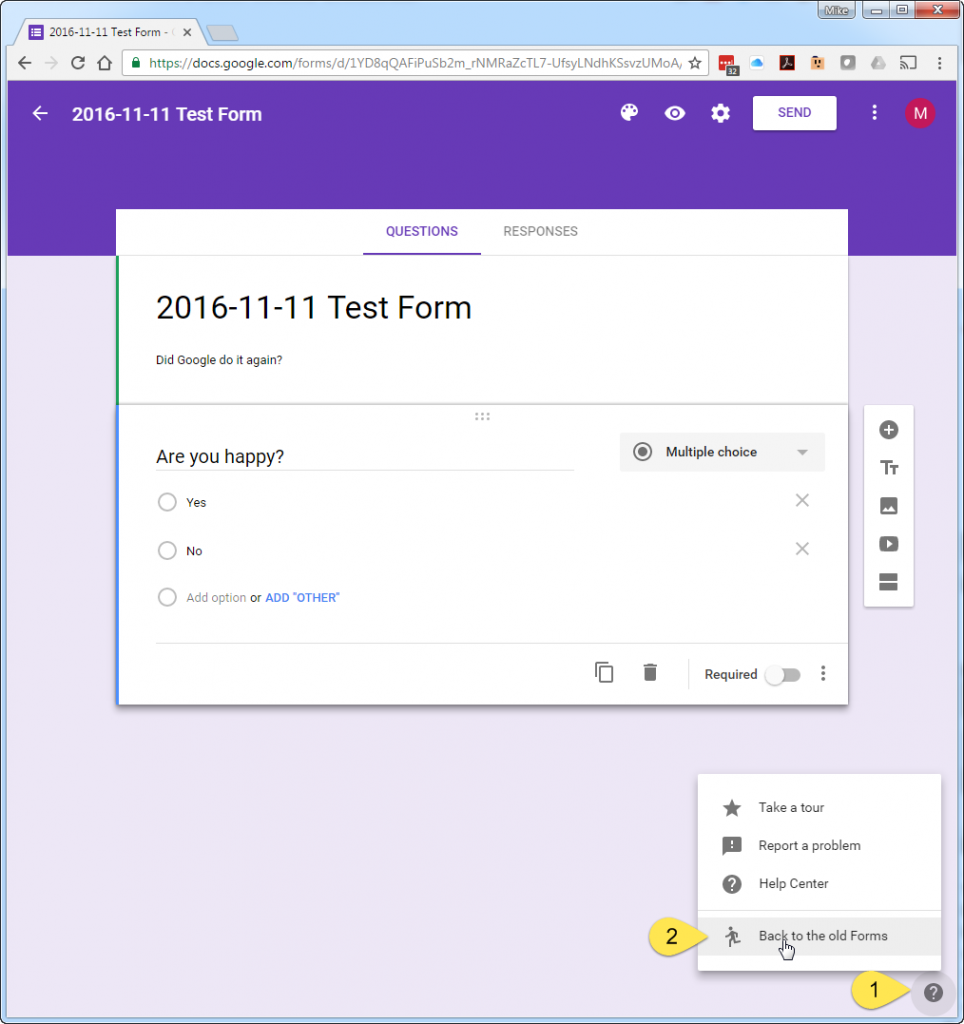
- Click on the Question Mark icon
- Click on the “Back to old Form” menu
This is the third time access to the downgrade option has moved. It is probably just a matter of time before Google eliminates this completely. If/when that happens it may no longer be possible to use Google Forms with WordPress.
WordPress Google Forms v0.87 released
This morning I released v0.87 of the Google Forms plugin. This update includes a new check when saving a form definition. The check scans the HTML from the form to ensure it has the proper HTML structure the plugin expects.
The new version of Google Forms is not supported by the plugin so this check ensures that a user is notified that the form isn’t of the expected format.
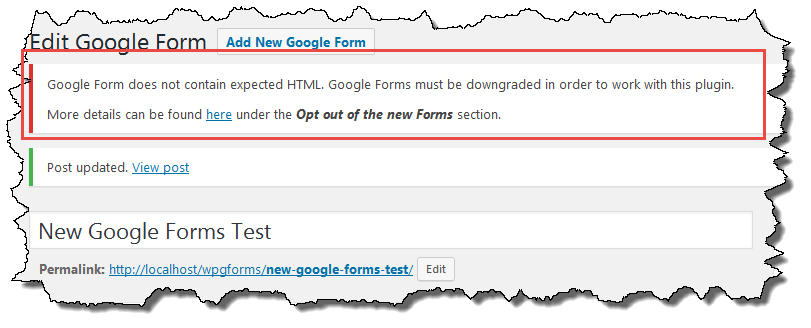
You can find this updated on your WordPress Dashboard or in the WordPress plugin repository.
Where did Email Users go?
A week ago (July 19th) I was contacted by WordPress regarding a potential security flaw in Email Users. Email Users was “closed” (which is why it doesn’t show up at WordPress.org) until the security flaw was addressed and a new version of the plugin was tagged and release.
Due to some work issues, I did not have a chance to work on the plugin until this past weekend. I have resolved the security concerns, committed all of the changes, and tagged a new release. On July 26th (Sunday) I notified WordPress.org that everything (I know of) has been addressed. At this point, I am waiting for the plugin to be opened again or notified that I’ve missed something.
I’ve uploaded v4.84. to my web site in the event anyone wants to download the update before WordPress.org makes it live again.
Email Users (30079 downloads )Google Forms development moved to GitHub
I have been toying with idea of moving development of my Google Forms plugin over to GitHUb for a while and I finally did it. Using the process outlined here, Google Forms development can now be found here. I’ve already made a few changes and pushed them into the WordPress Subversion repository from GitHub.
I’ve started looking at supporting the new version of Google Forms. What Google has done is so significantly different than prior versions that I am not if it will be possible. Google has stopped using standard HTML input elements and instead is using DIV elements with CSS classes and Javascript to handle the form. I can’t think of a technical benefit for Google to do what they did but it is their product and they can do as they see fit.
If someone wants to fork Google Forms and work on this, you are welcome to do so.
Email Users 4.8.2 released
Last night I released Email Users 4.8.2. This version addresses the use of several WordPress deprecated function messages, support for custom email headers and footers, and adds a feature to allow the admin to hide the Email Users menus from non-admin users. Full details can be found in the Change Log.
Email Users 4.8.2-beta-3 Available
Building on the beta-2 feedback, I have released what I hope to be the final beta release of Email Users 4.8.2.
Email Users 4.8.2-beta-3 adds the following:
- Ability to remove the “Notify Users” menus from the on the Post and Page sections of the Dashboard menu.
Please report any issues and I’ll do my best to get them fixed quickly and get this release out.
Email Users Beta (431164 downloads )Email Users 4.8.2-beta-2 Available
It has been quite a while since I’ve updated Email Users. There have been a couple of enhancement requests that I’ve wanted to add and some deprecated notices I wanted to resolve.
Email Users 4.8.2-beta-2 adds the following:
- Custom Header (similar to the custom footer which has been part of the plugin for a while).
- Control over customer header and footer usage. Each can be applied to Notifications, User and Group Emails, or both.
- Ability to remove the “Notify Users about this Post/Page” on the Post/Page editing screen.
- All references to get_currentuserinfo() have been updated. The get_currentuserinfo() API function has been deprecated for a while but WordPress 4.5 issues a strong warning on the Dashboard about it so it was time to resolve it.
Please report any issues and I’ll do my best to get them fixed quickly and get this release out.
Email Users Beta (431164 downloads )