It is no longer necessary to use this work-around, the WordPress Google Forms plugin now supports the new version of Google Forms. This post remains here are part of the development history of the plugin.
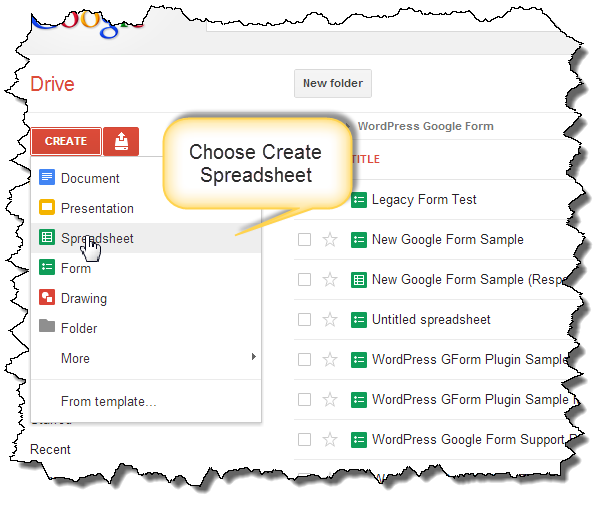
Thanks to a tip form Kevin Dillon, a work-around to the problem with new Google Forms has been identified! Legacy Google Forms are still available IF you start creating the form by opening a SpreadSheet first. Once the spreadsheet is open, select “Create a legacy Form” from the “Tools” menu. The form editor and published URL will be the same as those that had worked prior to the Google Forms update.

Thank you so much for your post. I’ve been looking for something like it for 2 days. You made my day!!!
Thank you, thank you, thank you! I knew what the problem was but couldn’t find the way to create the old embed code.
Thanks so much for this! It worked earlier, but unfortunately Create a Legacy Form option is no longer available. :/
Google made a change recently and the work-around is no longer required. I did a bunch of testing with new forms earlier this week and they worked as expected.
Hi Mike, for some reason since they made that update a few days ago, the new forms I create don’t take on my custom formatting from the plugin. I’m dropping in the URL part of the embed code just as before, and have also tried the live form URL (which actually seems to be the same) but no luck. Any ideas?
You may have to re-visit your custom CSS with the new forms. I had to do this with my Help and Support form. I didn’t look at the HTML too closely but it looks like the structure of the HTML that google is sending is slightly different so if you employed some very specific selectors, they may not work any more and you’ll have to redefine them.
Hi, Mike, Your plugin is excellent. But I have a problem with multipage forms. Only the last page answers are registered. Can I do something to fix it? Can you?
Thanks in advance.
Can you try downloading the latest beta version?
http://michaelwalsh.org/blog/2013/04/19/wordpress-google-form-v0-46-beta-13-available/
I fixed this issue (I hope) last Friday and it is working on my test cases.
Any idea why my forms keep saying “You must have missed a thing or two” upon pressing “Submit?” The form is 100% complete. I haven’t changed anything since I installed it and it worked fine. Thanks!
No but if you want to file out my help and support form I will be happy to take a look. Is it a multi-page form?
Hello!
I´m having the same problem than Hunter Wilson,
It´s a multipage form.
And there is another problem with the “multiple choice” “Go to page based on answer” option;
Depends on what choice it´s selected the form sends you to the next page or to another But with the form embeded using this plugin (it´s working fine on Gdocs) allways sends you to the next page.
I´m assuming that there is somethig wrong I am doing because nobody else has reported this issue.
What version of the plugin are you using?
The last one, 0.55.
Ok, I am going to need some more details in order to try and answer your question.
Can you fill out my Help and Support form?
Ok, did it
There is nothing in the spreadsheet. The last entry is from a couple days ago.
i don´t get the meaning of that answer (below)
It means that there isn’t any new information in the Google Spreadsheet where the form information is stored so it doesn’t appear that you completed the form correctly. It has three pages of questions.
Well, there is not new information stored because the form doesn´t work the way it should (the way it does outside wordpress)
If you play around with the Test Bed Form I use for testing WordPress Google Form you can see how a multi-page form should work. You can go back and forth and change your answers and they will be retained as you go back and forth between pages.
The whole urls are changed again. How can i get formkey?
Google changed the format of the URL about six months ago. I don’t believe there is any way to get an old style URL (one which contains formkey) from a new form. You need to use the new URL format if you’ve defined a new form. I also recommend moving forms away from the complex “gform” shortcode syntax to the new Custom Post Type and “wpgform” syntax.
The v0.58 works with WordPress 3.7.1?
I cannot redirect to my thanks page and the confirmation email is not sent.
Is this a new installation or was it working previously but is no longer working?
It is a new installatin made today.
Is the page visible somewhere? Probably the best thing is to fill out my Help and Support form so I can take a look at it see if there is anything obvious.
I have the same issue above. However, the forms I created before the update worked, the ones created after the update did not work.
You need to be more explicit on what doesn’t work in order for me to help you. The plugin definitely supports the new version of forms as most of my forms and most of the help requests I get are using new forms. Did you use the correct URL? This is by far the most common problem I see. You need to use the URL provided by the “Share this Form” button. The URL usually ends with “/viewform”. Which short code are you using? If you are still using the orignal gform shortcode, you should switch to defining your forms with the Dashboard UI (Dashboard->Google Forms->Add New Google Form) in conjunction with the wpgform shortcode. The original shortcode, while still included in the plugin, is no longer recommended and hasn’t been for some time.
Is this plugin now compatible with the new Google forms. As far as I can see it is no longer possible to create a ‘Legacy form’ in Google Drive.
Yes it is and has been for quite a while.
halo…so now the legacy form is no longer inside the list.
so which form is going to use ?
is it embed form?
Nope. Create a Google Form within Google Docs and when you’re done, choose the button for “View Live Form”. The URL for the live form is the URL you want to use when setting up your form within WordPress.
ok. thanks for reply .
but now i got one question how to check ip address for google?
this one i totally no idea.
What are you trying to do? Verify an IP address entered in a form belongs to Google? If so, I have no idea how you’d do that. I am sure Google has quite a few address blocks assigned.
because i had read the above comment. they mention that google IP will change. then how to solve this problem?
I just read through the entire string of comments on this post again and I don’t see any reference to a Google IP address changing. There is a mention of the URL format changing and it is no longer an issue. If you create a Google Form now, the URL format Google generates will work with the plugin.
i try work with it. if any problem i will update here.
thanks for spend your time to help me figure out.
the arduino code need to use goole IP thats why i bring that question.
the post is read from http://www.open-electronics.org/how-send-data-from-arduino-to-google-docs-spreadsheet/
thanks
Good luck with your project. I don’t think the article you referenced is still valid because it is no longer possible to create forms using the process outlined there. That is why there is a note at the top of my post that states what my plugin now supports the current URLs for Google Forms. Your issue seems to have no bearing on WordPress at all, it appears you ended up here due to a link on an Arduino post.
i got one question .
is it it work with arduino by connecting cable to laptop and use laptop upload data
or
can use ethernetshield as gateway to upload the data through router?
I have no idea. I don’t know much about Arduino other than what it is. You’ll have to ask that question on an Arduino forum.
how to install wordpress? because the wordpress google form is a plugin.
sorry i have no idea how to solve it.
any suggestion method?
There are about a million tutorials online on how to install WordPress, I cannot offer that sort of help, sorry about that.
https://docs.google.com/forms/d/(Your_Key)/viewform?=&entry.591200773=FirstField&entry.623380546=SecondField
This how far i got, No idea how to submit it though
The link you provided doesn’t work – is there something you want me to look at?
hi there
just wondering if you could help me. I’ve created a google form and it’s working. the only problems in when some people click on the link to the page it only opens half the form. on most computers when you click the down arrow on the keyboard you can scroll down and submit the form. However on tablets there isn’t an option to do this. I was just wondering why this happens-or how can a person using a tablet see the rest of the form and submit it. thanks
This sounds like an issue with your WordPress theme running on a mobile device. That said, if you’d like me to look at it, let me know the page to look at. It you don’t want to post it here, use my Help and Support form.
how to get the form key ???
You don’t need the form key to use the plugin. You do need the full URL to the Google Form – that is the only required value to make a form work with the plugin. Everything else is optional.
with this link I can fill the page, but it doesn’t submit it. Can you look at it please?
https://docs.google.com/forms/d/1PSDKNjlqWxR5tXp8OH_i1oO1OBSTTwyi3VvAdLFf9HI/viewform?=&entry.746784803=on&entry.2083370736=off&entry.1633392335=open&entry.138891828=closed&entry.2008209721=closed&submit=Submit
Not clear what you are asking here – you provided a link to your Google Form. If you have a problem I have a Help and Support Form where you can submit a help request.
With the link provided i can fill in the form, but i have to click manualy on the submit button.(“submit” command in the link doesn’t seems to work)
As far as I know there is no way to submit a form with a parameter in the URL.
https://docs.google.com/forms/d/1PSDKNjlqWxR5tXp8OH_i1oO1OBSTTwyi3VvAdLFf9HI/viewform?=&entry.746784803=on&entry.2083370736=off&entry.1633392335=open&entry.138891828=closed&entry.2008209721=closed&submit=Submit
can’t leave a reply ?
Sorry for the delay, there is something wrong and I am not getting comment notifications from my site so didn’t know I had a pile of them stacked up.
Should I submit it manually every time? Can’t be submitted through the URL?
I don’t understand what you are asking. Can you clarify what you want to do?
I checked your comments, you have said that now google form changed its format. How to find form key now? Can you help?
The newest version of Google Forms isn’t supported, see the post on my web site on how to revert a form to the prior version of Google Forms.